www.miinet.comMoore Industries-International, Inc.
- 37 -
User’s Manual
224-790-00K
May 2018
Programmable Limit Alarm Trips
SPA
2
SECTION 4
Applying Input (Bench Scaling)
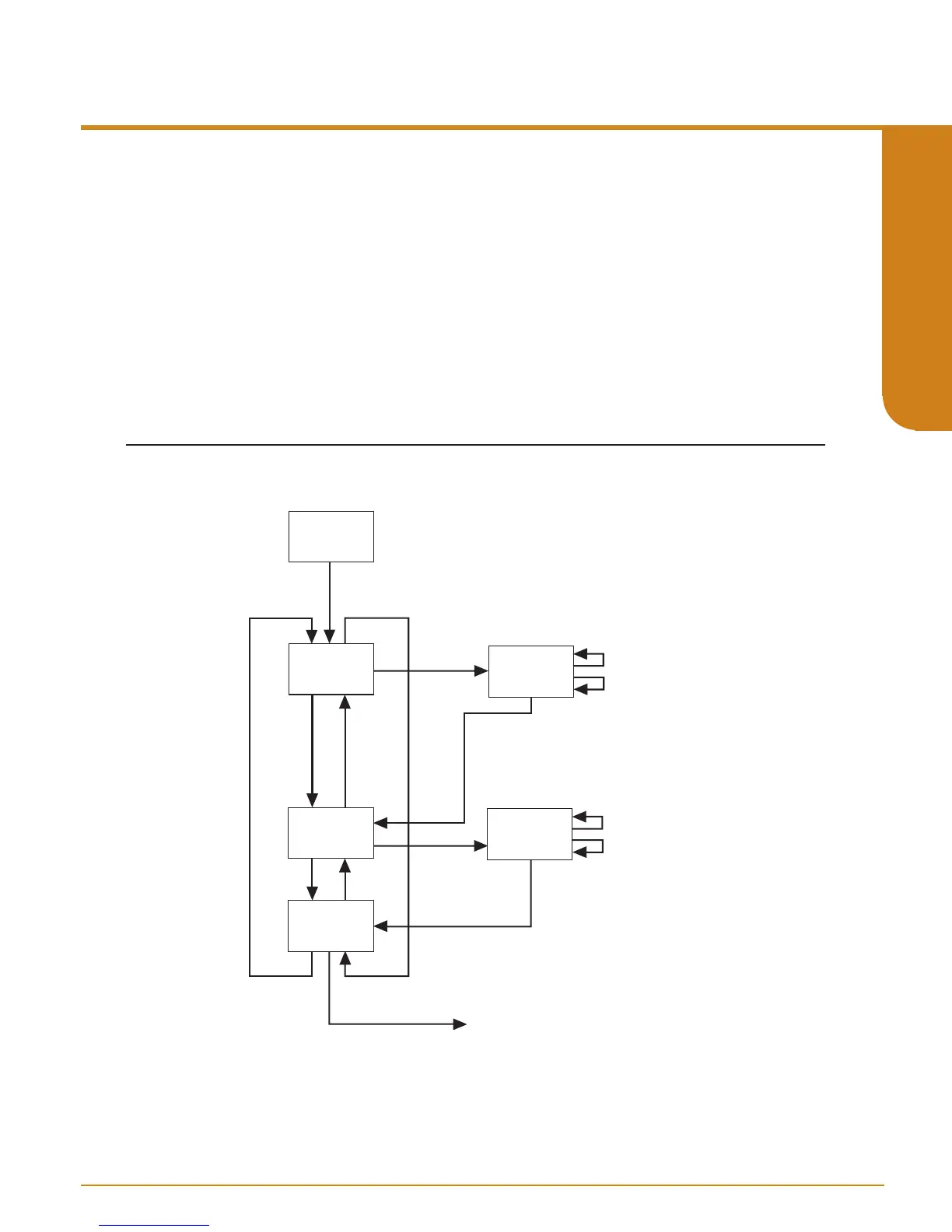
Figure 4.8. gives an overview of the Apply Input menu.
With Bench Scaling, also called “Standard Ranging”, inputs are “captured” at their zero and full scale
levels using external, calibrated equipment.
1. At the “APPLY INPUT” screen, press SELECT.
2. “APPLY ZERO” appears. Apply the input you wish as your zero and press SELECT. Wait until
it is flashed on the display and press SELECT to capture.
3. Next, “APPLY FULL” is displayed. Apply the value of your full range and press SELECT.
When this is flashed, press SELECT to capture.
4. Press SELECT at “EXIT APPLY” and exit the menu.
Figure 4.8. APPLY INPUT Menu
D
D
D
U
U
APPLY
ZERO
APPLY
FULL
EXIT
APPLY
APPLY
INPUT
SEL
U
TRIM INPUT menu
SEL
XXXXX
EGU
U
D
XXXXX
EGU
U
D
SEL
SEL
SEL
SEL


 To Next Page