www.miinet.comMoore Industries-International, Inc.
- 57 -
User’s Manual
224-790-00K
May 2018
Programmable Limit Alarm Trips
SPA
2
SECTION 4
Password Configuration
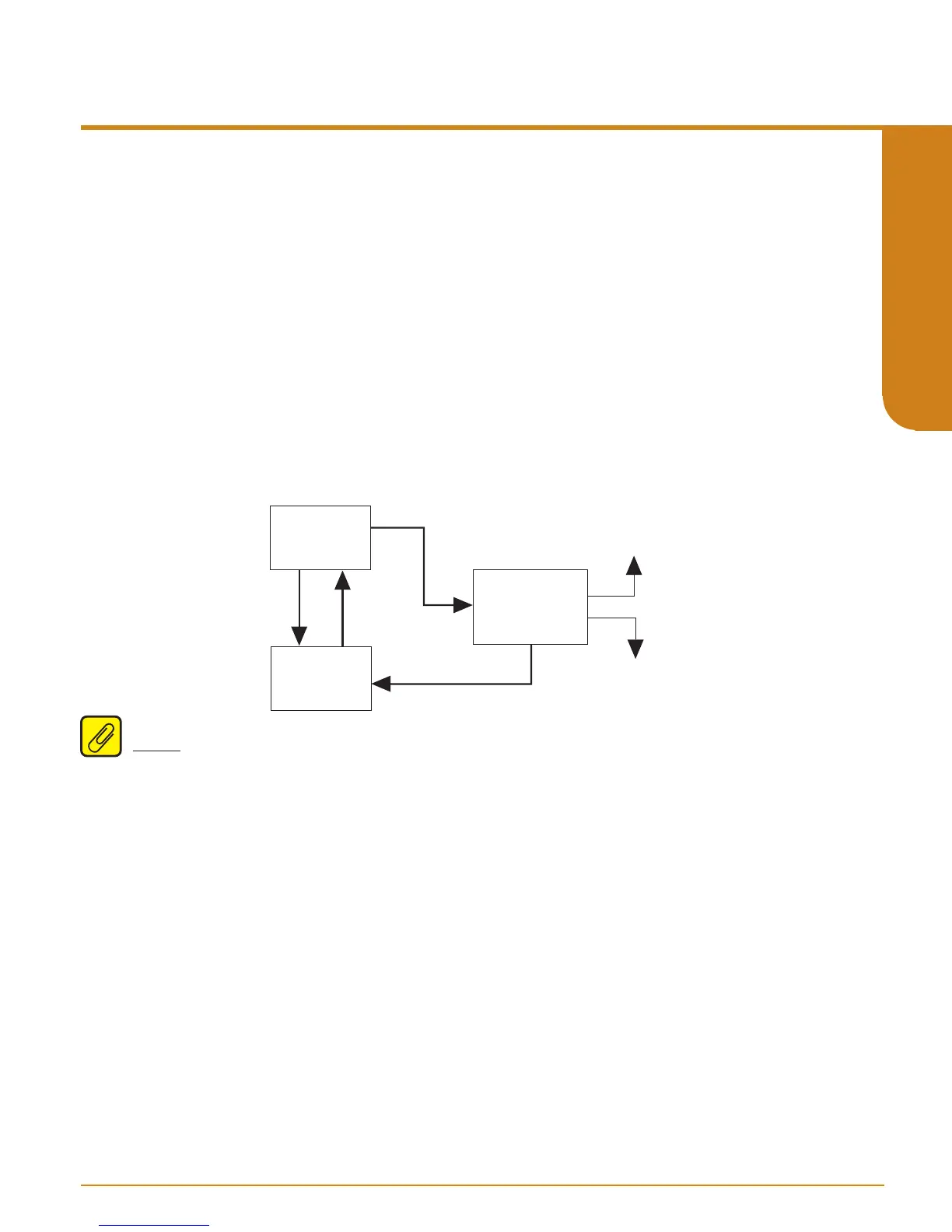
Figure 4.20 gives an overview of the Password Configuration menu.
The password menu is accessible only when the security jumper is installed in the “full access”
position (Figure 4.0) or when the password is entered correctly.
The last of your menus, “CONFG PASWD”, is for password configuration.
1. At “CONFG PASWD”, press SELECT. This puts you in the “PASS” menu. The previously
saved password appears.
2. Use the UP and DOWN buttons to set a new password to any number between 0 and 9999.
Press SELECT.
3. The “CONFG EXIT” option appears. Press SELECT to return to the process variable display.
D
U
CONFG
PASWD
CONFG
EXIT
XX
PASS
(Password 0-9999)
U
D
SEL
SEL
Figure 4.20. CONFG PASWD Menu
Note: The password menu is only accessible when either the password is entered correctly or the
password jumper is set to ‘Full Access’ (Figure 4.0).


 To Next Page