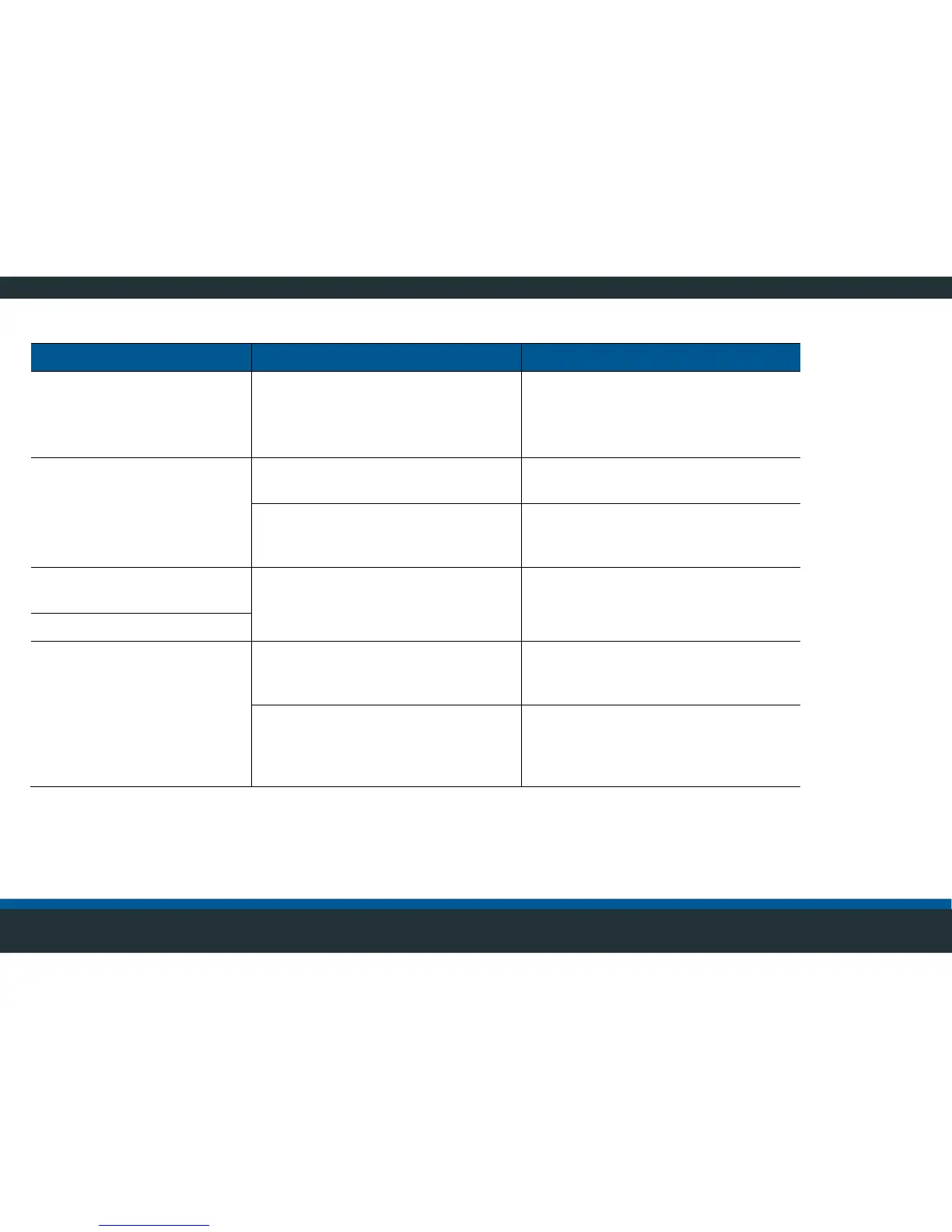
Part of the image is
shaking in the top view
Attachment of the affected camera
is loose.
Check camera bracket for tight fit.
Ask a certified service partner to
check the settings. If necessary,
recalibrate the system.
Protective film on monitor and/or
cameras has not been removed.
Carefully clean the cameras (Caution:
risk of scratching) with plenty of water
and clean with a soft cloth.
The top view has partially
shifted
Camera(s) is/are not correctly
aligned or adjustment is off.
Re-align the camera(s) and re-
calibrate the system.
Blind areas in the top view
Objects close to the
vehicle are not displayed
The camera’s alignment is not
optimally adapted to the vehicle’s
limitation.
Ask a certified service partner to
check the settings. If necessary,
recalibrate the system.
The markers were not placed
correct (too far from the vehicle)
during the calibration and image
areas were truncated.
Ask a certified service partner to
check the settings. If necessary,
recalibrate the system.



 To Next Page