Page 26
AED LOCATOR & CPR INSTRUCTIONS / ENDING YOUR ROUND
AED Locator & CPR Instructions
The M-TECH GPS can indicate the availability and location of on-course debrillators and provide
golfers with Cardiopulmonary Resuscitation (CPR) instructions. The feature can be enabled by selecting
"AED Locator" within the home settings menu and selecting "On" (terms & conditions apply).
If the course you are playing has an on-course debrillator and has registered details on the Motocaddy
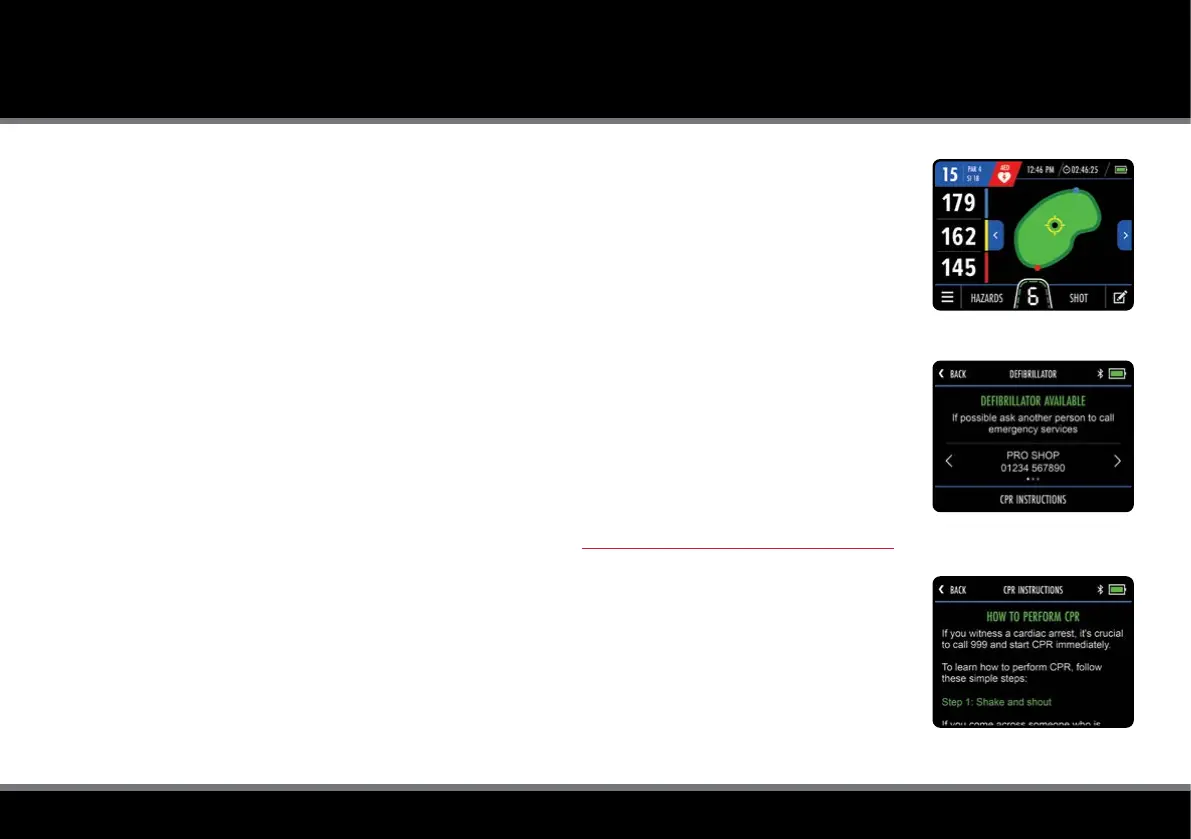
AED database, an AED icon will be displayed at the top of the GPS Mode screen (g. 1).
Tap the AED icon to access information about the location of on-course debrillators and the contact
number to gain access (g. 2). From this screen, you can also access step-by-step CPR instructions (g. 3)
by selecting "CPR Instructions".
Please be aware that AED and CPR features are available in selection regions only and usage requires
acceptance of the AED & CPR feature 'Terms of Use' available at www.motocaddy.com/deb-cpr-terms.
Ending your Round
The round can be ended at any point by selecting “End Round” from the GPS Mode settings menu.
If you have used score tracking, a score summary will be displayed with an option to “Exit Round”.
If you have not used score tracking, you will return to the Home screen.
Fig 1 - GPS Mode - AED Icon
Fig 2 - AED Locator
Fig 3 - CPR Instructions



 To Next Page