Page 8
Charging your Lithium Battery
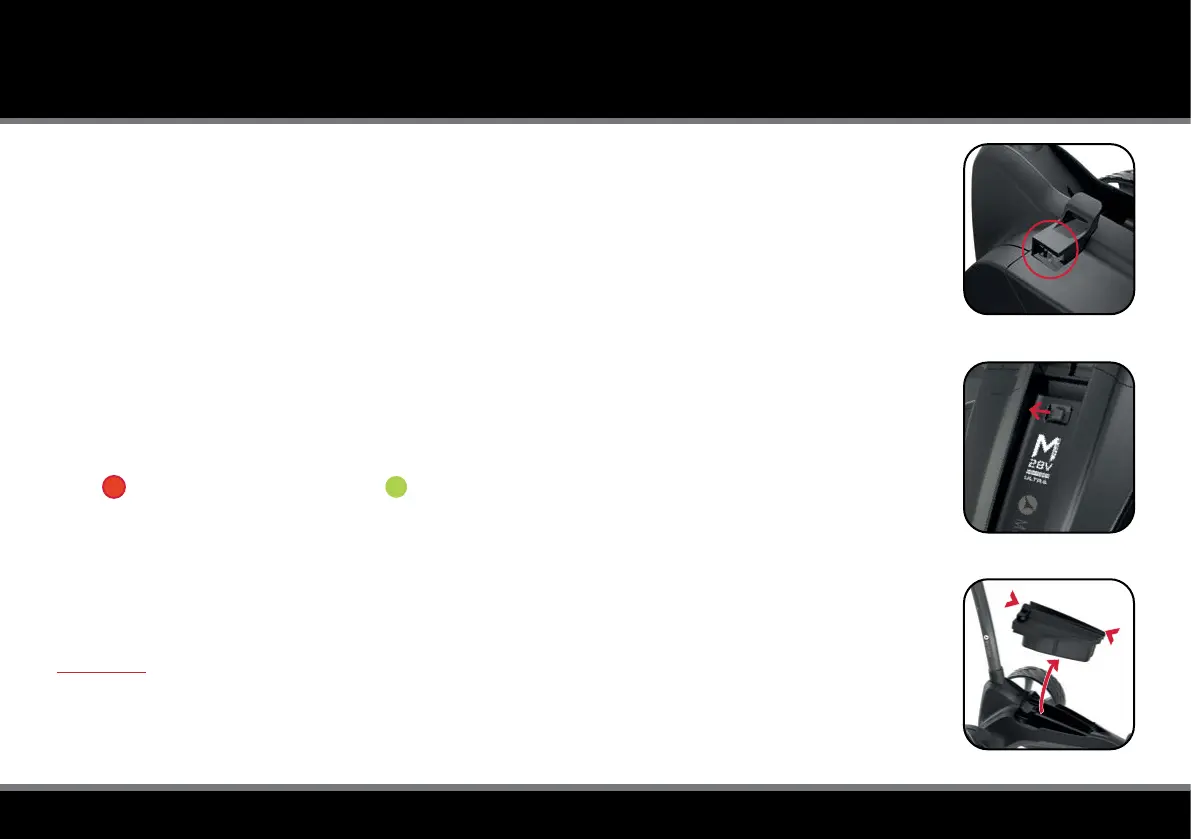
The Lithium battery can be left on the trolley or removed for charging. It is possible to charge the battery
while the trolley is folded or unfolded. If folded, the charging port will be automatically accessible (g. 1).
If removing the battery for charging, slide the battery release catch to the left (g. 2) and lift the battery
using the grab handles provided (g. 3). If the charging port is not visible - for example when the trolley is
unfolded or battery has been removed - it can be pulled out manually.
1. Plug the Motocaddy 28V Lithium battery charger into an earthed mains power socket
2. The charger light will be GREEN when not attached to a battery to indicate that it is ready to charge
3. Attach the charger cable to the charging port, matching the black and grey connections
4. The charger light will provide an indication of charging phase:
RED - Battery charging GREEN - Battery fully charged
5. The charging process will take between 3 to 5 hours depending on the depth of discharge.
This may take longer for the rst few charges
6. Once charging is complete, disconnect the charger from the mains power supply and battery
7. The charging port will need to be pushed into the battery to switch the power on for next use
WARNING - If the charger LED light flashes RED and/or GREEN consecutively when connected to
the battery, this indicates there is likely to be a fault with the battery or charger. It is important that you
disconnect the charger immediately and contact our support team for further assistance. Do not attempt
to use the battery or charger as this could pose a signicant safety risk which could result in re.
CHARGING YOUR LITHIUM BATTERY
Fig 1
Fig 2
Fig 3



 To Next Page