Page 32
LANGUAGE SETTINGS / COMPETITION MODE / FACTORY RESET
Language Settings
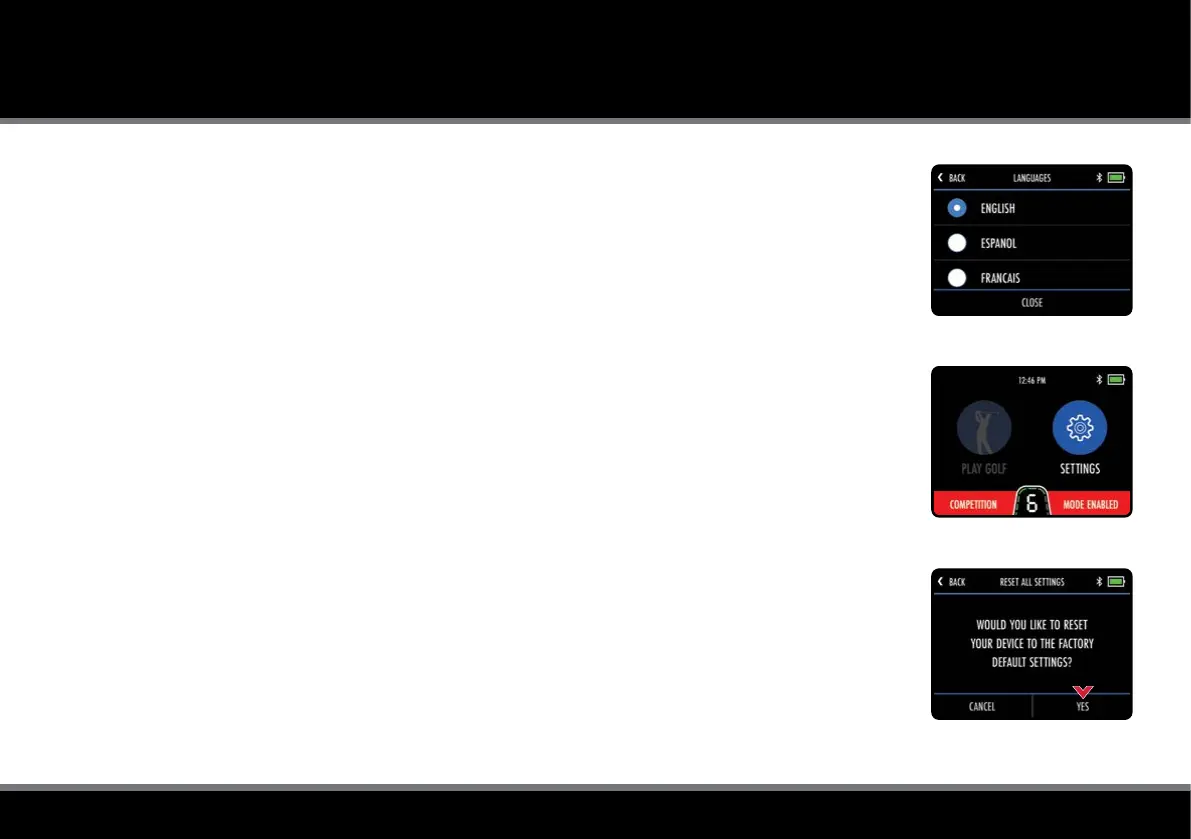
The trolley can be used in a number of different languages:
1. From the Home screen select “Settings” and then “Languages”
2. Select preferred language and then "Close" to conrm (g. 1)
Competition Mode
It is possible to temporarily disable GPS using the competition mode should competition rules dictate.
It is recommended that you always check competition rules before using your trolley with GPS enabled.
To Enable/Disable Competition mode:
1. From the Home screen select “Settings” and then “Competition Mode”
2. Select “On” (to enable) or ”Off” (to disable) & select "Close" to exit
When Competition Mode is enabled, the “Play Golf” option will be disabled and the Home screen
will display “Competition Mode Enabled” (g. 2).
Factory Reset
Should you experience a problem with your M-TECH GPS, it is possible to reset the trolley back to its
original factory default settings:
1. From the Home screen select “Settings” and then "Reset all Settings”
2. You will be asked to conrm that you want to go ahead with the reset, select “Yes” (g. 3)
3. A conrmation screen will be displayed and select "Close" to exit
Resetting the trolley to factory default will clear any setting preferences.
Fig 1 - Language Settings
Fig 2 - Competition Mode
Fig 3 - Factory Reset



 To Next Page