8
9
Model no. 011-1973-2 l Questions? Contact us 1-88 8 -942 -6686
CONTROLS AND INDICATORS
FOLLOW THESE STEPS WHEN BATTERY IS OUTSIDE VEHICLE.
WARNING: A SPARK NEAR THE BATTERY MAY CAUSE A BATTERY EXPLOSION. TO REDUCE THE
RISK OF A SPARK NEAR THE BATTERY:
Check polarit y of batt ery posts. POSITIVE (POS, P, +) bat t ery post usually has a larger diameter than
NEGATIVE (NEG, N, -) post .
Attach at least a 24" (61 cm) 6-gauge (AWG) insulated bat tery cable to NEGATIVE (NEG, N, -) batt ery
post .
Connect POSITIVE (RED) charger clip t o POSITIVE (POS, P, +) post of batt ery.
Position yourself and free end of cable as far away from batt ery as possible—then connect NEGATIVE
(BLACK) charger clip t o free end of cable.
Do not face battery when making final connect ion.
When disconnecting charger, always do so in reverse sequence of connect ing procedure and break first
connection while as far away from batt ery as practical.
A marine (boat) bat t ery must be removed and charged on shore. To charge it on board requires
equipment specially designed for marine use.
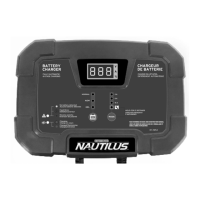
CONTROLS AND INDICATORS
WARNING
A SPARK NEAR A BATTERY MAY CAUSE A BATTERY EXPLOSION!
Battery chargers may get hot during operation. DO NOT set charger on
flammable materials like carpeting, upholstery, paper, cardboard, etc.
Charger may damage leat her and plastic.
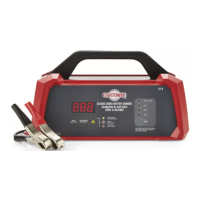
A. Digital Display
During charging, the digit al display will alt ernat e bet ween Volt s (V), Amperage (A) and Batt ery St at e of
Charge (% ). It can also display Fault Codes if a charging error is det ect ed.
Volts—Actual charging volt age will be displayed. Charging volt age can reach up t o 14.4 V—t his is normal
and required t o effectively charge a 12-volt batt ery.
Amps—Act ual charging amperage will be displayed. While you may select 2 A, 8 A, or 15 A charge
modes, t hese are maximum currents and the bat t ery charger will reduce actual current delivered to t he
batt ery based on feedback from the bat tery and ot her fact ors.
Stage of Charge—The approximate batt ery state of charge is displayed. A reading of “ LO” indicat es
that the bat tery is below 50% st at e of charge. Above 50% , t he percent age will display in 10%
increments bet ween 60 t o 90% capacit y. Once t he batt ery is fullly charged, the display will read
“ 100% ” .
NOTE: About 30 minut es after reaching full charge, the bat t ery charger will ent er a power-saving mode
and t he digit al display will turn off.
Fault Codes—The charger will continuously monitor charge progress and collect feedback from t he
batt ery during charging. In t he event an abnormal condit ion is det ected, charging will st op and a fault
code (e.g., ” F01” ) may be displayed. (See ” Troubleshooting/ Fault Codes” for possible causes and
solutions.)
NOTE: A fault condit ion will also be indicated by the LED illuminating.
CONNECTING YOUR BATTERY
®/MD
A
B
C
D
E




 To Next Page