145
The Menu
Log On
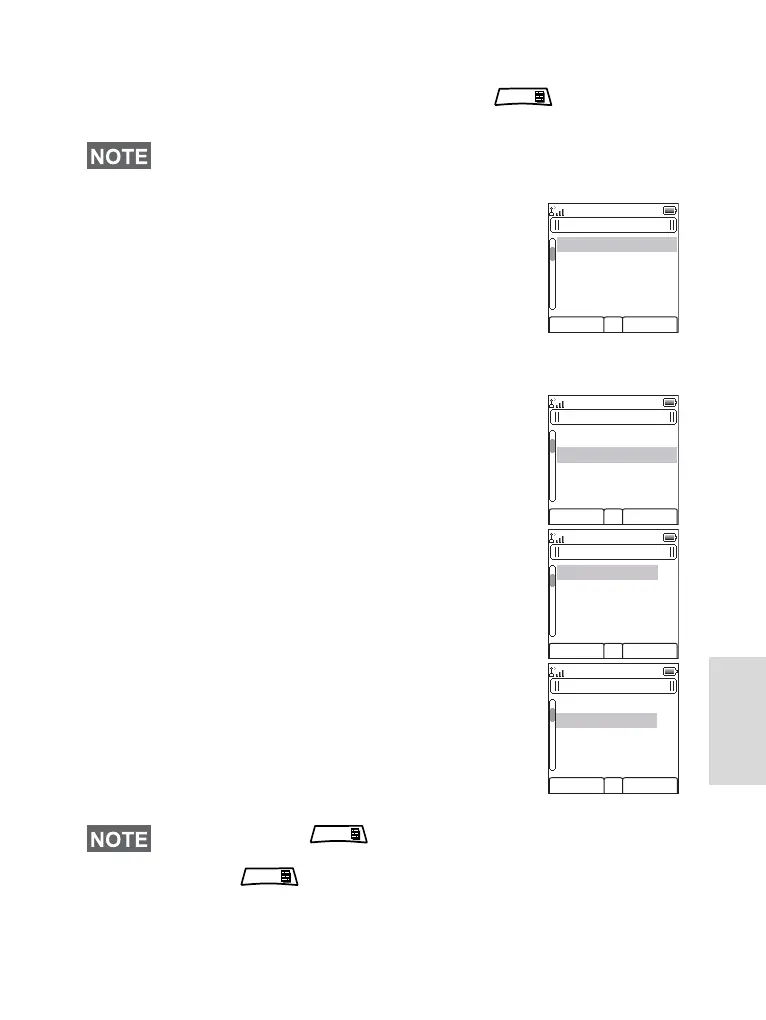
From the idle screen you need to press > More... >
RUI > Log On
1. Selecting User ID.
• to edit User ID go down to second line
and press Edit.
• to enter New User ID press Select
Type your User ID and press OK
• to choose your User ID from the list
highlight the correct one and press
Select
•
You can press Back to go to the previous screen in any
time.
You can press anytime to view the detailed list
(useful for the long User ID’s that are not fully displayed).
Press again to go back to the previous list.
MENU
Back
Select
RUI Logon
User ID: __________
User PIN:
Back
Edit
RUI Logon
User ID: __________
User PIN:
Back
Select
User ID List
[New User ID]
Jan
Peter
Mark
Back
Select
User ID List
[New User ID]
Jan
Peter
Mark
MENU
MENU











 To Next Page