REDUCING MONITORING LATENCY
47
ADJUSTING THE AUDIO I/O BUFFER
A buffer is a small amount of computer memory
used to hold data. For audio interfaces like the
4pre, buffers are used for the process of
transferring audio data in and out of the computer.
The size of the buffers determines how much delay
you hear when monitoring live inputs through
your audio software: larger buffers produce more
delay; smaller buffers produce less.
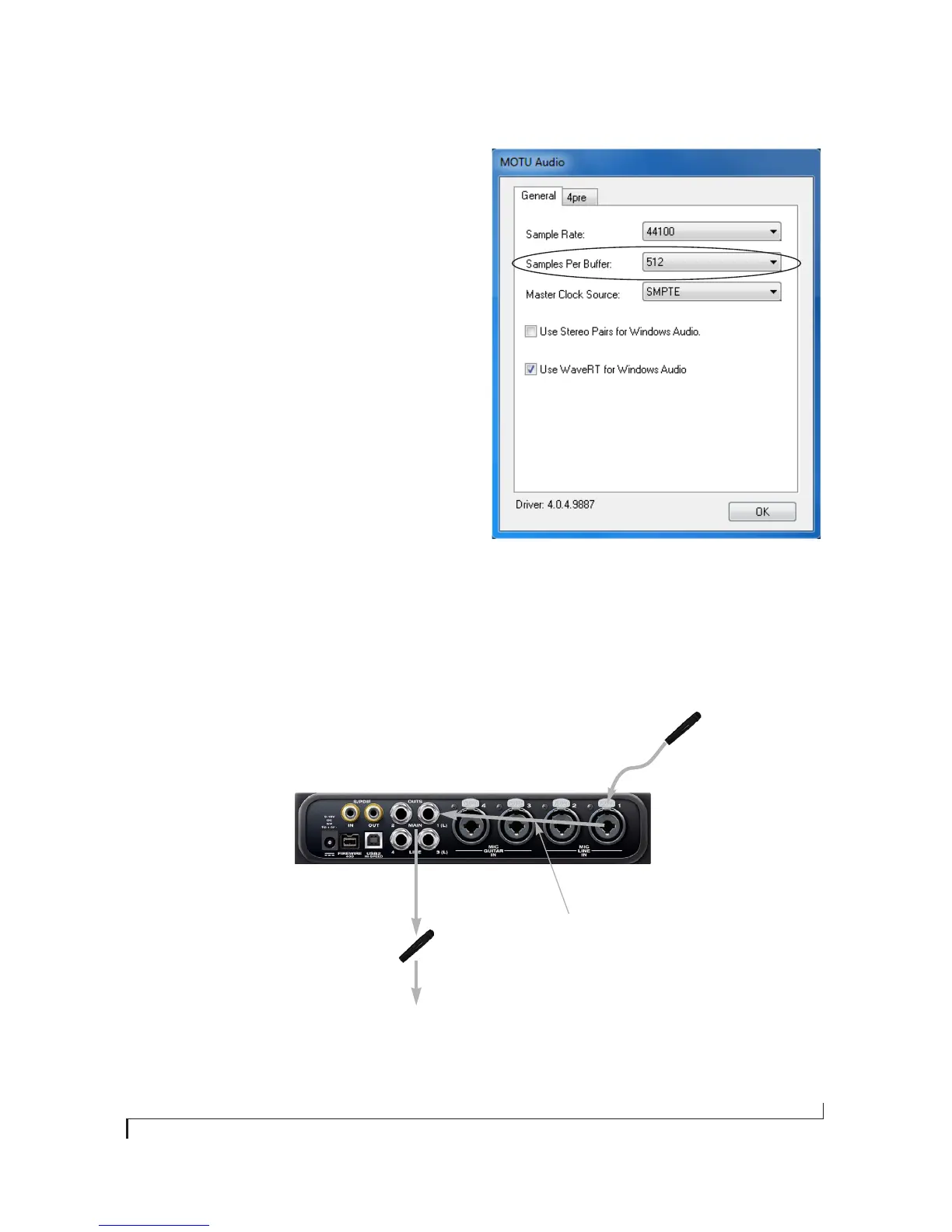
Buffer size adjustment is made in MOTU Audio
Console, as shown in Figure 8-3 via the Samples Per
Buffer setting.
Figure 8-3: Lowering the ‘Samples Per Buffer’ setting in MOTU Audio
Console reduces patch thru latency. But doing so increases the
processing load on your computer, so keep an eye on the Perfor-
mance Monitor in your host audio software.
2. CueMix immediately
patches the live mic signal
directly to the main outs (or
other output), completely
bypassing the computer.
3. Mic signal is mixed with the
main outs, and you can
control the volume (relative
to the rest of the mix) with
the mic’s fader in CueMix FX.
Figure 8-2: This diagram shows the signal flow when using CueMix no-latency monitoring.
Notice that this method does not process the live input with plug-ins in your audio software.
1. Live input (from mic, guitar, etc.)
enters the MOTU interface.


 To Next Page