CONFIGURING HOST AUDIO SOFTWARE
43
5 Check the 4pre inputs and outputs that you wish
to use and uncheck the ones you don’t, as shown in
Figure 7-7 on page 42.
Other audio settings in SONAR
There are a few other settings in SONAR that
impact 4pre operation:
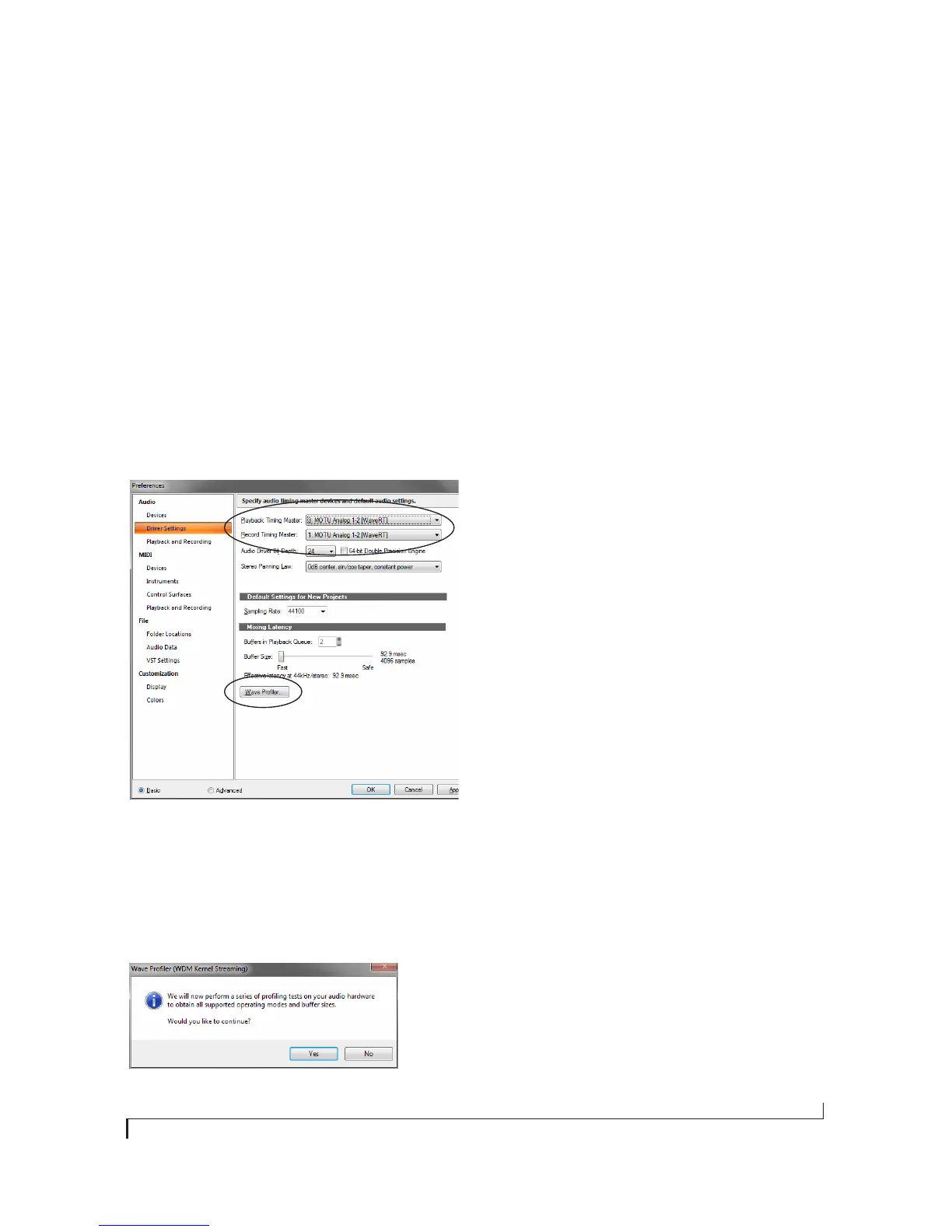
1 In the Audio preferences section, choose Driver
Settings.
2 Choose an 4pre input and output for recording
and playback timing as shown below in
Figure 7-10. It doesn’t matter which input or
output you choose.
Figure 7-10: Make sure you have chosen a 4pre input and output for
the playback and recording timing master settings.
3 Additionally, if you are using the MOTU WDM
driver, click the Wave Profiler button and run the
Wave Profiler. This process chooses the optimum
settings for the 4pre hardware.
Figure 7-11: Running the Wave Profiler in Cakewalk’s SONAR.
Sound Forge
In Sony Sound Forge, go to the Preferences
window, click the Audio tab, and then choose
MOTU Audio from the Audio device type menu.
Other audio software
For other audio applications, the procedure is
similar to that shown above. Consult your owner’s
manual for further information.
REDUCING LATENCY
On Windows, audio I/O buffer size is handled by
the audio driver rather than the host audio
application.
In the MOTU Audio Console, Samples Per Buffer
provides an adjustable audio buffer setting that lets
you control the amount of delay you’ll hear when
monitoring live inputs through your host audio
software or processing them with software
plug-ins.
For information, see the “Adjusting the audio I/O
buffer” section of chapter 8, “Reducing Monitoring
Latency” (page 45).
WORKING WITH 4PRE INPUTS AND
OUTPUTS
Once you’ve enabled the 4pre’s driver, 4pre audio
inputs and outputs will appear in your host
software wherever audio inputs and outputs are
listed.
Remember that the headphone output can be
configured in MOTU Audio Console to mirror
other outputs besides the main outs. See “Phones
Assign” on page 34.
Number of channels
If your host audio software requires that you
specify the number of audio voices or channels you
will be using, be sure to choose enough channels to
cover the 8 inputs and 8 outputs provided by your
4pre.


 To Next Page