CONFIGURING HOST AUDIO SOFTWARE
42
SONAR
In Cakewalk SONAR, you can use the MOTU
ASIO driver or the MOTU WDM driver. Note that
when using ASIO, only one audio interface may be
selected for use in SONAR.
Using the MOTU ASIO driver
1 Go to SONAR’s Preferences.
2 In the Audio preferences section, choose
Playback and Recording.
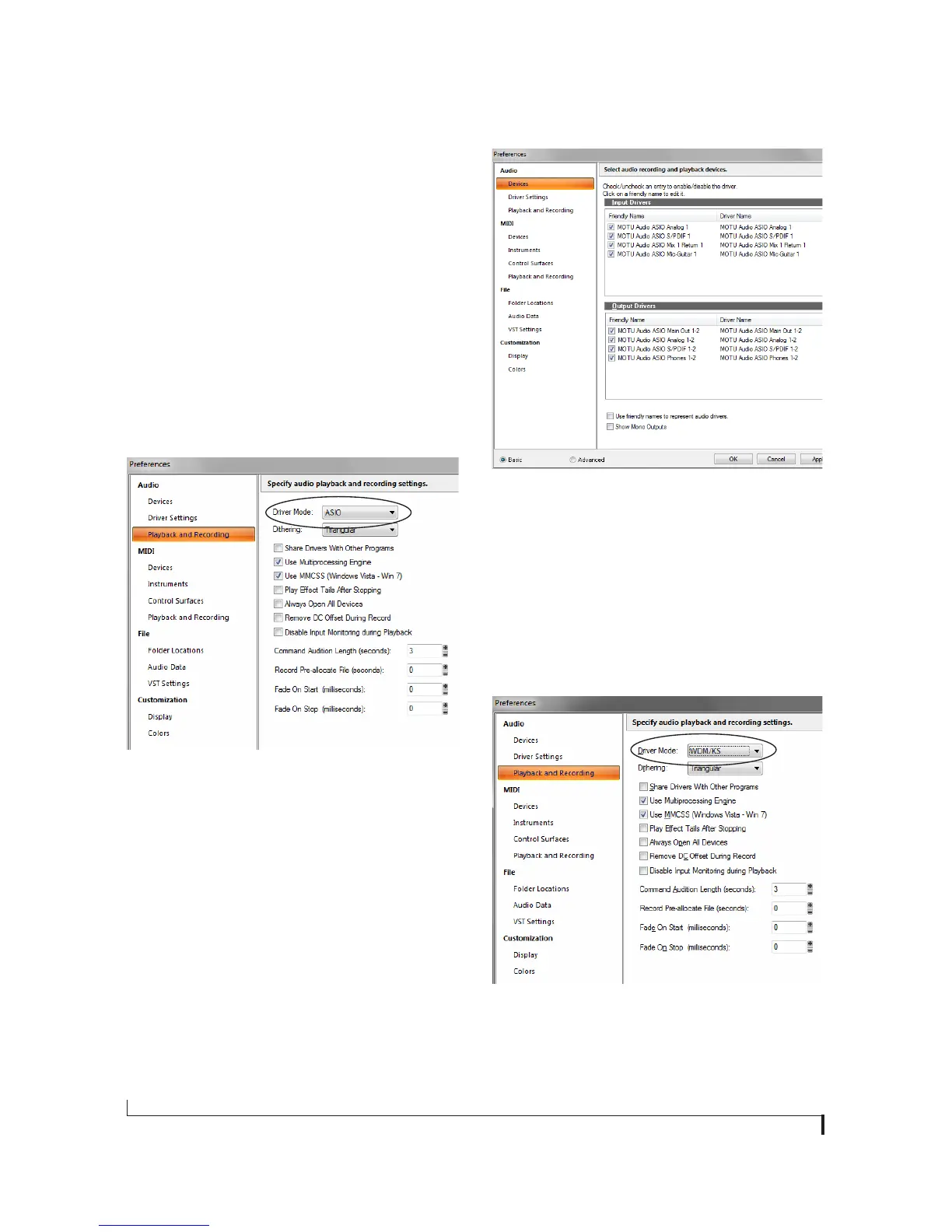
3 Choose ASIO as the Driver Mode, as shown
below.
Figure 7-7: Enabling the MOTU Audio ASIO driver in SONAR.
4 Next, in the Audio preferences section, choose
Devices.
5 Check the 4pre inputs and outputs that you wish
to use and uncheck the ones you don’t, as shown in
Figure 7-8 on page 42.
Figure 7-8: Enabling inputs and outputs in SONAR.
Using the MOTU WDM driver
1 Go to SONAR’s Preferences.
2 In the Audio preferences section, choose
Playback and Recording.
3 Choose WDM/KS as the Driver Mode, as shown
below.
Figure 7-9: Enabling the MOTU WDM driver in SONAR.
4 Next, in the Audio preferences section, choose
Devices.


 To Next Page