CHAPTER
75
10 MOTU SMPTE Console
OVERVIEW
The 4pre can resolve directly to SMPTE time code
via any analog input, without a separate
synchronizer. The 4pre can also generate time code
via any analog output. The 4pre provides a DSP-
driven phase-lock engine with sophisticated
filtering that provides fast lockup times and sub-
frame accuracy. Direct time code synchronization
is supported by Cubase, Nuendo and other audio
sequencer software that supports the ASIO 2 or 3
sample-accurate sync protocol.
MOTU SMPTE Console . . . . . . . . . . . . . . . . . . . . . . . . . . . . . . . 75
Clock/Address . . . . . . . . . . . . . . . . . . . . . . . . . . . . . . . . . . . . . . . 75
Frame Rate . . . . . . . . . . . . . . . . . . . . . . . . . . . . . . . . . . . . . . . . . . 75
Reader section . . . . . . . . . . . . . . . . . . . . . . . . . . . . . . . . . . . . . . . 76
Generator section . . . . . . . . . . . . . . . . . . . . . . . . . . . . . . . . . . . 77
Resolving Cubase or Nuendo to time code . . . . . . . . . . 77
Syncing to SMPTE time code. . . . . . . . . . . . . . . . . . . . . . . . . 78
MOTU SMPTE CONSOLE
The included MOTU SMPTE Console™ software
provides a complete set of tools to generate SMPTE
for striping, regenerating or slaving other devices
to the computer.
CLOCK/ADDRESS
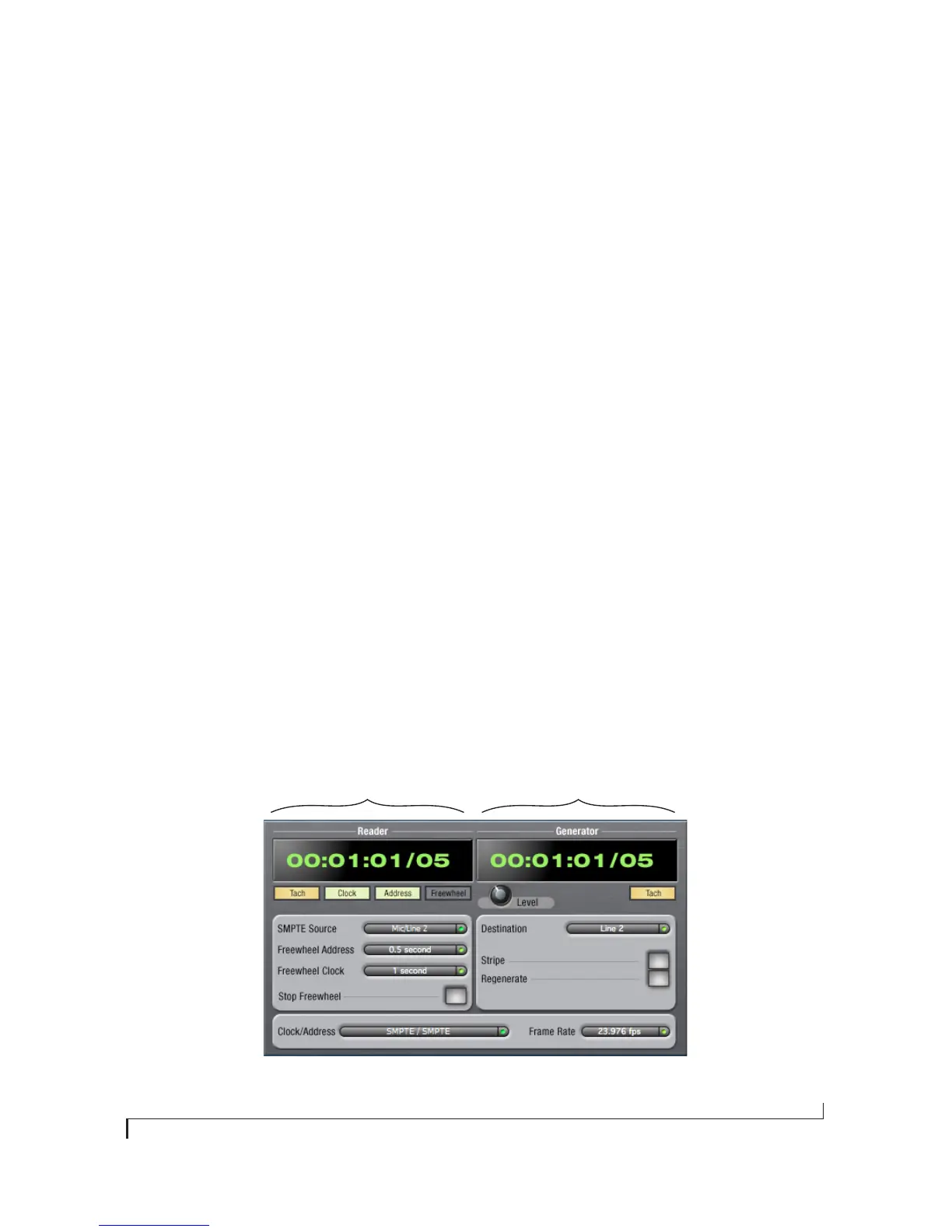
The Clock/Address menu (Figure 10-1) provides
the same global Master Clock Source setting as in
MOTU Audio Console (“Master Clock Source” on
page 32), but it includes additional information:
each setting shows both the clock and the address
(time code or sample location), separated by a
forward slash ( / ). To resolve the 4pre to SMPTE
time code, choose the SMPTE / SMPTE setting in
the Clock/Address menu. This means that the
system will use SMPTE as the clock (time base)
and SMPTE as the address.
FRAME RATE
This setting should be made to match the SMPTE
time code frame rate of the time code that the
system will be receiving. The 4pre can auto-detect
Figure 10-1: SMPTE Setup gives you access to your 4pre’s on-board SMPTE
time code synchronization features.
The Reader section provides
settings for resolving to
SMPTE time code.
The Generator section
provides settings for striping
SMPTE time code.


 To Next Page