19
8
QUARTZ CHRONOGRAPH
1/5 OF A SECOND – TYPE B
Select 38 mm Movado BOLD chronograph models
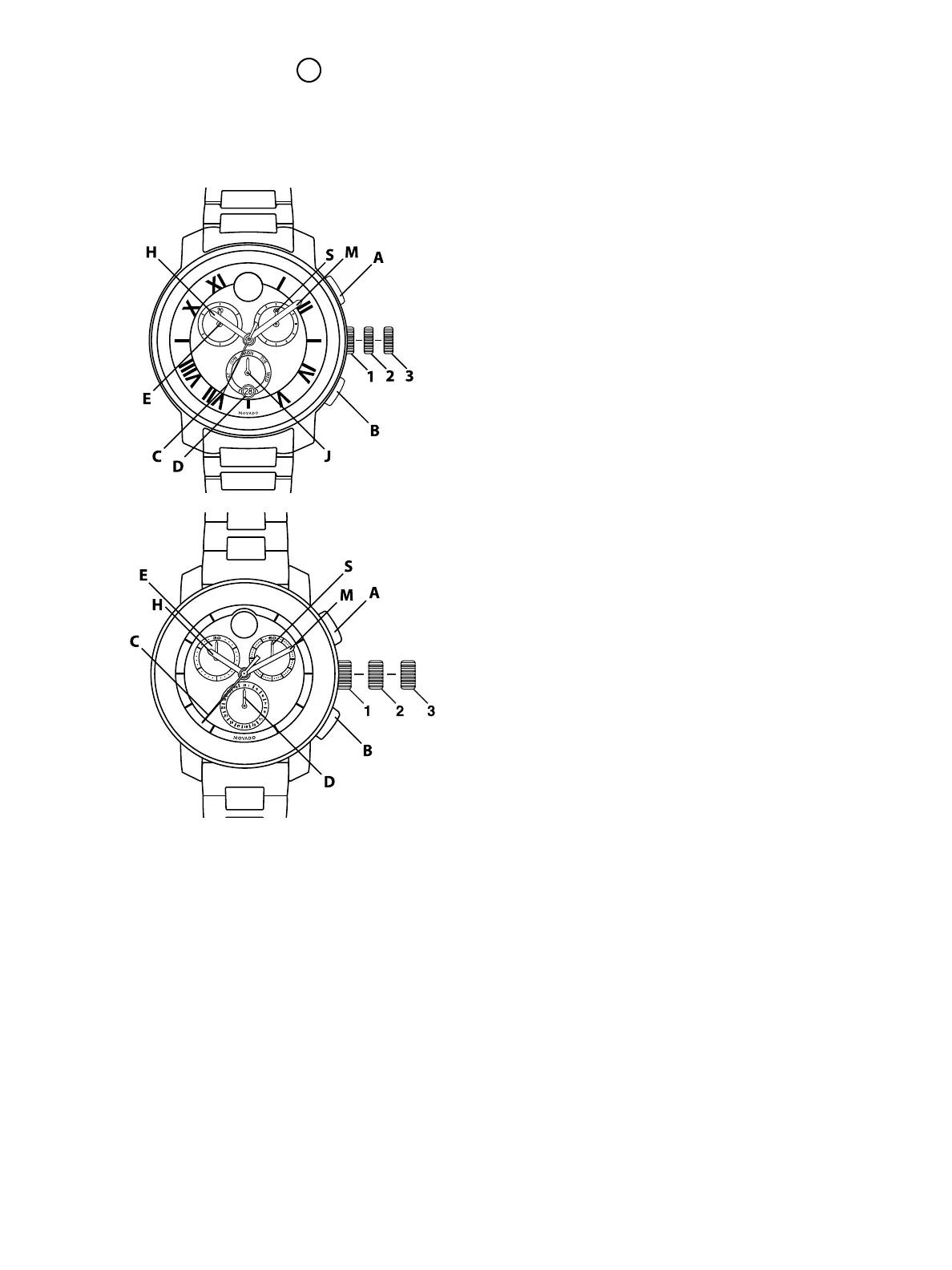
LEGEND:
H – Hour hand
M – Minute hand
C – Chronograph 1/5 seconds hand
S – Small seconds hand
J – Day Indicator Hand
D – Date Window/Indicator
E – Chronograph 30-minutes counter
1, 2, 3 – Crown positions
A – Start/Stop
B – Reset
These chronograph models feature a center-
mounted fifths-of-a-second chronograph hand,
a minute counter (up to 30) and small seconds
subdials; and day indicator subdial with date
window (figure A) or date indicator subdial (figure
B). They can be used to time an event up to 30
minutes in duration to the nearest 1/5 of a second.
To set the TIME:
1. Pull crown out to position 3; watch (small seconds
hand S) stops.
NOTE: If crown is pulled to position 3 while
chronograph is running, timing will stop.
2. Turn crown in either direction to set hour H and
minute M hands to desired time taking AM/PM
into account.
3. Push crown back in to position 1; watch restarts.
To set the DAY (select models, Figure A):
1. Pull crown out to position 3.
2. Turn crown in either direction to set weekday:
Day indicator hand J will advance or move back
by one day each time hour H and minute M
hands pass midnight (24:00).
3. Once hand J indicates correct day, continue
turning crown to set hour H and minute M hands
to desired time, taking AM/PM into account.
4. Push crown back in to position 1.
To set the DATE:
1. Pull crown out to position 2.
2. Turn crown clockwise (Figure A) or
counterclockwise (Figure B) to set date D.
CAUTION: Do not set date D when hour and
minute hands are between 9:00 PM and 12:30 AM;
doing so could damage the calendar mechanism.
If you must reset date during those hours, first
move hour and minute hands to any time outside
that period, reset the date, and then reset hands to
correct time.
3. Push crown back in to position 1.
FIGURE A
FIGURE B



 To Next Page