16
7
QUARTZ CHRONOGRAPH
1/1 OF A SECOND – TYPE A
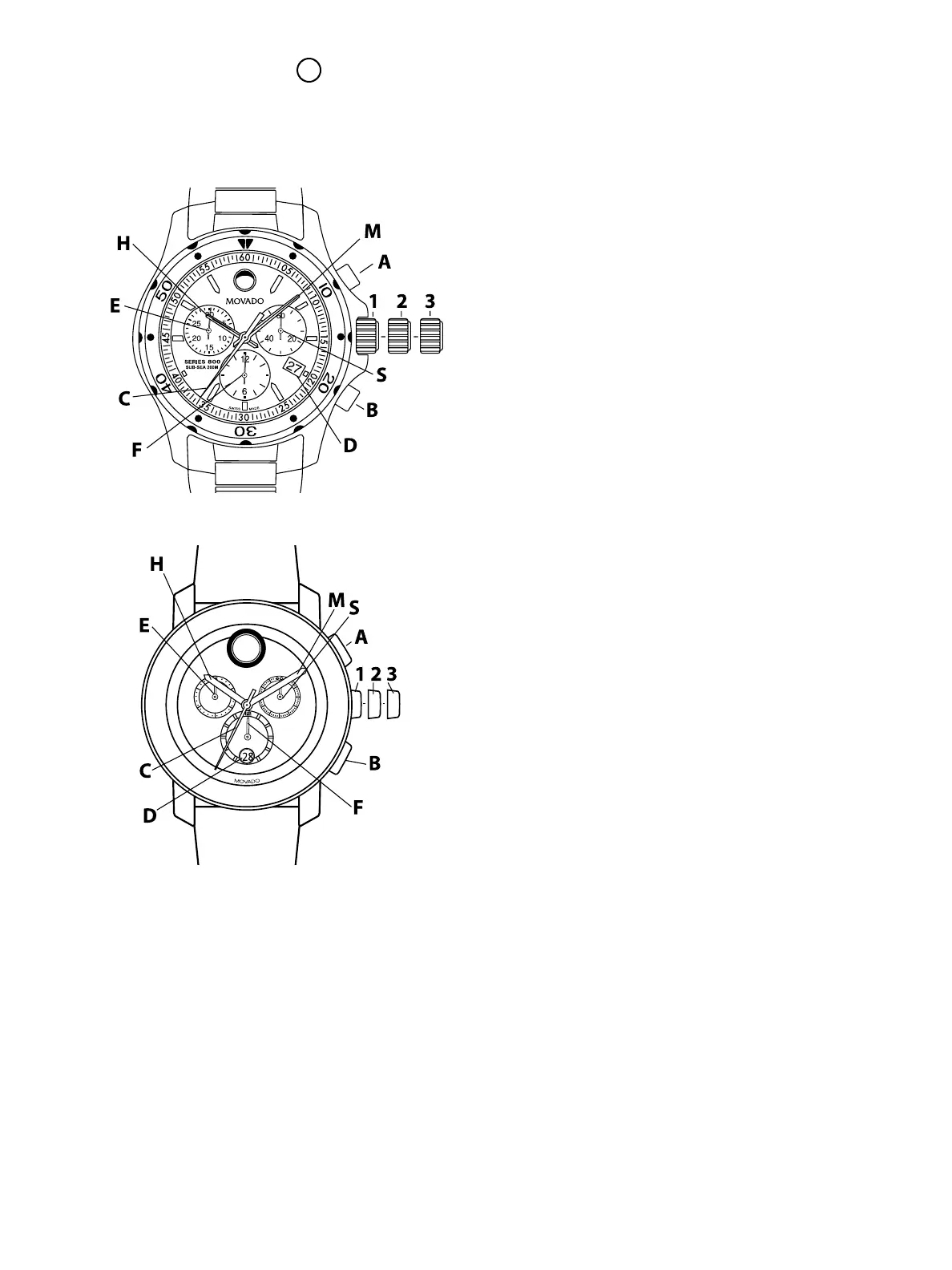
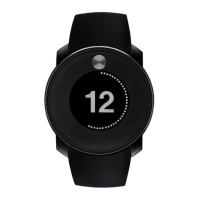
Includes Series 800 Quartz chronograph & Movado BOLD TR90 chronographs
LEGEND:
H – Hour hand
M – Minute hand
S – Small seconds hand
C – Chronograph 60-seconds counter
E – Chronograph 30-minutes counter
F – Chronograph 12-hours counter
D – Date window
1, 2, 3 – Crown positions
A – Chronograph push-button (start/stop)
B – Chronograph push-button (split-time/reset)
These chronograph models feature a minute
counter (up to 30), hour counter, and small seconds
subdial; center-mounted chronograph seconds
hand; and date or big date window. They can be
used to time an event up to 12 hours in duration to
the nearest second.
TIME/DATE SETTING
To set the time:
1. Unlock screw-down crown on models with
this feature. See “Screw-down Crown” for
instructions.
2. Pull crown out to position 3; watch stops.
3. Turn crown in either direction until hands
indicate desired time.
4. Push crown back in to position 1; watch restarts.
5. Screw crown back into case on models with
screw-down crown.
To adjust the time to the exact second:
1. Unlock crown on models with screw-down crown.
2. As soon as small seconds hand S reaches
<<60>> position, pull crown out to position 3;
watch stops.
3. Turn crown to move hands and set time, making
sure date changes at midnight, not noon.
4. Move hands slightly ahead of exact time, then
slowly turn crown counterclockwise to align
minute hand with correct minute marker.
5. Take an accurate time signal (from a radio news
station, for example). When audible tone signals
exact time, immediately push crown back in to
position 1; watch restarts, now set to the exact
time.
6. Screw crown back down into case on models
with screw-down crown.
To correct the date (quick mode):
1. Pull unlocked crown out to position 2; watch
continues to run.
FIGURE A
FIGURE B



 To Next Page