26
11
QUARTZ CHRONOGRAPH
110 OF A SECOND TYPE D
Select 38 mm Movado BOLD Quartz chronographs
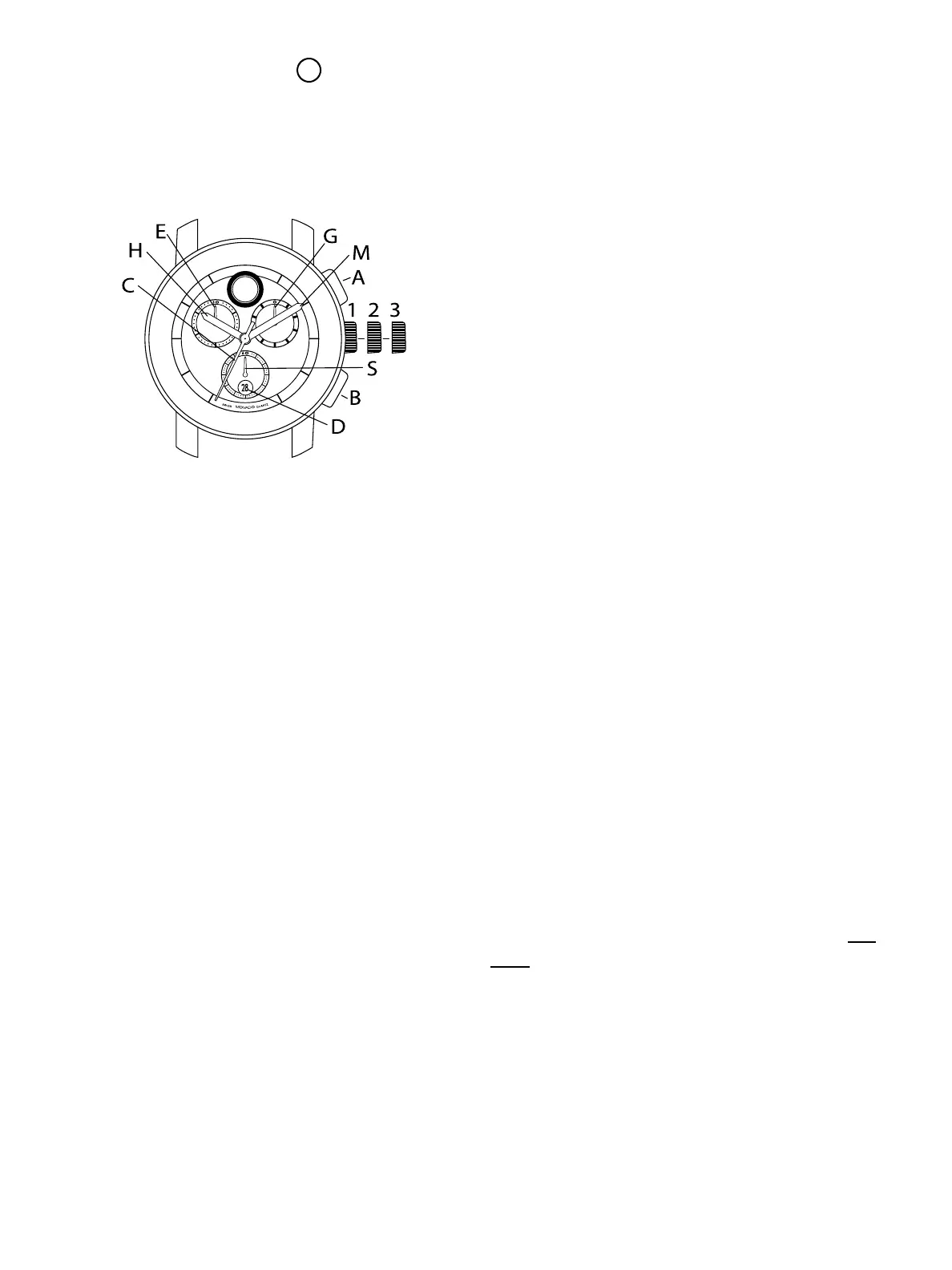
LEGEND:
H – Hour hand
M – Minute hand
C – Chronograph seconds hand
E – Chronograph 30-minutes counter
G – Chronograph tenths-of-a-second counter
S – Small seconds hand
D – Date window
1, 2, 3 – Crown positions
A – Chronograph push-button (start/stop)
B – Chronograph push-button (split-time/reset)
These quartz chronograph models feature a
tenths-of-a-second counter, minute counter (up to
30), and small seconds subdials; center-mounted
chronograph seconds hand; and date window.
They can be used to time an event up to 30 minutes
and 60 seconds in duration to the nearest 1/10 of a
second.
TIME/DATE SETTING
To set the time:
1. Pull crown out to position 3; watch stops.
2. Turn crown in either direction until hands
indicate desired time – check that the date
changes at midnight, not at noon.
NOTE: Date D will advance by one each time
hour hand H completes two clockwise revolutions,
passing midnight.
3. Push crown back in to position 1; watch restarts.
To adjust the date rapidly using crown:
1. Pull crown out to position 2; watch stops.
2. Turn crown counterclockwise to advance date.
3. When correct date is displayed in window D,
push crown back in to position 1; watch restarts.
CHRONOGRAPH FUNCTIONS
Overview
Use buttons A and B to operate the chronograph.
Pressing button A the first time will start the
chronograph. While the chronograph is running,
once the chronograph seconds counter hand C
has completed one turn, minute-counter hand E
will jump ahead one minute. Tenths-of-a-second
hand G does not move when the chronograph is
running. Pressing button A a second time will stop
the chronograph and move hand G to the relevant
tenth-of-a-second mark. Pressing button B will
reset hands G, E and C to zero. Adjusting the time
does not stop the chronograph, but it does block
buttons A and B for as long as the crown is pulled
out.
IMPORTANT: Crown must be in position 1 and
hands must be at zero before chronograph is
started. Press button B to reset hands to zero. DO
NOT push button A or B while crown is pulled
to position 2 or 3. If button A or B is accidentally
activated while crown is not flush against case, one
or more of the chronograph hands will become de-
synchronized. Should this occur, follow instructions
below.
Synchronization of chronograph hands:
After changing the battery, or in the event of an
FIGURE A



 To Next Page