9
5
0
5
5
6
0
0
5
1
0
4
0
3
5
2
5
2
0
4
5
1
5
3
0
AUTOMATIC
1
2 3
M
S
H
D
3
STANDARD 3-HAND/DATE AND 3-HAND/DAY/DATE MODELS
QUARTZ AND AUTOMATIC
Includes Museum Classic Automatic, 1881 Automatic men’s, Red Label, SE Quartz, SE Automatic &
SE Diver, select Series 800 Quartz & Series 800 Automatic, select Vizio Quartz & Vizio Automatic and
Movado Heritage Series Datron & Disco Volante
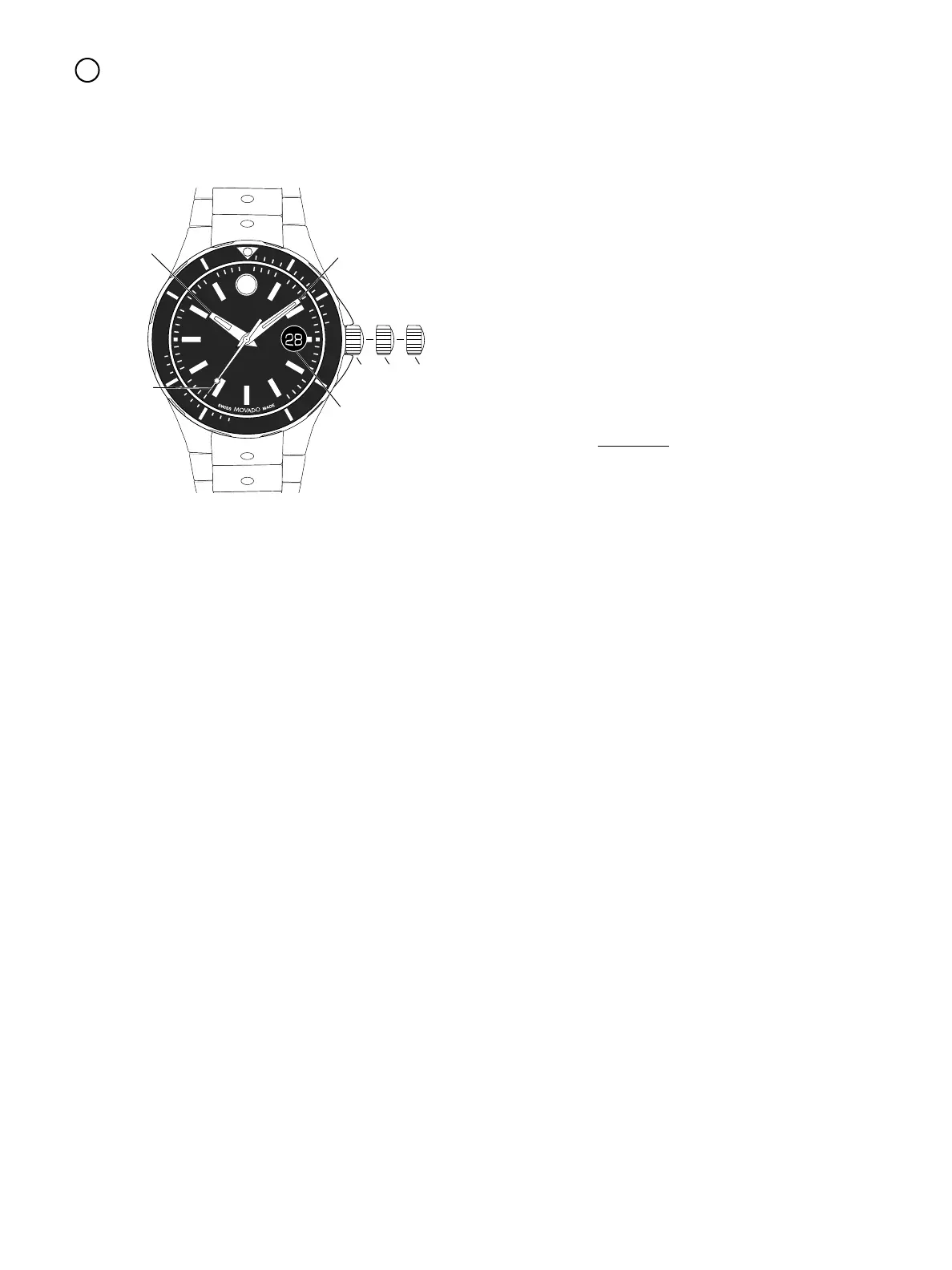
FIGURE A
LEGEND:
H – Hour hand
M – Minute hand
S – Seconds hand
D – Date Window
1,2,3 – Crown Positions
Crown positions:
Position 1 – Normal running position.
Crown pushed into case.
Position 2 – To set DATE*:
Rotate crown clockwise.
To set DAY*:
Rotate crown counterclockwise.
Position 3 – To set TIME*:
Rotate crown in either direction.
* IMPORTANT: DO NOT set the Date on Vizio
models when the time is between 9:30 PM and
3:00 AM, and automatic calendar changes are
already in progress. Doing so could damage the
mechanism.
* NOTE: If your watch has a screw-down crown,
before you can set the Date (Day/Date) or Time,
you must first unlock the crown by turning it
counterclockwise approximately six rotations. After
Time/Date (Day/Date) setting, the crown must be
screwed back down into the case to ensure water
resistance.
To manually wind an automatic movement:
The motion of your arm during normal daily
activities should be sufficient to keep the movement
of your Movado automatic timepiece wound.
However, if you have not worn your watch for 38
hours or more, and the watch has stopped, you will
need to wind it by hand before setting the time:
1. With the crown in position 1, turn the crown
clockwise approximately 20 revolutions.
2. Reset time following instructions above.



 To Next Page