21
9
QUARTZ CHRONOGRAPH
1/10 OF A SECOND – TYPE B
Select Vizio Quartz chronographs
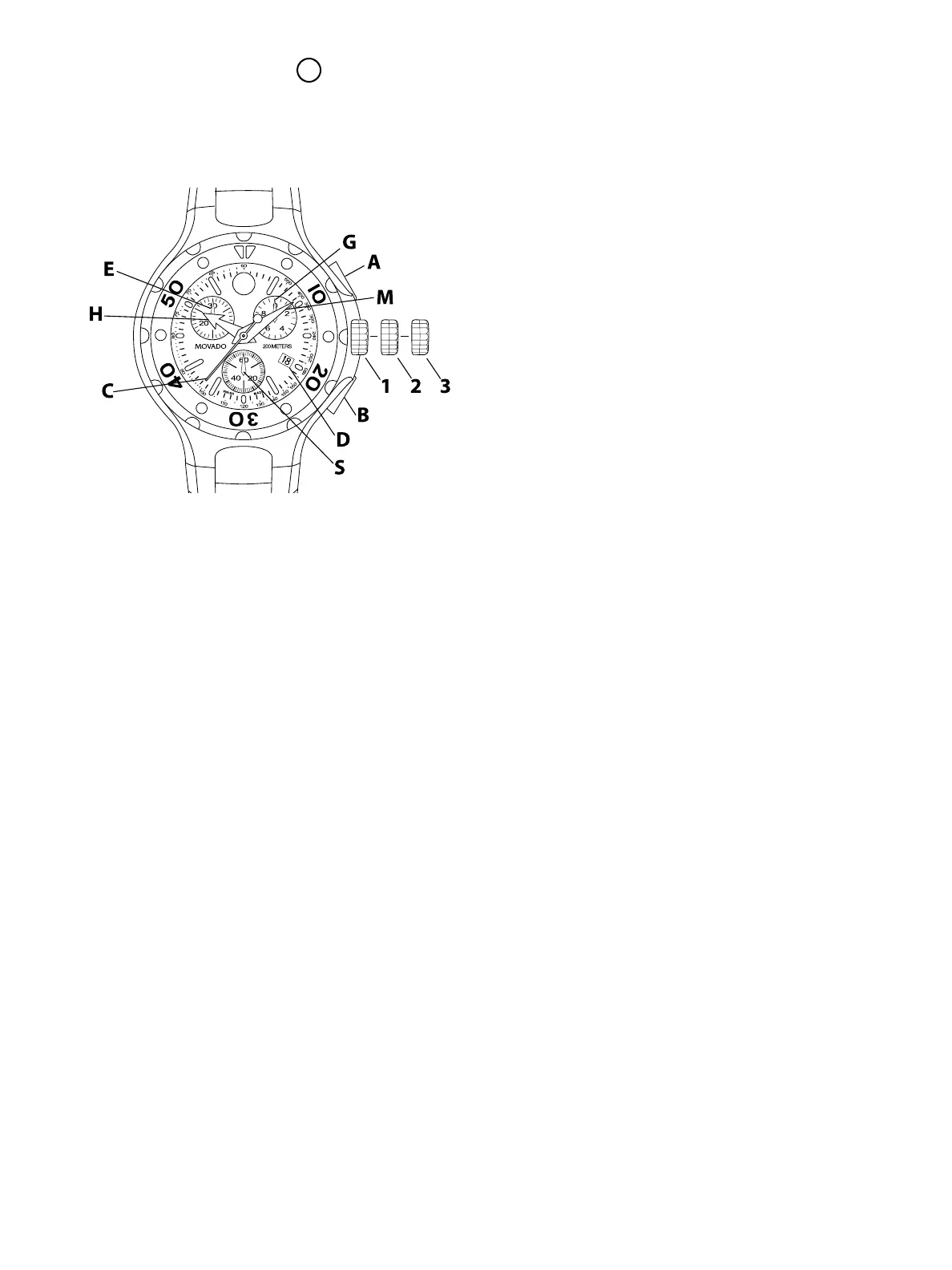
LEGEND:
H – Hour hand
M – Minute hand
C – Chronograph seconds hand
E – Chronograph 30-minutes counter
G – Chronograph tenths-of-a-second counter
S – Small seconds hand
D – Date window
1, 2, 3 – Crown positions
A – Chronograph push-button (start/stop)
B – Chronograph push-button (split-time/reset)
These quartz chronograph models feature a
tenths-of-a-second counter, minute counter (up to
30), and small seconds subdials; center-mounted
chronograph seconds hand; and date window.
They can be used to time an event up to 29 minutes
and 59.9 seconds in duration to the nearest 1/10 of
a second.
TIME/DATE SETTING
To adjust the time:
1. First unlock screw-down crown; some models
only. See “Screw-down Crown” for instructions.
2. As soon as small seconds hand S reaches
<<60>> position, pull crown out to position 3;
watch stops.
3. Turn crown to move hands and set time, making
sure date changes at midnight, not noon.
4. Move hands slightly ahead of exact time, then
slowly turn crown counterclockwise to align
minute hand M with correct minute marker.
5. Take an accurate time signal (from a radio news
station, for example). When audible tone signals
exact time, push crown back in to position 1;
watch will restart, now set to the exact time.
6. Screw crown back down into case; some models
only. See “Screw-down Crown” for instructions.
To correct time zone and date:
1. Pull crown or unlocked screw-down crown out to
position 2.
2. Turn crown to move hour hand H ahead or back
after crossing into another zone, or to correct for
daylight savings/standard time change.
3. To change date D, advance hour hand H by two
complete revolutions, otherwise date will change
at noon. These adjustments will not stop the
watch and do not affect the time indicated by the
minute and seconds hands.
4. Once adjustments have been made, return
crown to position 1 immediately, then screw
crown back down into case on select models.
CHRONOGRAPH FUNCTIONS
Overview
Use buttons A and B to operate the chronograph.
Pressing button A the first time will start the
chronograph. While the chronograph is running,
once the chronograph seconds counter hand C
has completed one turn, minute-counter hand E
will jump ahead one minute. Tenths-of-a-second
hand G does not move when the chronograph is
running. Pressing button A a second time will stop
the chronograph and move hand G to the relevant
tenth-of-a-second mark. Pressing button B will
reset hands G, E and C to zero. Adjusting the time
FIGURE A



 To Next Page