13
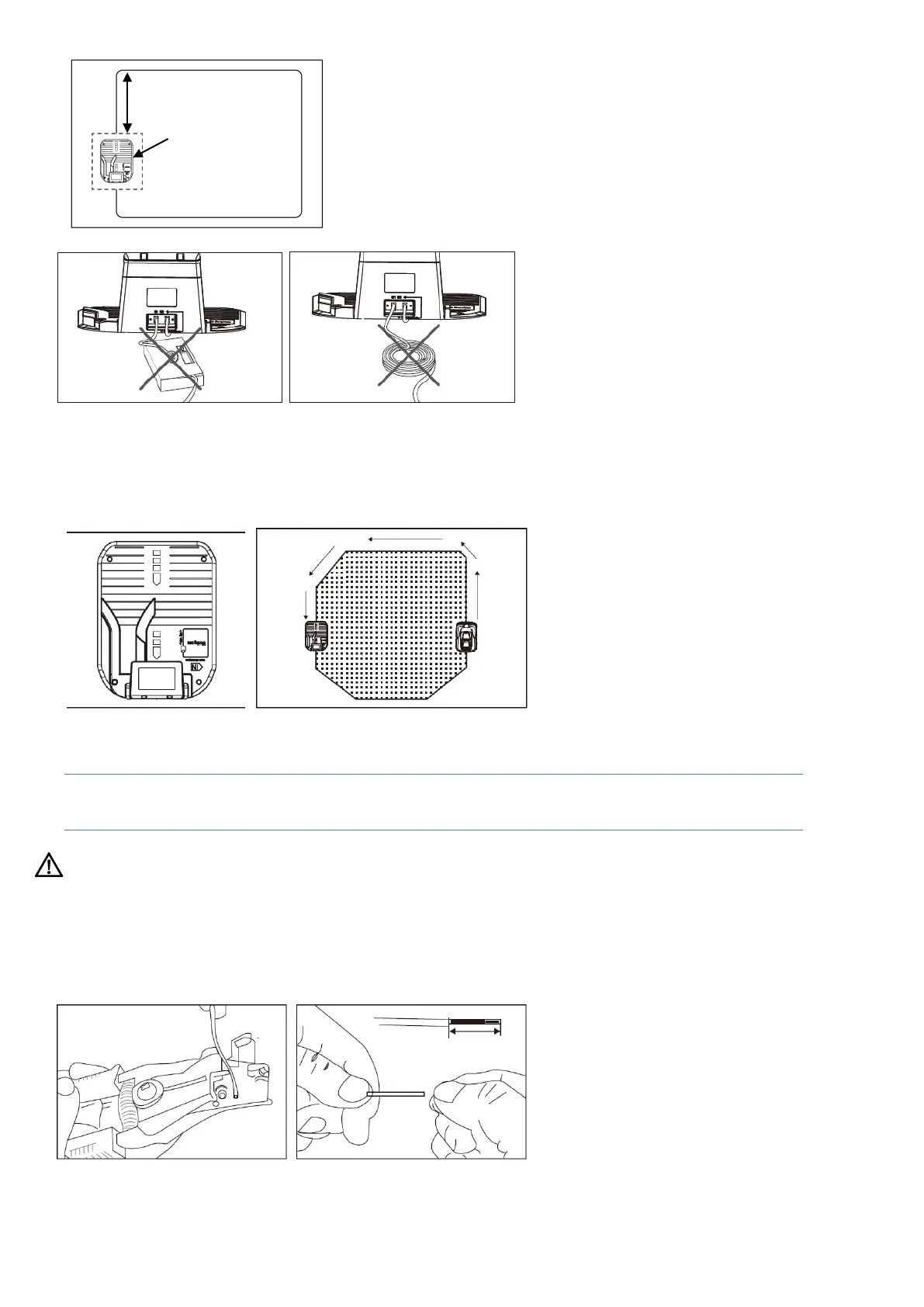
Fig.16A
Fig.16B Fig.16C
Locating the charging station
After working, when your Robotic Mower's battery voltage is
low
, the
Robotic Mower will automatically return to
the charging station by following the boundary wire anti-clockwise. After a full recharge, your Robotic Mower will
start again with its next cutting sequence (if within your set worktime window) (Fig.17A/Fig.17B).
Fig.17A Fig.17B
Note! The charging station area should be flat. Do not locate near a pond or stairs.
NOTICE: Your robot does not have stairs or pond sensors.
Pay attention to protect the extension cable!
Please fix the charging station on a horizontal place.
Before connecting to your power socket, finish all boundary layout work.
4.4.1 Prepare the boundary wire for the charging station
After laying the boundary wire you will need a wire stripper (Fig. 18A). Expose 10-15mm of the metal threads
for connection to the charging station (Fig.18B).
Fig.18A Fig.18B
≥
The potential location of
charging station


 To Next Page