16
Chapter 5 – Programming
IMPORT
ANT!
PLEASE SET THE DATE AND TIME FIRST
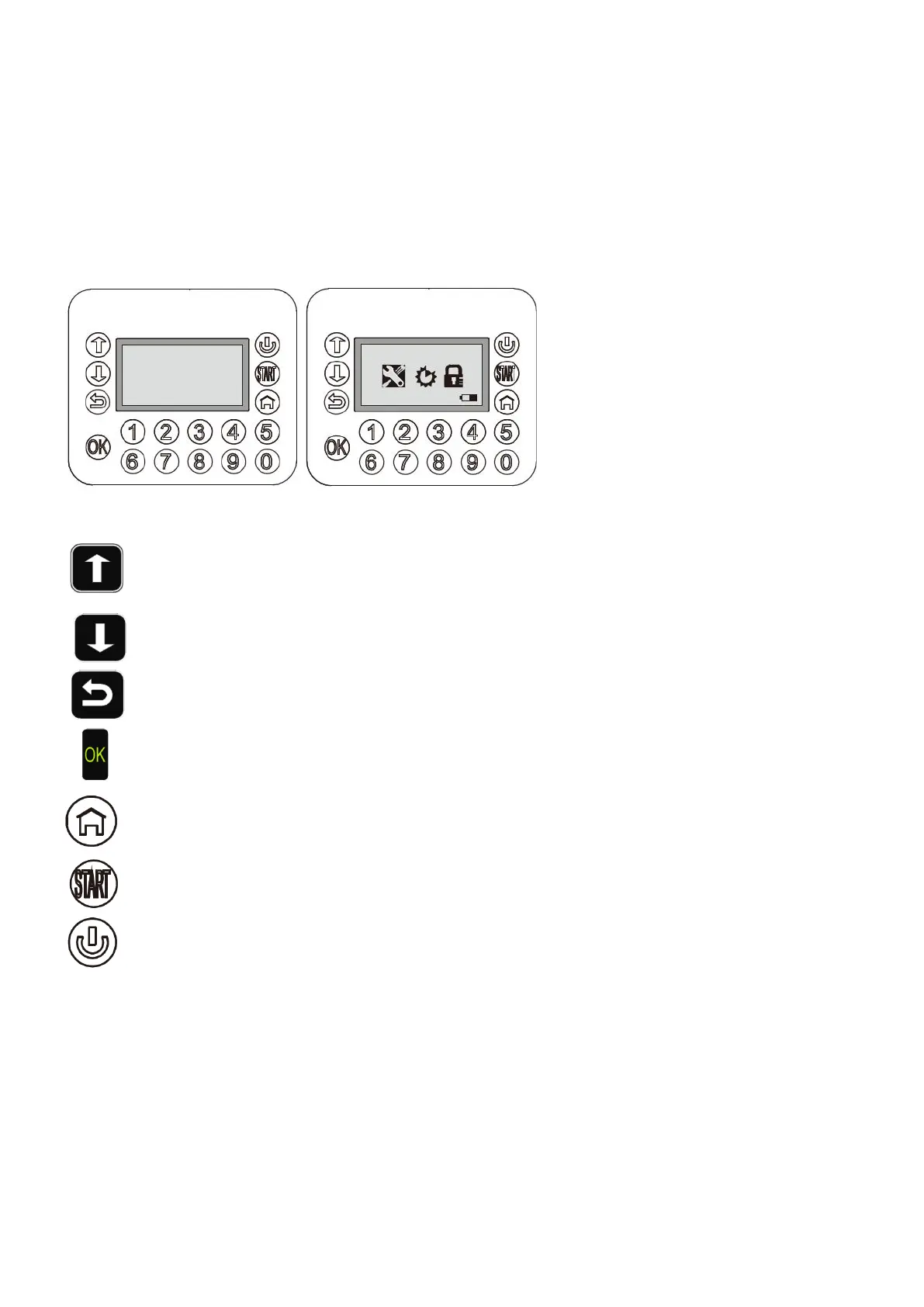
5.1 Control panel
The Robotic Mower has already been pre-programmed in the factory to standard settings,
but
these can be
changed as required. Even though factory settings will suit the majority of gardens, it’ll be worthwhile to familiarize
yourself with the available options.
After powering on the Robotic Mower, it will be locked with a factory-set PIN code “1-2-3-4”. Press the numbers,
then the Robotic Mower will be unlocked. The main operation menu will be displayed.
IMPORT
ANT
Key options:
Cursor up/ back key: On each keystroke, the cursor moves upwards or left
.
Cursor down/ forward key: On each keystroke, the cursor moves downwards or right
.
Return key: On each keystroke, the cursor returns to the previous screen or the settings are cancelled
.
OK key: Confirm settings.
Home key: Send the
Robotic Mower to the charging station
(to be followed by “OK” key).
Start key: Press the Start key and close the LCD cover, the Robotic Mower will start the working cycle.
Power Key: Ensure the status of main power switch on the back underside is “ON”. Then this power
key starts or shuts down the mower. Push for 3 seconds.
_ _ _ _
08-59-21 Mower


 To Next Page