mr
.
steam
®
C U S E R I E S Installation, Operating & Maintenance Manual
21
NOTE:
The Time Cloc
k controls boiler operation. The boiler is Off
when the timer is on. The Blowdown Valve will open when the timer
t
urns on and the boiler shuts off. See page 24 for Time Clock instructions
To provide for safe and low temperature blowdown, and
to comply with National and local plumbing and building Codes, it may
be necessary to blowdown into an ASME Code blow-down separator
tank, or to take other precautions to prevent damage to building drain
plumbing. Consult with a licensed plumber.
Burn Hazard. Pressurized Steam and
Hot Water is discharged during blowdown.
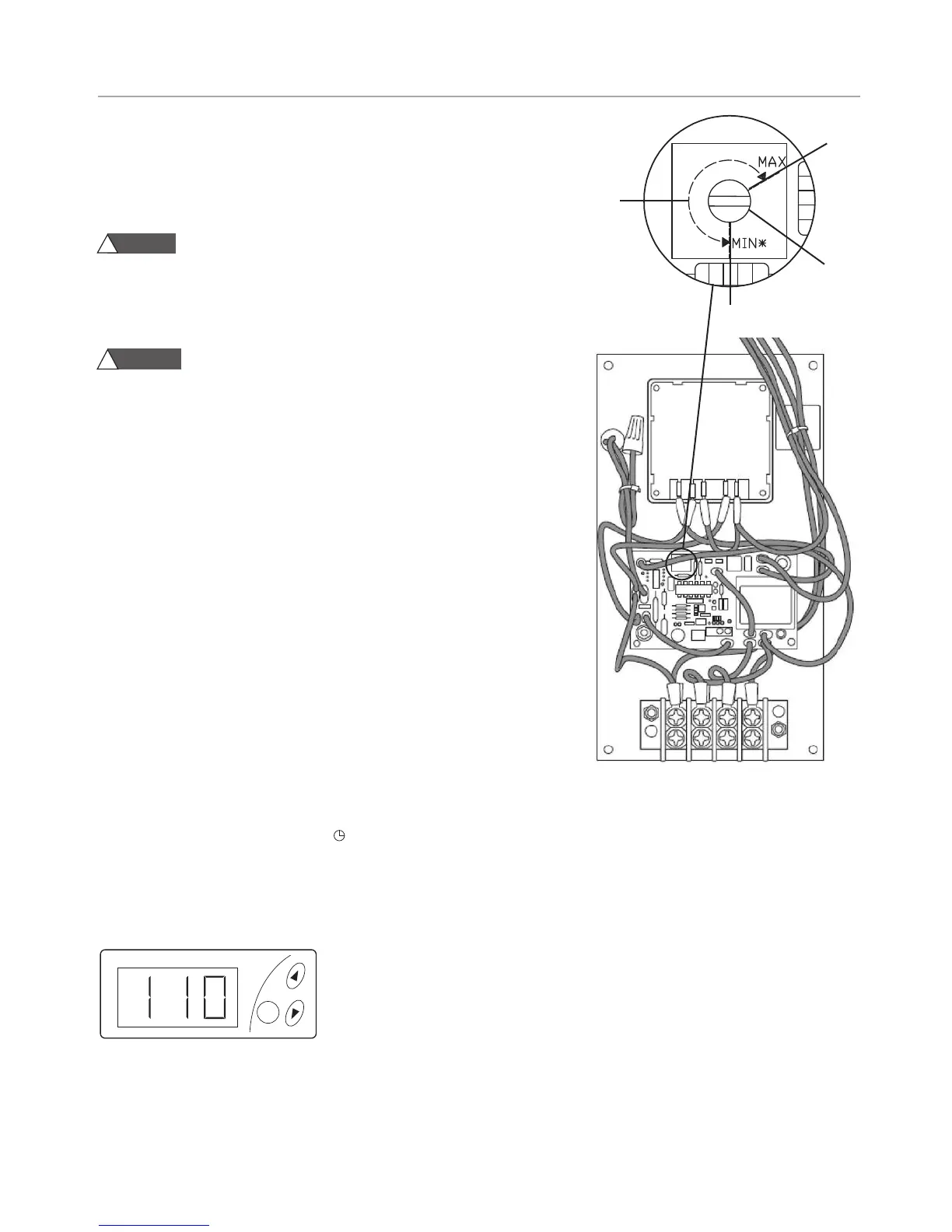
Duration Adjustment
Using a small flathead screwdriver, rotate the adjustment screw
to the desired setting as shown in the diagram on the right..
IMPORTANT: Do not set less than 10 seconds. Do not force screw past min
and max stops, screw does not rotate more than 300 degrees
Factory Recommended Settings:
The factory recommended setting for all CU boilers is 60 seconds
(100% turn).
1. Turn the override switch to permanent OFF (0).
2. Turn the generator On/Off Switch to “ON”. On/Off Switch pilot light
and generator should be “ON”. Motorized drain valve
should be closed. Auto blowdown light should be “OFF”.
3. Turn the override switch to permanent ON (I). On/Off Switch pilot light
and generator should be “OFF”. Auto blowdown light should be “ON”
Motorized drain valve remains open and remains open for
approximately 60 seconds.
4. After 60 seconds: Motorized drain valve closes. Auto blowdown
light should be “OFF”. On/Off Switch pilot light and generator
remains “OFF”.
5. Turn the override switch to automatic ( ).
NOTE: ASME blowdown separator tank systems are available
from Mr. Steam. For more information please contact Mr. Steam
at 1-800-76 STEAM.
DIGITAL1
®
CONTROL OPERATING PARAMETERS
• Operating Temperature range 100 – 120 °F (37.5 – 49 °C)
• Backup Temperature shut off fixed at 130 °F (54.5 °C).
WARNING
!
CAUTION
!
AUTOMATIC BLOWDOWN OPERATION & TESTING
SETTING OPERATING TEMPERATURE
1. Press the SET button twice, the light under OUT 2
will be on and the display will be flashing.
2. Use the UP / DOWN arrows to set the temperature.
Factory set at 100° F (37.5 °C).
3. Press the SET button again; the display will be solid
and showing room temperature (not pressing any
button for 1 minute will also return the control to
the room temperature).
NOTE: the control display remains on if the steam
bath generator switch is in the OFF position, how-
ever power to the solenoids will be OFF.
60
s
ec
0
sec
30
sec
10 sec
Back



 To Next Page