7.6 Test and Commission the EZ Gateway
• Connect the EZ Gateway to the third party device(s), and test the application.
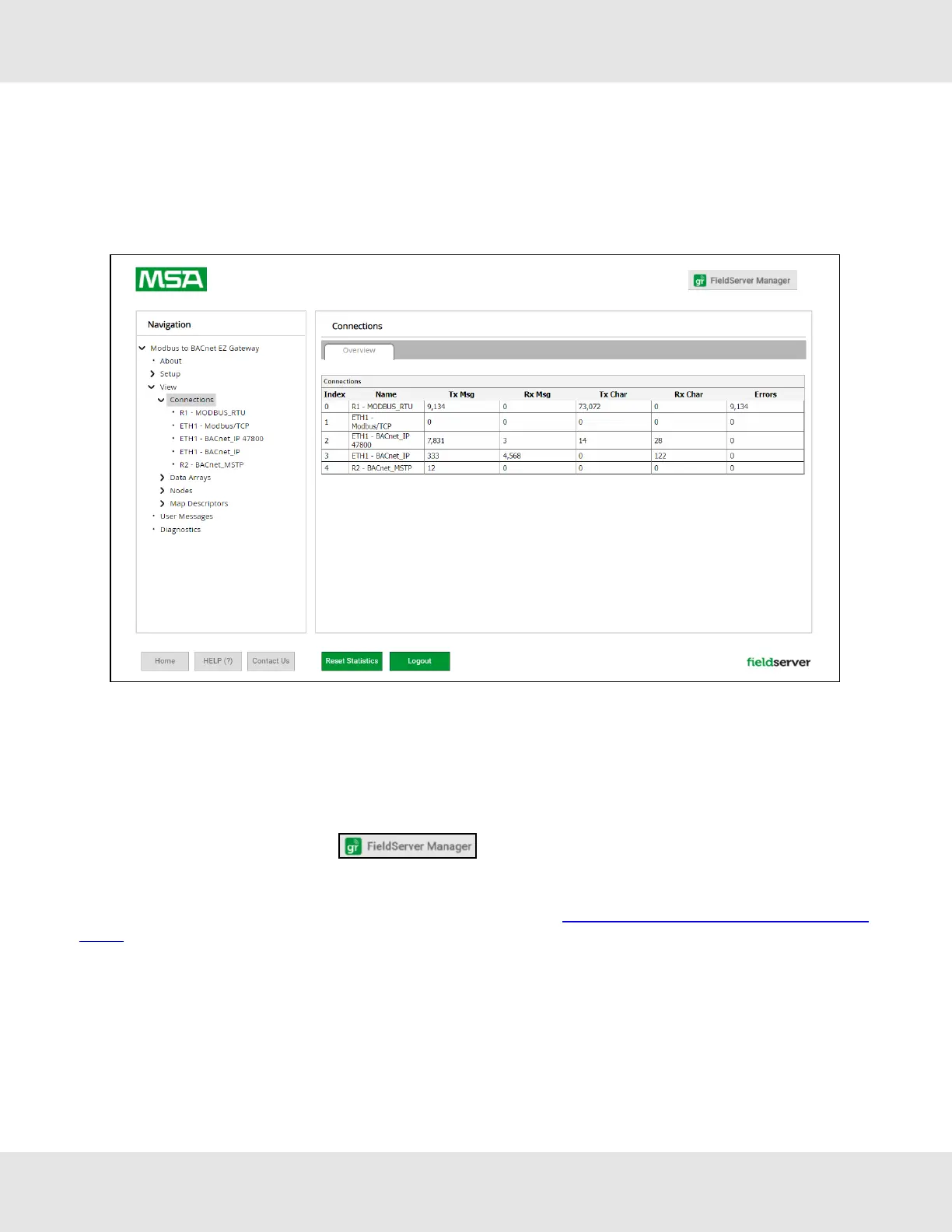
• Click on the Diagnostic button to view to get to the FS-GUI.
• From the landing page of the FS-GUI click on View in the navigation tree, then Connections to see the number of
messages on each protocol.
NOTE:For troubleshooting assistance refer to Section10 Troubleshooting, or any of the troubleshooting
appendices in the related driver supplements and configuration manual. MSA Safety also offers a technical
support on the MSA Safety website, which contains a significant number of resources and documentation
that may be of assistance.
7.6.1 Accessing the FieldServer Manager
NOTE:The FieldServer Manager tab (see image above) allows users to connect to the Grid,
MSA Safety’s device cloud solution for IIoT. The FieldServer Manager enables secure remote connection to
field devices through a FieldServer and its local applications for configuration, management, maintenance.
For more information about the FieldServer Manager, refer to the MSA Grid - FieldServer Manager Start-up
Guide.
28 EZ Gateway Modbus to BACnet Start-up Guide



 To Next Page