Configuration
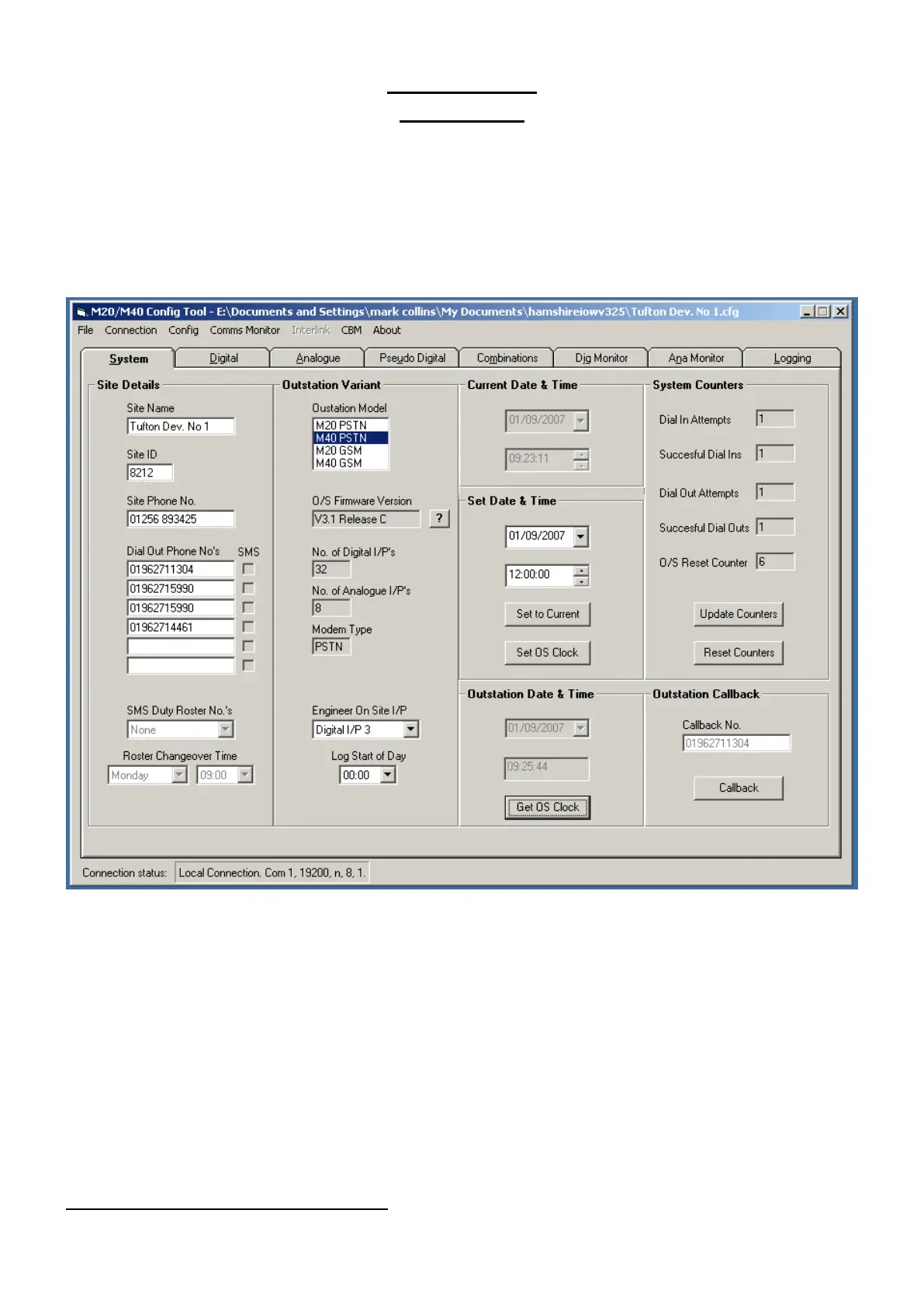
System Tab
M20/M40 units are configured using the configuration tool supplied by Multiform Design.
Note: Communications with the M20/40 is controlled via the Outstation Id. Therefore the ID selected on
the configuration package must match that of the Outstation
If you are unsure of the outstation Site ID, upload and save the configuration as standard.
Options for setting the following items: - Site Name, Site ID, Dial Out Telephone Numbers, Model Type,
Time & Date and Engineer On Site Input selection.
Selecting the ‘Outstation Model’ will automatically select the correct communication options and
available I/O.
SMS Duty-Roster. Phone numbers, quantity of officers and day and time of changeover. (See SMS
Section, page 17, for more details).
‘Log start of day’. Set as required to enable daily totals to be calculated.
‘Outstation Callback’. Test function to cause the outstation to dial out to the first number on the dial out
list for testing purposes.
System Counters. Monitoring communication and outstation resets.
Once user defined data has been entered
Select ‘File’ and ‘Save As’ to save your configuration before proceeding.



 To Next Page