114
Ultima S / SL Flex & Pro
3/2019
114060421
Hooklift Multilift Ultima S / SL Flex & Pro
User Manual
Additional hydraulics
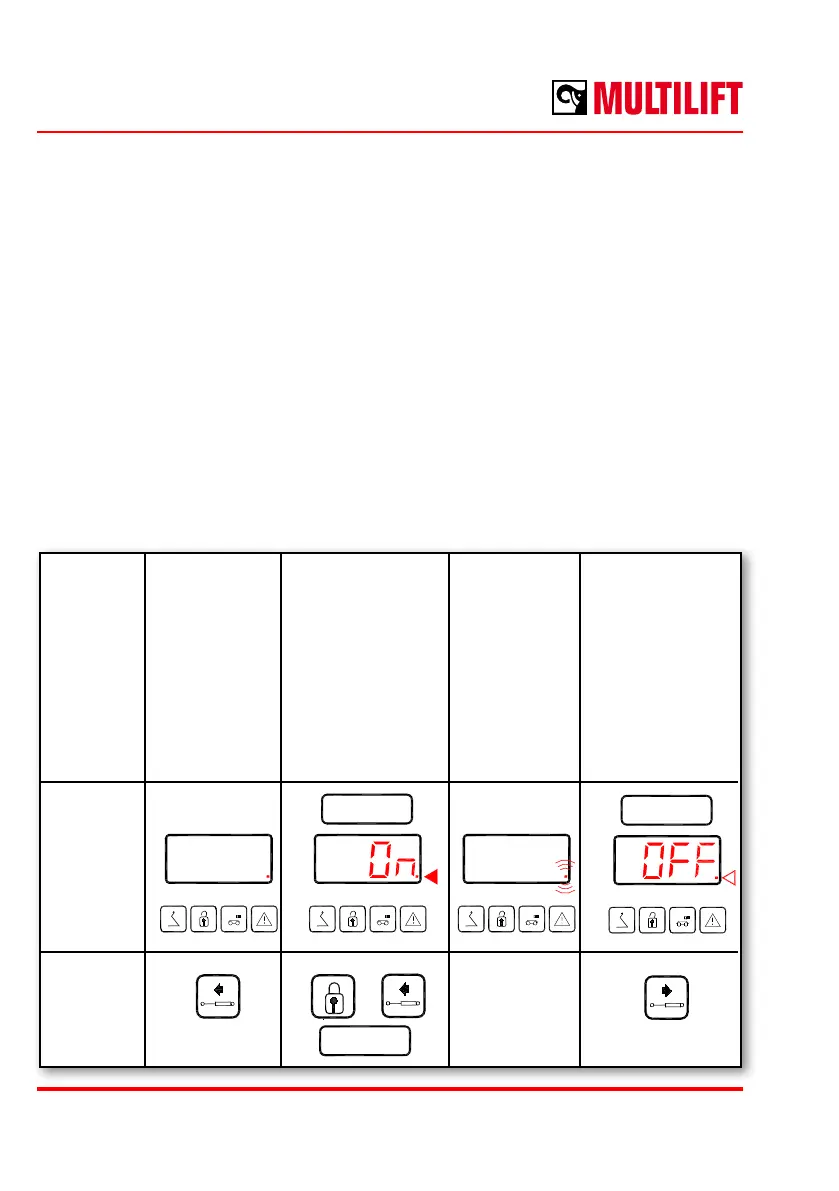
Auxiliary equipment connected to the Ultima´s own hydraulics, is controlled by the additional
hydraulic switch (push button), for example, tail gate, sand spreader, etc.
Additional hydraulics can be changed to continuous operation in two ways, depending
on settings of the control system:
1. (standard setting) by pushing simultaneously the button additional hydraulics on
and the button body locks closed for 2 seconds.
2. (alternative setting) by pushing the button additional hydraulics on for 2 seconds.
When switching on, the display will show text ”On” for a moment.
Switching o can be obtained by pressing the stop the operation of additional hydraulics
and the display will then show text “OFF”.
Switching on the function for continuous operation by radio control (2GRC or 2GMR) is
blocked up for safety reasons.
2 sec
+
2 sec 2 sec
Function Additional
hydraulics on
Switch the
additional
hydraulics to
continuous
operation mode
”On” appears for
approx. 2 seconds
LED starts blinking
LED is
blinking when
the additional
hydraulics is
in continuous
operation
mode
Additional
hydraulics o
”OFF” appears
for approx. 2
seconds
LED stops
blinking
Display
and LEDs
2GCC
Button



 To Next Page