128
Ultima S / SL Flex & Pro
3/2019
114060421
Hooklift Multilift Ultima S / SL Flex & Pro
User Manual
Indikatiivinen punnitusjärjestelmä
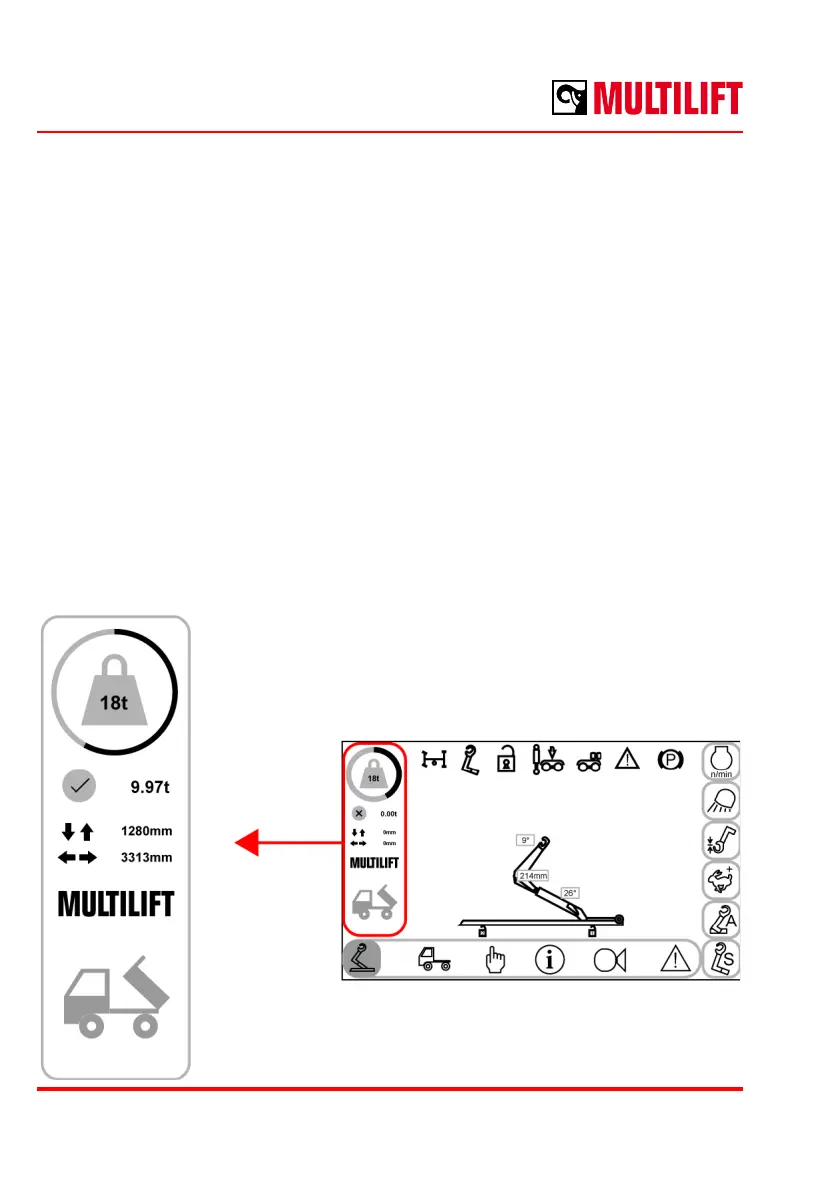
Indikatiivinen punnitusjärjestelmä näyttää kuorman painon ±2% tarkuudella* ohjaamossa olevassa
näytössä. Järjestelmä on rakennettu koukkulaitteen ohjausjärjestelmään eikä se tarvitse mitään
ulkopuolisia komponentteja.
Punnitus suoritetaan automaattisesti lavan päällevedon aikana ja suuntaa antava tulos näkyy näytöllä
vihreänä ympyränä, joka muuttuu punaiseksi ylikuorman kanssa. Koukkulaitteen päällevetokapasiteetti
näkyy ympyrän keskellä.
Lopullisen punnituslaskelman tulos näkyy vihreänä hyväksytty-merkkinä punnitustuloksen vieressä.
Kuorman painopisteen paikka pituussuunnassa lavan takareunasta sekä pystysuunnassa lavan pohjasta
laskien näkyy punnitustuloksen alapuolella.
Lisävaruste sekä Pro- että Flex-laitteissa. Toiminto vaatii FutureTouch™ -näytön.
*) Punnitustulokseen vaikuttavat epätasainen ja/tai liukas alusta, sekä lavan ja auton suorasta linjasta
poikkeaminen. Lisäksi Z-laitteessa täytyy taittokoukkurungon olla edessä. Tarkista työskentelyalueen ehdot
tämän ohjekirjan alkuosasta!
Indicative weighing system
Optional for Pro and Flex
Requires FutureTouch™ display
Indicative weighing system gives weight of the load in metric tons with ±2% accuracy *).
Option is integrated into hooklift own systems and does not require any 3rd party weighing
parts.
Weighing is done automatically during loading cycle. Indicative load is shown visually with
a circle. Overload turns circle red. Hooklift nominal capacity is shown in the centre of circle.
The nal and accepted result is shown in the green circle next to the calculated weight.
Centre of gravity (COG) horizontally is shown from back of container and vertically from
the bottom of container.
*) Weighing result accuracy may be aected by uneven loading
conditions, aligned container position, slippery ground. In addition,
when using z-model make sure tilting arm is not tilted. Important
to make sure that conditions when loading are according to
instructions!



 To Next Page