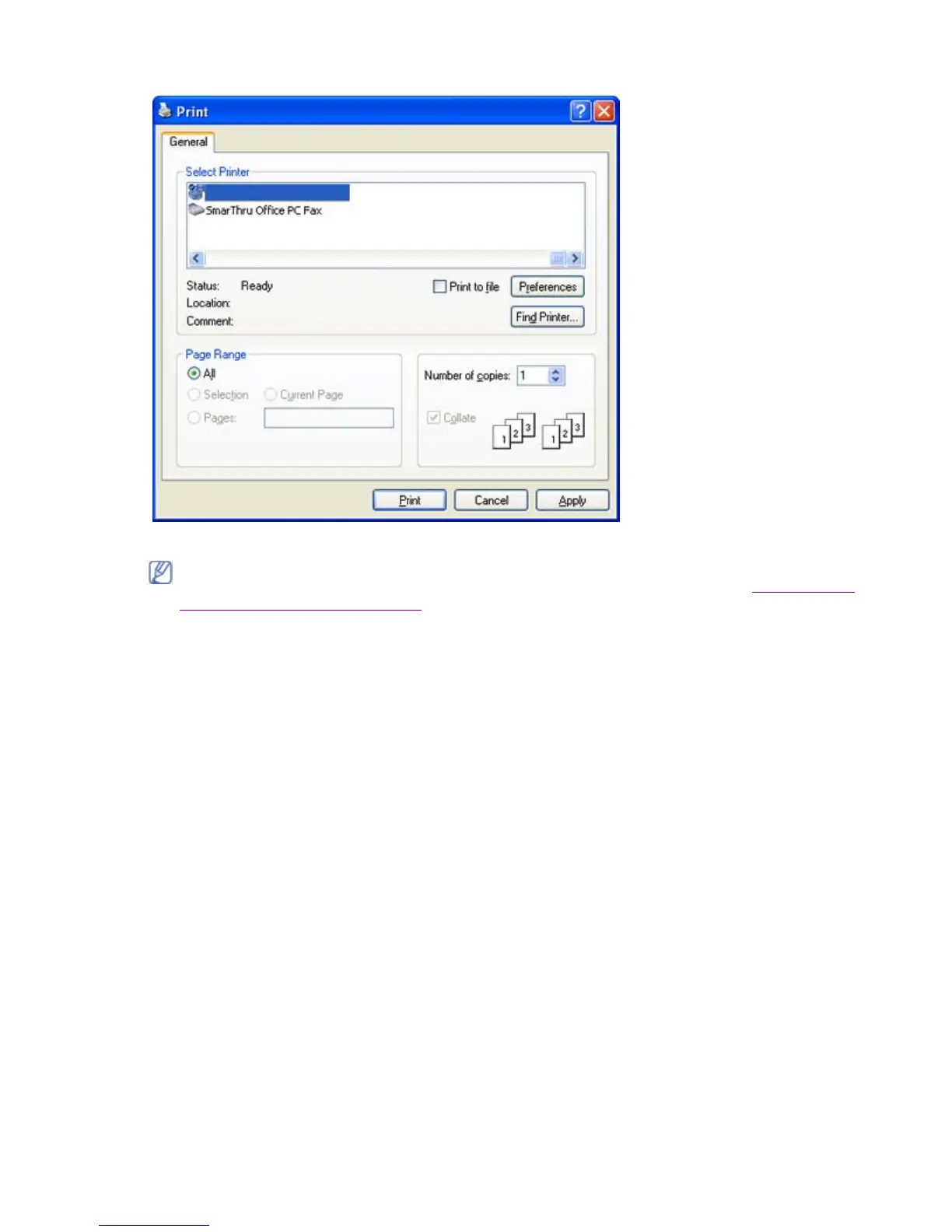
3. Select your machine’s PS driver from the Select Printer list.
4. To start the print job, click OK or Print in the Print window.
Understanding PS driver’s Printing Preferences
Opening Printing Preferences
1. Open the document you want to print.
2. Select Print from the File menu. The Print window appears.
3. Select your machine’s PS driver from the Select Printer.
4. Click Properties or Preferences.
Layout tab
The Layout tab provides options to adjust how the document appears on the printed page.
To take advantage of the printer features provided by your printer driver, click Properties or
Preferences in the application’s Print window to change the print setting. (See Understanding
PS driver’s Printing Preferences.)
Pa
e 20 of 23Printin
8/4/2009htt
://downloadcenter.samsun
.com/content/UM/200907/20090721152022250/EN/en
lish
...






 To Next Page