- 82 -
Maintenance
B
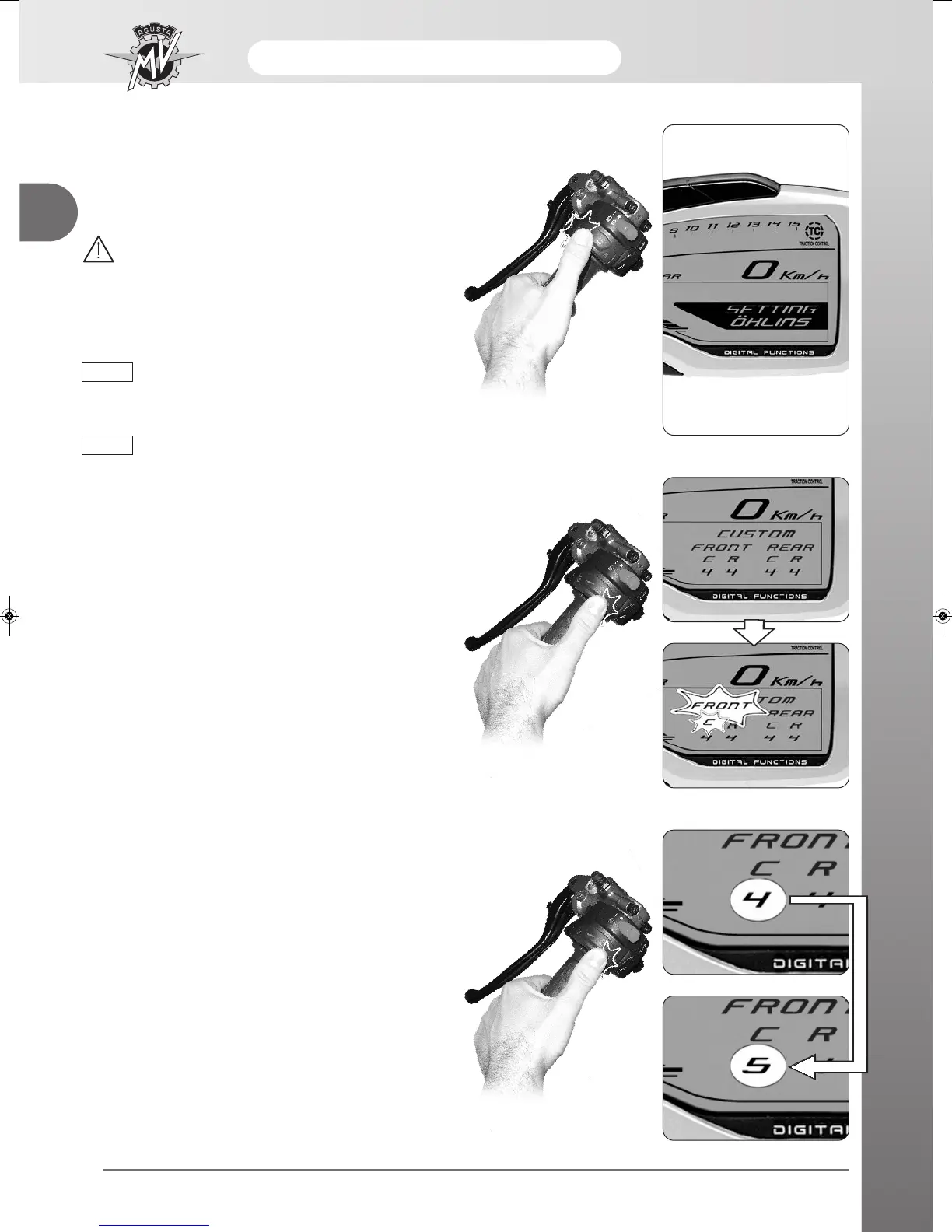
“SETTING öHLINS” Mode (F4 RR MY13)
- In order to perform the customised adjustment of the
suspensions setup, press “SET” to access to “SET-
TING ÖHLINS” mode.
WARNING
The display modes may be changed or set
when the engine is off, the gear in neutral,
the motorbike stationary with your feet on
the ground. Do not change the display while
driving.
The suspension setup adjustment is allowed
only if the mapping “C” of the control unit is
selected (see page 84 of this chapter).
Refer to the table at section “F - Suspension
and wheels” to get the recommended
suspension setup values.
q Compression damping
(
Front suspension
)
- By pressing “OK” for less than three seconds, the
display shows the available suspension adjustment
parameters.
- After some seconds, the “FRONT” and “C” captions
start blinking; it is now possible to modify the com-
pression damping value for the front suspension.
- Press “OK” for less than three seconds: the compres-
sion damping level rises up to the next value. Such
value may range between 4 and 24.
- Press “OK” for over three seconds to confirm the
selected compression damping level; the display is
ready for the next adjustment. Otherwise, press
“SET” for less than three seconds to stop the adjust-
ment procedure, save the settings and return to the
main menu.
NOTE
NOTE





 To Next Page