Chapter 2 Installing Compact FieldPoint Hardware and Software
cFP-20xx and cFP-BP-x User Manual 2-10 ni.com
2. Bolt the rack-mount accessory to a standard 19 in. rack.
3. Connect the safety ground as explained in the Compact FieldPoint
Safety Information section.
Caution Disconnect power before removing the backplane from the rack.
Installing a DIN Rail in the Rack-Mount Accessory
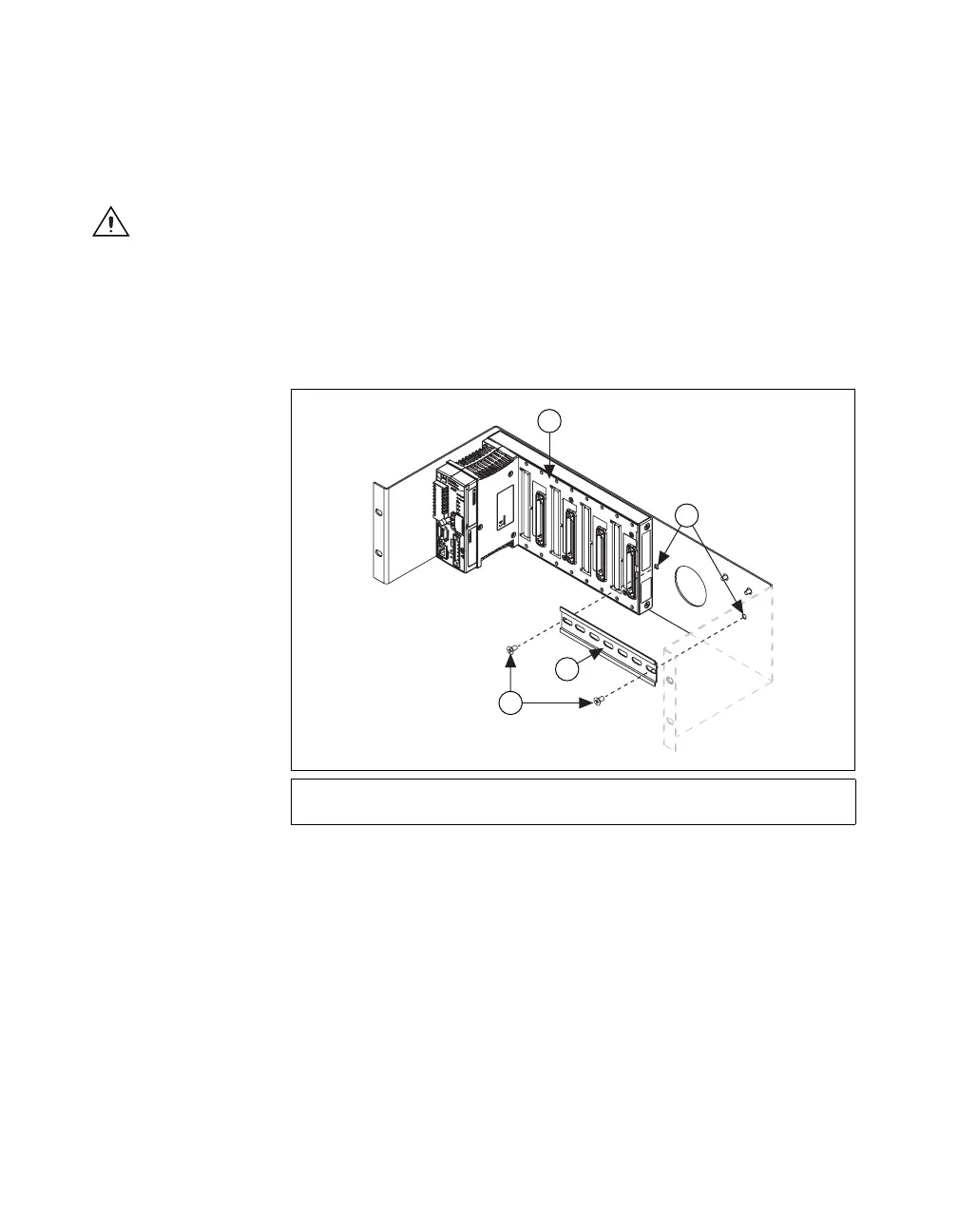
If you are using a rack-mounted cFP-BP-4, you can install a short
(approximately 8 in.) DIN rail to the right of the backplane for mounting
power supplies, terminal blocks, or other accessories. Refer to Figure 2-9.
Figure 2-9. Installing a Small DIN Rail in the Rack-Mount Accessory
You can install a 16 in. DIN rail in another rack-mount accessory if you
need more DIN rail space.
1 cFP-BP-4 Backplane
2Screw Holes
3 Short DIN Rail for Power Supply
4 #10-32 Screws, 3/8–1/2 in.
1
2
3
4



 To Next Page
 Loading...

