Chapter 2 Installing Compact FieldPoint Hardware and Software
© National Instruments Corporation 2-11 cFP-20xx and cFP-BP-x User Manual
Mounting the cFP-BP-4 on a DIN Rail
You can mount the cFP-BP-4 backplane on a standard 35 mm DIN rail
using the DIN rail clip, NI part number 778614-01. NI does not recommend
mounting the cFP-BP-8 on a DIN rail. Complete the following steps to
mount the cFP-BP-4 on a DIN rail:
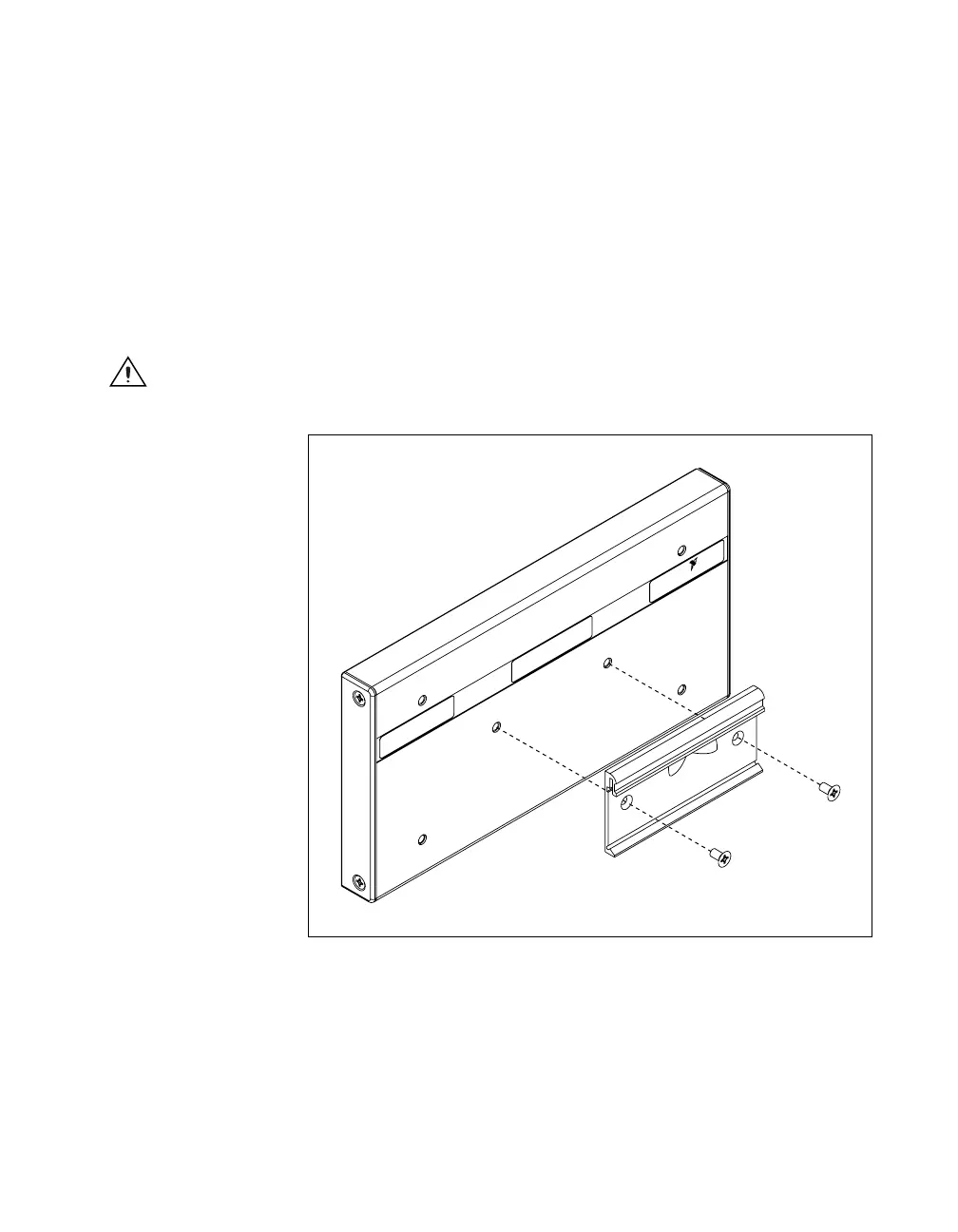
1. Fasten the DIN rail clip to the cFP-BP-4 using a number 2 Phillips
screwdriver and the 8-32 × 5/16 in. countersink screws shipped with
the DIN rail clip(s). These screws have a nylon coating to prevent them
from loosening. Refer to Figure 2-10.
Caution Do not use screws longer than 5/16 in. to fasten the DIN rail clip to the backplane.
Figure 2-10. Fastening the DIN Rail Clip to the cFP-BP-4 Backplane
NATIONAL
INSTRUMENTS



 To Next Page
 Loading...

