170
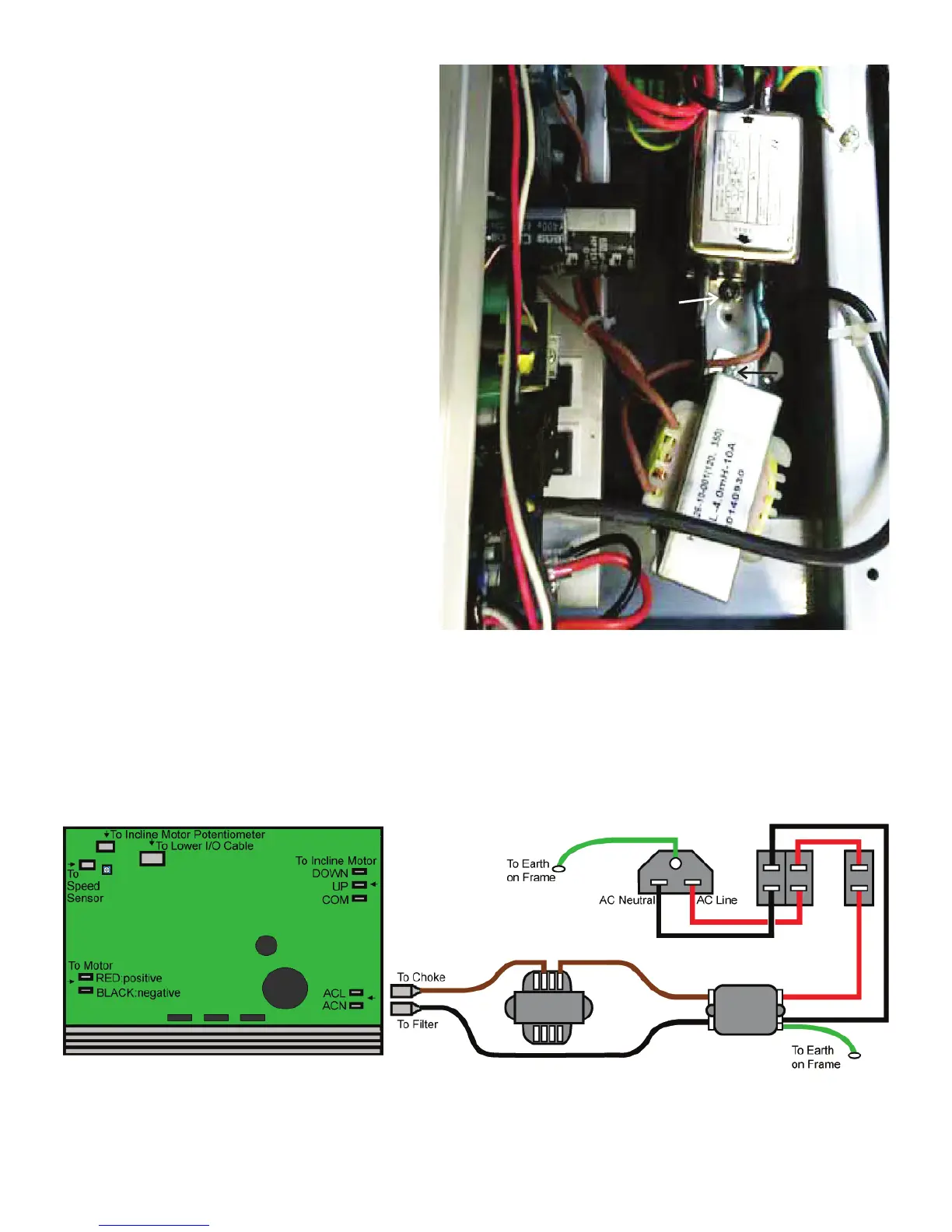
4. Using a #2 Phillips screwdriver, remove the hardware that
attaches the Filter to the Frame.
5.RemovetheconnectorsfromtheoldFilterandattachtothe
new Filter. Be sure not to crimp any cables.
Note: Be sure to note where all cables attach for re-assembly.
6. Using a #2 Phillips screwdriver, attach the new Filter to the
Frame. Be sure not to crimp any cables.
7. Using a #2 Phillips screwdriver, remove the hardware that
attaches the Choke to the Frame.
8. Remove the connectors from the old Choke and attach to the
new Choke. Be sure not to crimp any cables.
Note: Be sure to note where all cables attach for re-assembly.
9. Using a #2 Phillips screwdriver, attach the new Choke to the
Frame. Be sure not to crimp any cables.
10. Re-install all remaining parts that were removed in reverse
order.
Choke
Filter
MCB


 To Next Page
 Loading...