39
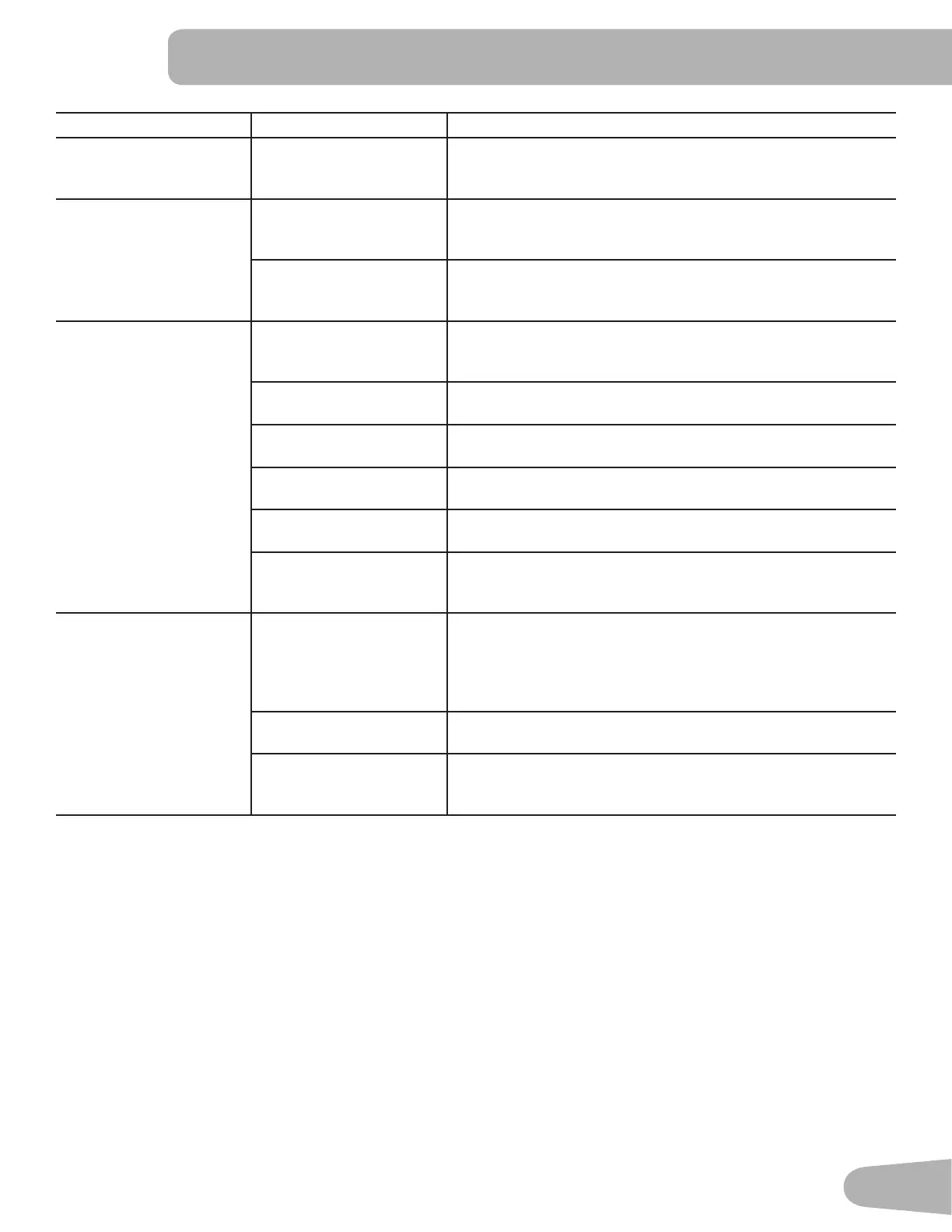
Condition/Problem Things to Check Solution
Console continuously
cycles through program
screens
Console is in demonstra-
tion mode
Hold down the PAUSE/END button and Left button together for
3 seconds.
Active User does not
change when User button
is pushed
Console is in studio mode Reset the Console (see Console Setup Mode).
If the above step does not resolve the problem, contact Cus-
tomer Service (if inside US/Canada) or your local distributor (if
outside US/Canada).
Workout results will not
sync with Bluetooth
®
enabled device
Current console mode Machine must be in Idle Mode to sync. Push the PAUSE/END
button until the Power-Up Mode screen is displayed.
Total time of workout A workout must be longer than 1 minute to be saved and
posted by the Console.
Fitness machine Unplug unit from electrical outlet for 5 minutes. Reconnect to
outlet.
Bluetooth
®
enabled device Consult your device to be sure that the Bluetooth
®
wireless
feature has been enabled on it.
Fitness App Review Speci¿cations of Fitness App and con¿rm your device
is compatible.
Contact appsupport#nautilus.com (if inside US/Canada) or
your local distributor (if outside US/Canada) for further assis-
tance.
Workout results not post-
ing from Nautilus Trainer
™
App to MyFitnessPal
®
account or Under Armour
®
Connected Fitness
Sync accounts From the Menu icon on the Nautilus Trainer™ App, select the
Sync to MyFitnessPal
®
or Under Armour
®
Connected Fitness.
Sync fails Review account and password for MyFitnessPal
®
/ Under Ar-
mour
®
Connected Fitness.
Contact appsupport#nautilus.com (if inside US/Canada) or
your local distributor (if outside US/Canada) for further assis-
tance.





 To Next Page