7
3. Projectng an Image (Basc Operaton)
SOURCE
AUTO
ADJ.
ON/STAND BY
FOCUS
LAMP
STATUS
POWER
SELECT
SOURCE
AUTO
ADJ.
ON/STAND BY
FOCUS
LAMP
STATUS
POWER
SELECT
EXIT
MENU
UP
PAGE
OFF
POWER
ON
DOWN
ENTER
MAGNIFY AV-MUTE
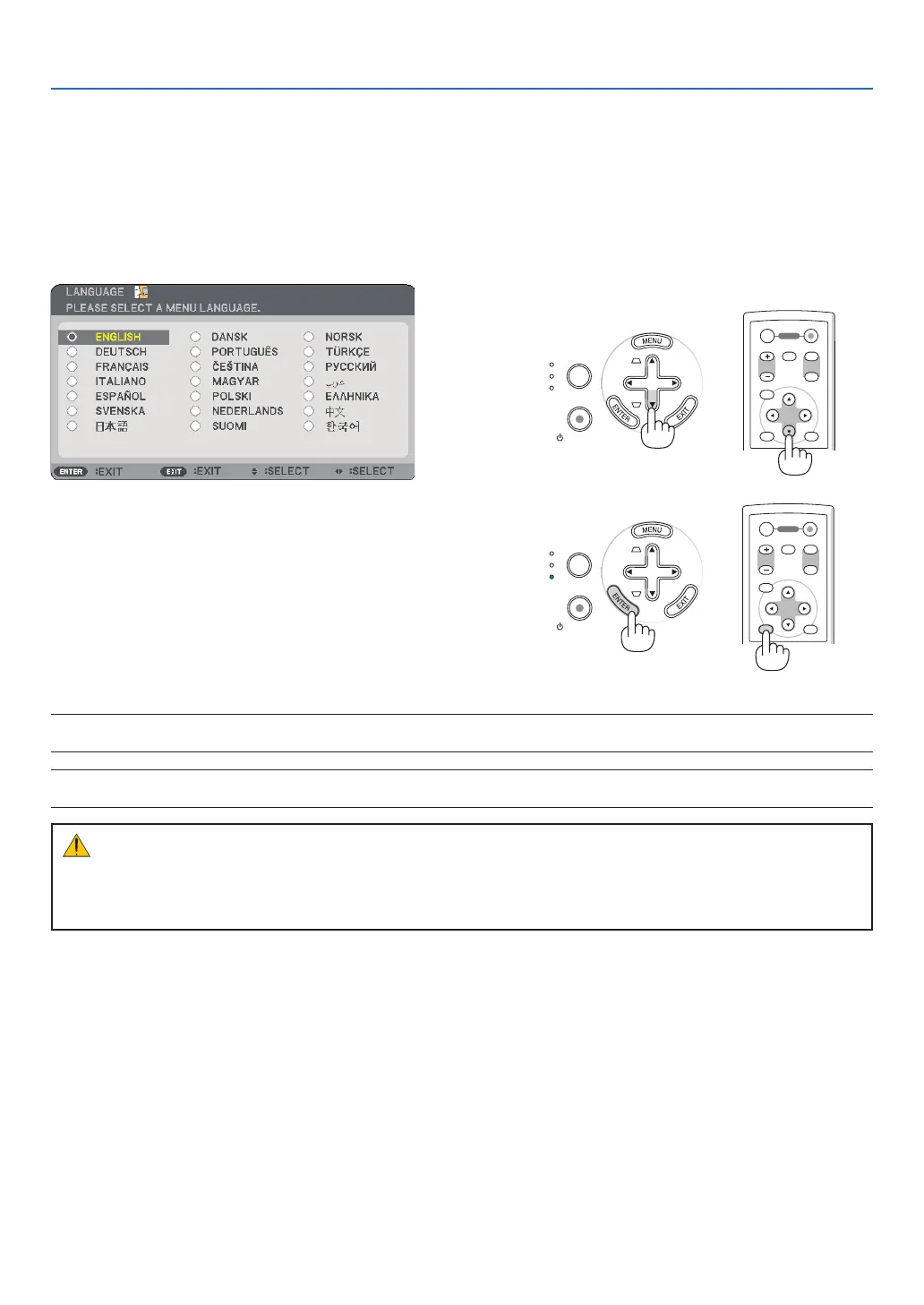
Note on Startup screen (Menu Language Select screen)
When you rst turn on the projector, you will get the Startup menu. The menu gives you the opportunity to select
the menu in one of the 21 languages.
To select a menu language, follow these steps:
▲
,
▼
,
◀▶
After this has been done, you can proceed to the menu op-
eration.
If you want, you can select the menu language later. (→ [LAN-
GUAGE] on page 48)
NOTE: Immediately after turning on the projector, screen flicker may occur. This is normal. Wait 3 to 5 minutes until the lamp
lighting is stabilized.
NOTE: If you turn on the projector immediately after the lamp is turned off or when the temperature is high, the fans run without
displaying an image for some time and then the projector will display the image.
CAUTION:
The projector cannot be turned off while the POWER indicator is blinking green.
• Do not turn off the AC power during this period.
Doing so could cause premature lamp failure.
When the [LAMP MODE] is set to [ECO], the LAMP indicator will light green.
If one of the following things happens, the projector will not turn on.
• If the internal temperature of the projector is too high, the projector detects abnormal high temperature. In this
condition the projector will not turn on to protect the internal system. If this happens, wait for the projector's in-
ternal components to cool down.
• When the lamp reaches its end of usable life, the projector will not turn on. If this happens, replace the lamp.
• If the lamp fails to light, and if the STATUS indicator ashes on and off in a cycle of six times, wait a full minute
and then turn on the power.
ENTER
EXIT
MENU
UP
PAGE
OFF
POWER
ON
DOWN
MAGNIFY AV-MUTE



 To Next Page