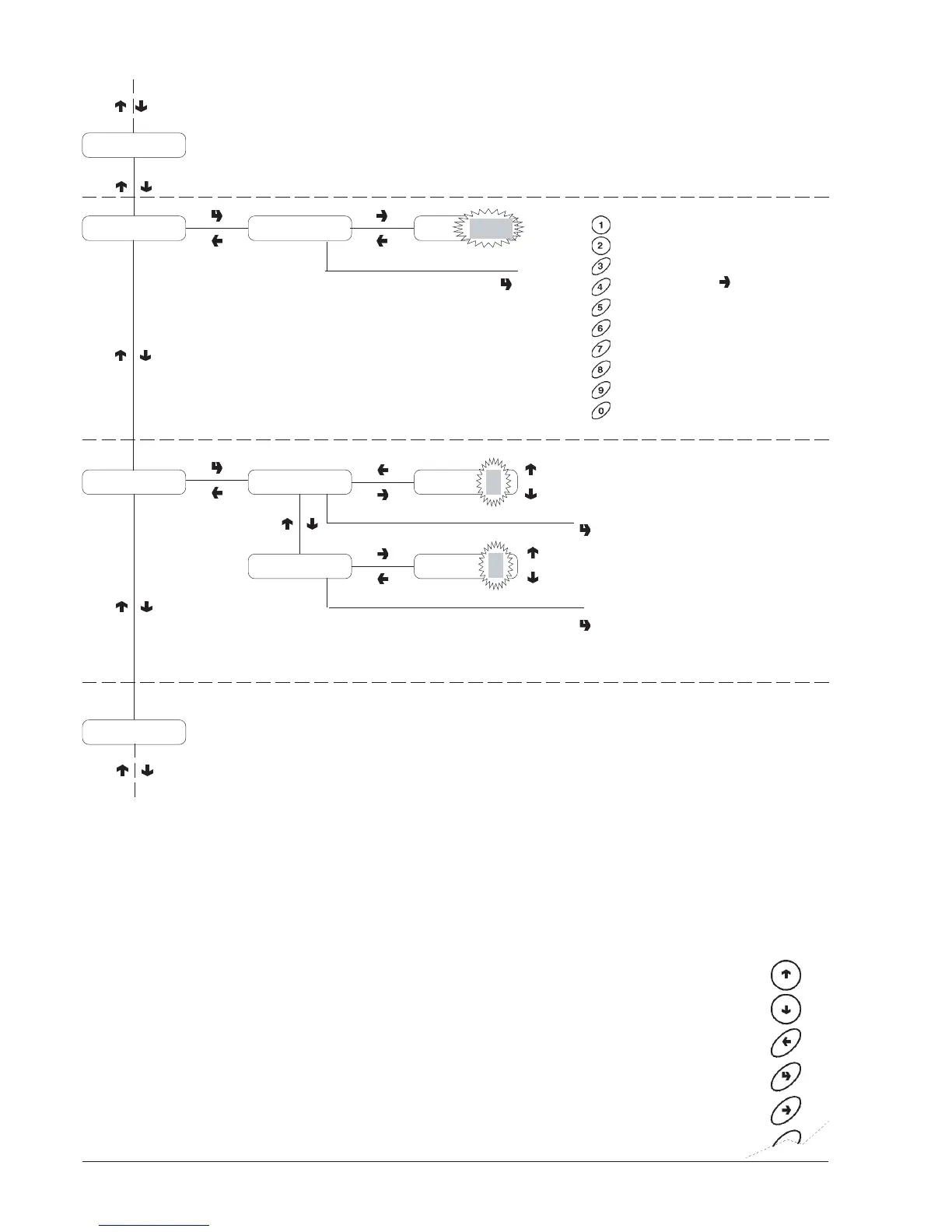
Programming menu
© by NECTA VENDING SOLUTIONS SpA
00301 162-00
26
PREVIOUS FUNCTION/
DECREASE DATA UNIT (-
1)
NEXT FUNCTION/
INCREASE DATA UNIT (+1)
DELETE DATA/
EXIT FUNCTION
CONFIRM DATA/
CONFIRM FUNCTION
CHANGE DATA
MACHINE CONFIGURA-
TION
To be done after initialising
the RAM.
MACHINE IDENTIFICATION
CODE
When pressing the change
button the first digit starts
blinking.
The buttons take on
numeric values.
When pressing a button, the
blinking digit takes on that
value and the next digit
starts blinking.
Initialising
Machine code Code XXXX Code
XXXX
Machine Config.
Tank
ON
Fast cyclesFast cycles OFF
Tank OFF
Selection counter
Air-break
TankON
OFF
ON
ON
OFF
Fast/better dispensing










 To Next Page