© by NECTA VENDING SOLUTIONS SpA
27
00301 162-00
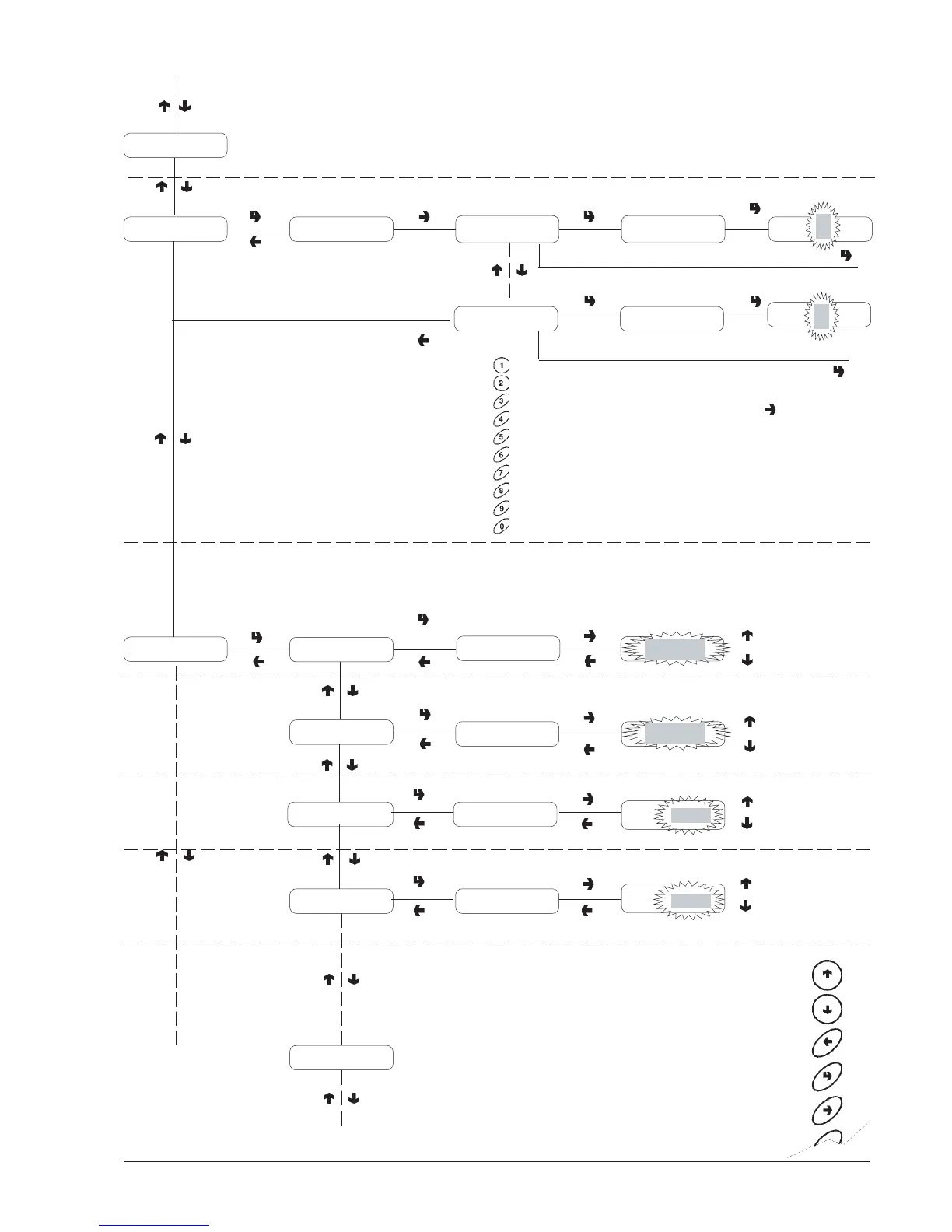
Programming menu
PREVIOUS FUNCTION/
DECREASE DATA UNIT (-1)
NEXT FUNCTION/
INCREASE DATA UNIT (+1)
DELETE DATA/
EXIT FUNCTION
CONFIRM DATA/
CONFIRM FUNCTION
CHANGE DATA
When pressing the change
button the first digit
starts blinking.
The buttons take on
numeric values.
When pressing a button,
the blinking digit takes on
that value and the next
digit starts blinking.
The password corresponds
to the sequence "4", "2",
"3" and "1".
P= :A=nnnn
P= :A=nnnn
P=nnnn:A=nnnn
P=nnnn:A=nnnnInstant
Espresso coffee
Password =####Selection counter
nn
nn
Machine Config.
MDB data
Accepted coins
TYPE OF VEND
Single vend
Multi vend
Single Vend
Single Vend
Dispensing type
CREDIT RETURN
Enabled
Enabled
Disabled
Escrow ch. lever
Enabled
XXXX + 1
XXXX - 1
XXXX
MAXIMUM CREDIT
XXXX + 1
XXXX - 1
XXXX
MAXIMUM CHANGE
Maximum credit Value = ####
Value =
Maximum change Value = #####
Value=










 To Next Page