HV Control Panel
21
EN
Serviceshowsthenumberofhoursofusesincelastservice.Totalshowsthetotalnumber
ofhourstheproducthasbeenused.Thewrenchsymbolshowstheserviceinterval.Aer
serviceisdone,theservicemerisresetinSengs.See6.6. Sengs.
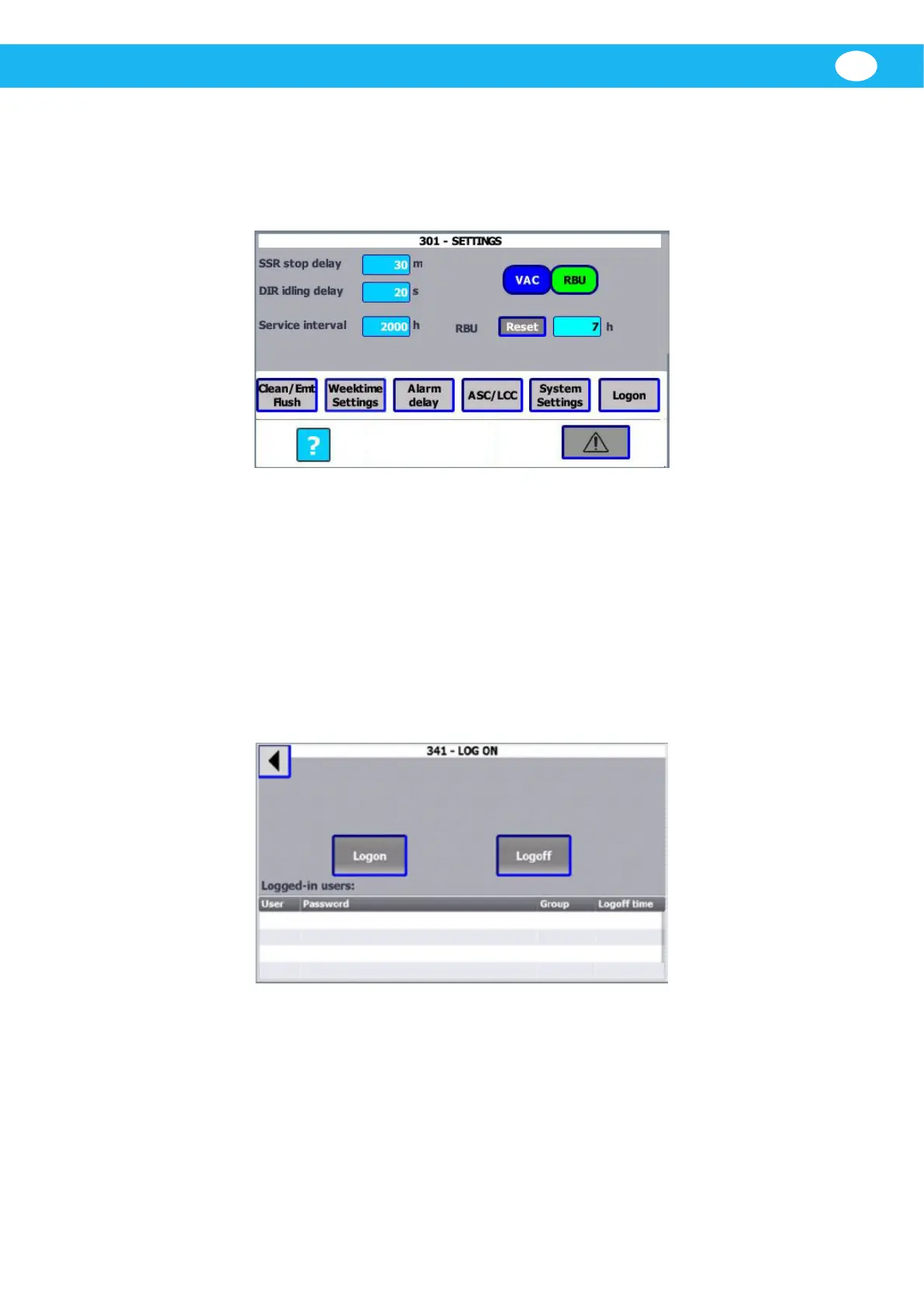
6.6 Sengs
Apasswordisrequiredtoconguremostparametersandsengs.
Basicsengsareconguredsuchas,Clean,Emptying,Flush(CleanEmt/Flush),Weekme
Sengs,Alarmdelay,ASC/LCC,SystemSengs,andLogon.Systemsengscanbe
accessedwithoutapasswordforcertainfuncons.
VAC/RBU selector for unit
SelectwhetheraVACoranRBUisconnectedtothesystem.IfRBUisselected,DIRidling
delaysengalsobecomesvisible.
Thequesonmarkbuonisforthehelppages.
6.6.1 Logon
Tobeabletoconguremostparametersandsengs,apasswordisrequired.Thereare
dierentuserlevels,eachwithitsownpassword.Thepasswordhierarchyisasfollows:
1. FieldCong
2. Admin
3. User
4. Any
Automaclogoaerveminutesofinacvity.


 To Next Page