Saturn Bt – Chapter 1. Getting Started 1.15
Setting Up Cont’d
ON
DIAL 00+INTL
TEL.NO.+
MORE/
HELP
MORE/
HELP
ESC
– – – –
S/N: 254
ON
BER : 48
SOUND OFF
SHIFT
7
STU
ON
BER : 48
SOUND ON
ON
Signal quality
indication
SHIFT
7
STU
Setting Up Cont’d
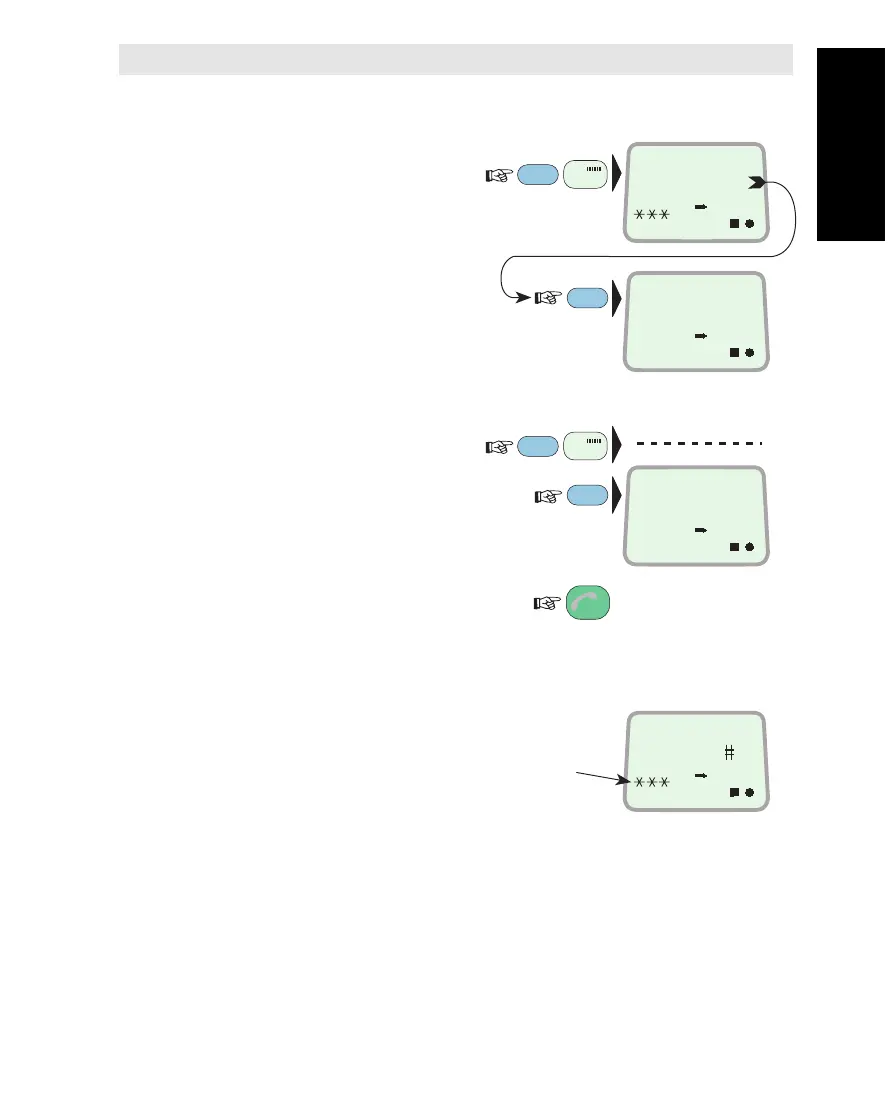
Observing Signal Strength for Accurate Pointing
Pressing SHIFT + 7 displays the
signal strength bar (----) and
signal/noise ratio (S/N):
Fine adjust for maximum value.
Pressing MORE/HELP dis-
plays the "BER" value:
Pulse Tone for Remote Antenna Pointing
Pressing SHIFT + 7 a second time
turns on a
pulse tone which rises
in pitch when
closing in on the
satellite. Note that there is a
delay in the indication.
Pressing MORE/HELP shows
that the sound is ON.
Pressing ESC exits the
fineadjustment function:
Signal Quality Indication
The signal quality indicators
are displayed during communi-
cation and signal strength
readout:
1 - 3 asterisks – increasing
quality of communication.
No asterisks – to call may be possible,
but uncertain.
Note!
The signal strength reading (S/N=Signal/Noise ratio) will vary during a
call.
The Bit Error Rate (BER) reading decreases as the quality of the
received signal improves.


 To Next Page