Saturn B – Chapter 3. Configuration3.16
General
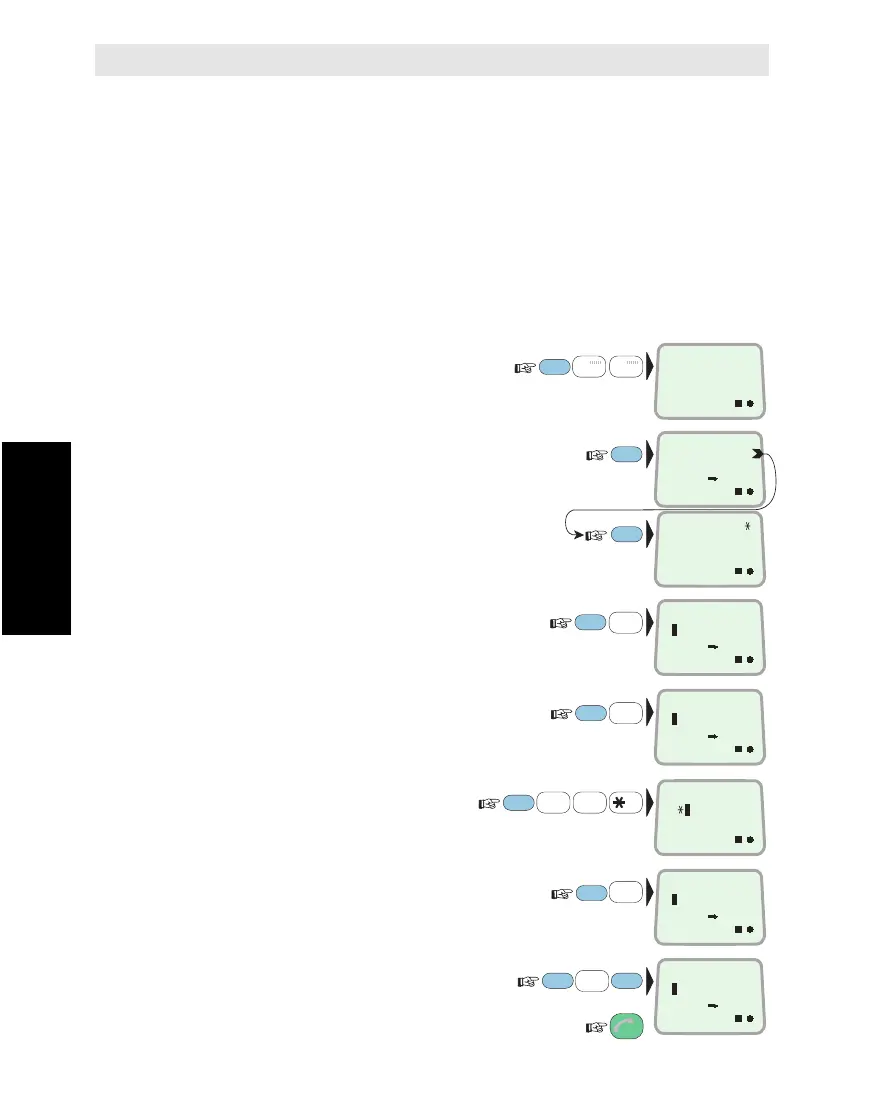
The "Various Config" function (77) is used to select the following
default settings:
• Routing of printouts to PRINTER or DTE port.
• Routing of Service Announcements from LES/NCS.
• Setting of response on the remote Message Indicator.
• Selection between manual update of geographic position, and
automatic update through the NMEA-0183 port.
•
Enabling/disabling of low power standby detection level in the 2W telephone ports.
Setting
1 Select VARIOUS
CONFIG function (77):
2 Check current settings:
The example shows as follows:
• printouts routed to PRINTER.
• service announcements routed to PC.
• Message Indicator responds to telefax
and telex.
• manual course input, NMEA-183 off.
3 Select routing of printouts:
0=no output, 2=to printer,
3=to DTE port
4 Select routing of
Services Announcements, e.g. to PC:
0=no output, 1=to PC port.
2=to printer, 3=to DTE port.
5
Set Message Indicator response:
F=telefax, T=telex, D=data
(1=indication,
*
=no indication)
(SW version no. 2.03 and above only)
6 Select position input source:
0=manual input, 1=NMEA-0183 input
Note! When manual update has been selected,
new geographic position must be entered manually.
7 Turn on or off standby:
0=disabled (OFF), 1=enabled (ON)
and revert to IDLE:
1
ABC
FUNC
ON
7
STU
DATA
ØÅ.
1
ABC
7
STU
1
ABC
2
DEF
PLAY
MORE/
HELP
1
ABC
1
ABC
VARIOUS
CONFIG
77
ON
TO PRINTER
TO PC
ON
DEF.PRINTER
2
ENTER
ENTER
ESC
3x
ENTER
ENTER
ON
MSGIND: 11
NO NMEA
ON
FTD (MSGIND)
11
ON
POS.SOURCE
1
ON
COMBO LOWPWR
1
ON
SERV.ANN PRN
1
ENTER
ENTER
ENTER
Various Configurations
Various Configurations *



 To Next Page