Saturn B – Chapter 3. Configuration 3.15
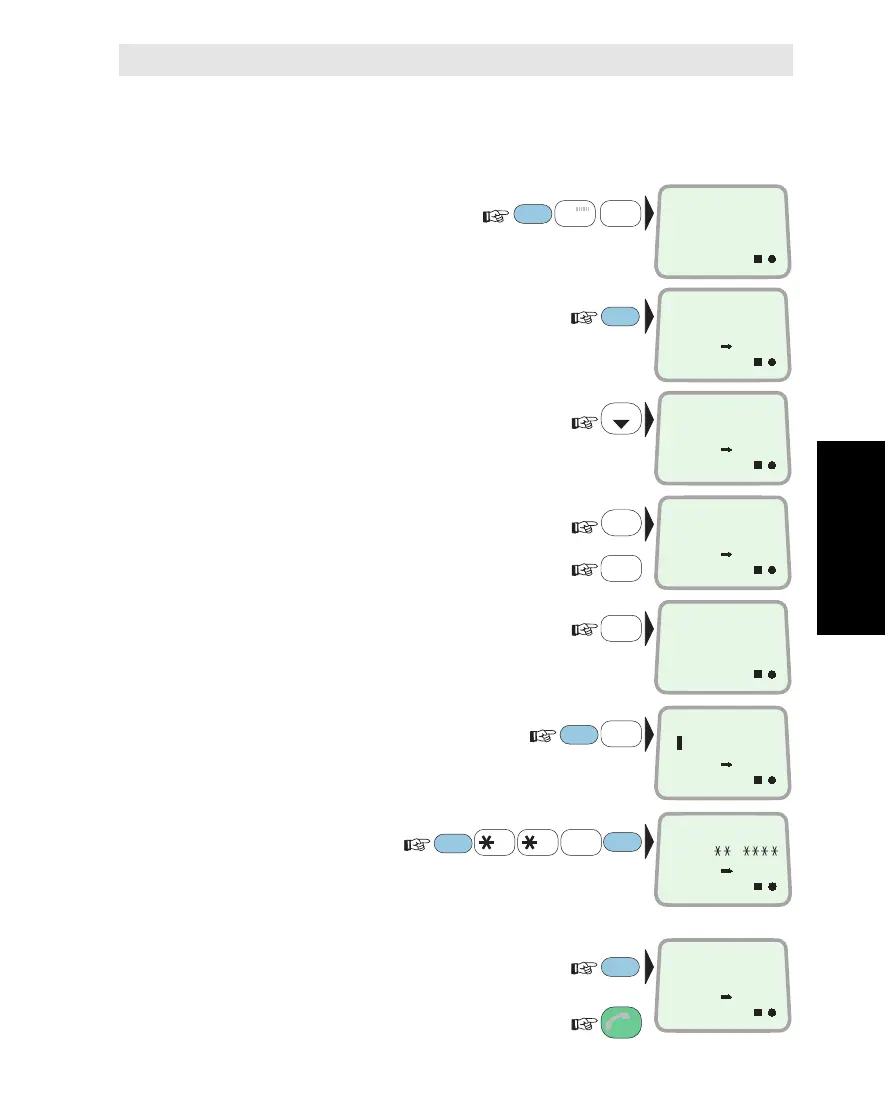
Changing Call Route from FAX to PHONE
To change the routing to TEL.2 from FAX to PHONE,
(DI=17 to DI=3):
1Select INCOMING
CALL ROUTE function (71):
2ENTER list of DIs:
3Scroll down to DI no.17:
4Press and hold the DEL key:
and
press the Y-key to delete existing setup:
5
Key the DI assigned by Inmarsat, e.g. 3:
6Change to TELEPHONE service:
7Change routing:
If the message "Routed to wrong type" appears,
change existing configuration of TEL.2 from FAX
to PHONE, see "Configuring Ports:
Selecting End Terminal Service".
check entries:
and revert to IDLE:
FUNC
ON
7
STU
1
ABC
LIST
1
ABC
3
GHI
9
LIGHT
YZÆ
DEL
1
ABC
DATA
ØÅ.
DATA
ØÅ.
INCOMING
CALL ROUTE
71
ON
TELEPHONY
1
ESC
3x
ENTER
ON
FACSIMILE
17
ON
SERVICE
0
ON
DELETE ?
Y = YES
ON
0
3
ENTER
RING H12345P
ON 1
ON
ON
TELEPHONY
3
ENTER
ENTER
ENTER
Incoming Call Route * Cont’d
Incoming Call Route Cont’d



 To Next Page