Saturn B – Chapter 3. Configuration 3.5
General
In the event of an NCS (Network Coordinating Station) failure, some
LESs provide "Stand-alone" capabilities by transmission of the call
announcement and channel assignment messages normally con-
veyed by the NCS.
A stand-alone LES does not maintain full connectivity between MESs
and LESs for fixed-originated calls, but connectivity for mobile-
originated calls is not affected by NCS failure.
The "LES Capabilities" function (60) indicates the LESs in the region
that offer "Stand-alone" capability.
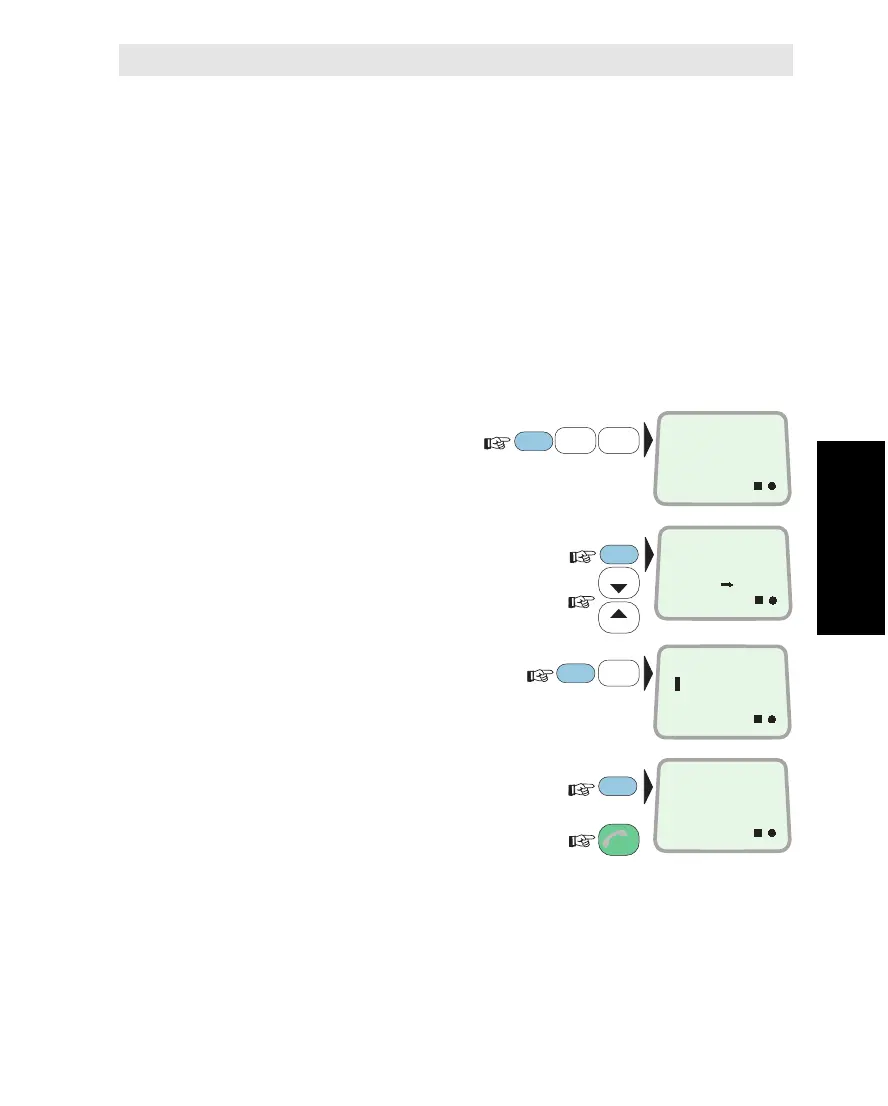
Current Stand-alone LES
1Select STAND-
ALONE LES function (54):
2Scroll through list to select
Ocean Region:
New stand-alone LES
3Key in code number of
chosen Land Earth Station:
4Enter e.g. LES 004 as standalone LES:
and revert to IDLE:
Saturn B must be synchronized with the satellite when selecting
Stand-alone LES (circle indicator displayed). When switching on
initially, a Stand-alone LES is preselected automatically.
Note! If the message "ILLEGAL CHOICE" appears, either the LES
does not exist or it has no stand-alone capability (see "LES Capabili-
ties" on previous page).
5
MNO
4
JKL
4
JKL
FUNC
ON
STAND-ALONE
LES
54
ON
ALONE LES
4
ON
IOR
LES 4
3
LIST
LIST
ON
IOR
LES 12
3
ESC
3x
ENTER
ENTER
ENTER
Selecting Stand-alone LES
Selecting Stand-alone LES *



 To Next Page