Saturn Bt – Chapter 1. Getting Started1.14
Using the Compass
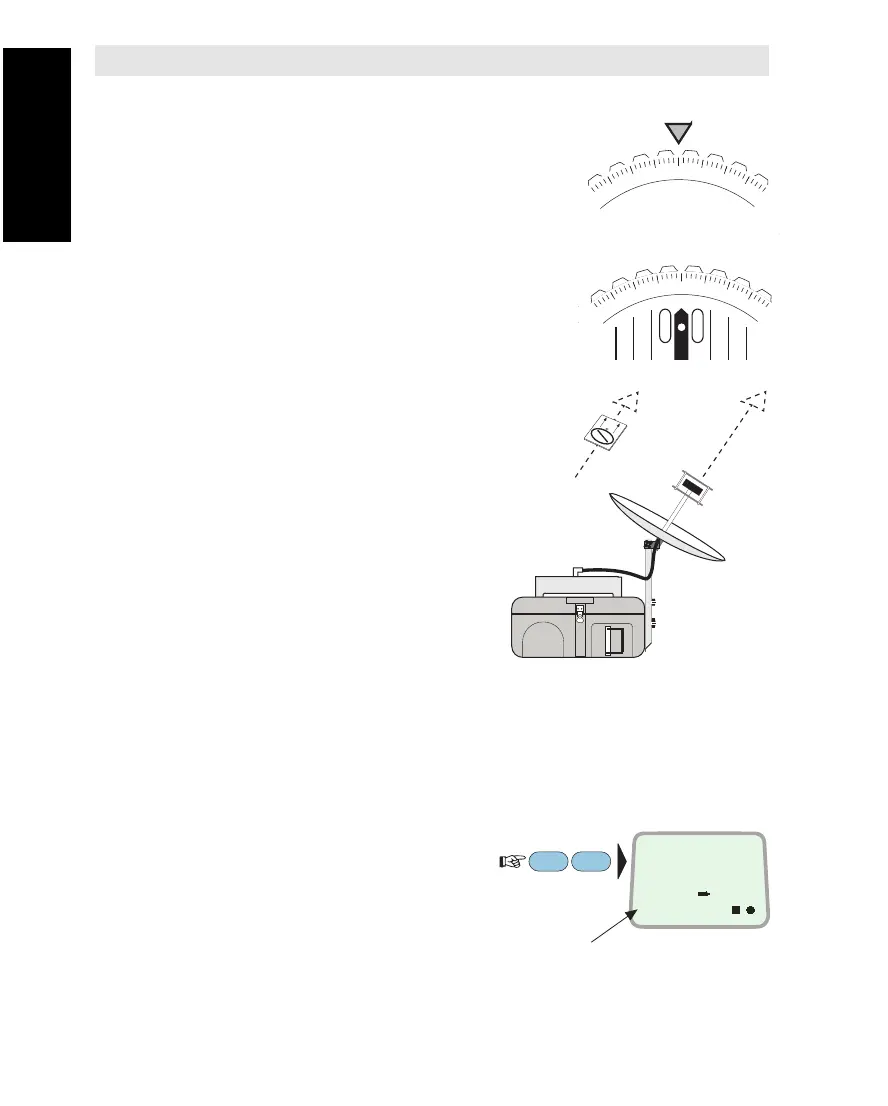
1Adjust the dial until the horizontal angle
coincides with the arrow mark.
E.g., using the Azimuth Map, London rela-
tive to the AOR-E satellite is approximately
200°.
(See maps in APPENDIX A or on Antenna
Mounting/Operating Instruction).
2Keeping the compass away from
possible magnetic fields, turn the compass
until the needle stabilizes towards N
(North).
3The antenna feeder should now be
pointed in the same direction as that of
the compass base plate.
Preparing for Operation
1Place Saturn Bt with free line of sight to the satellite.
2Direct the antenna horizontally towards the satellite using the
compass, and tilt the antenna to correct vertical angle.
3
To check the current Ocean Region:
To select a new one, continue as described in
"Selecting Ocean Region" in chapter 2. Operation.
Setting Up
180
210
200
ON
OCEAN REGION
IOR
3
LES
PTT
SHIFT
Ocean Region ref. no.
340
2
0
N
Transceiver
Setting Up



 To Next Page