Saturn Bt – Chapter 1. Getting Started1.16
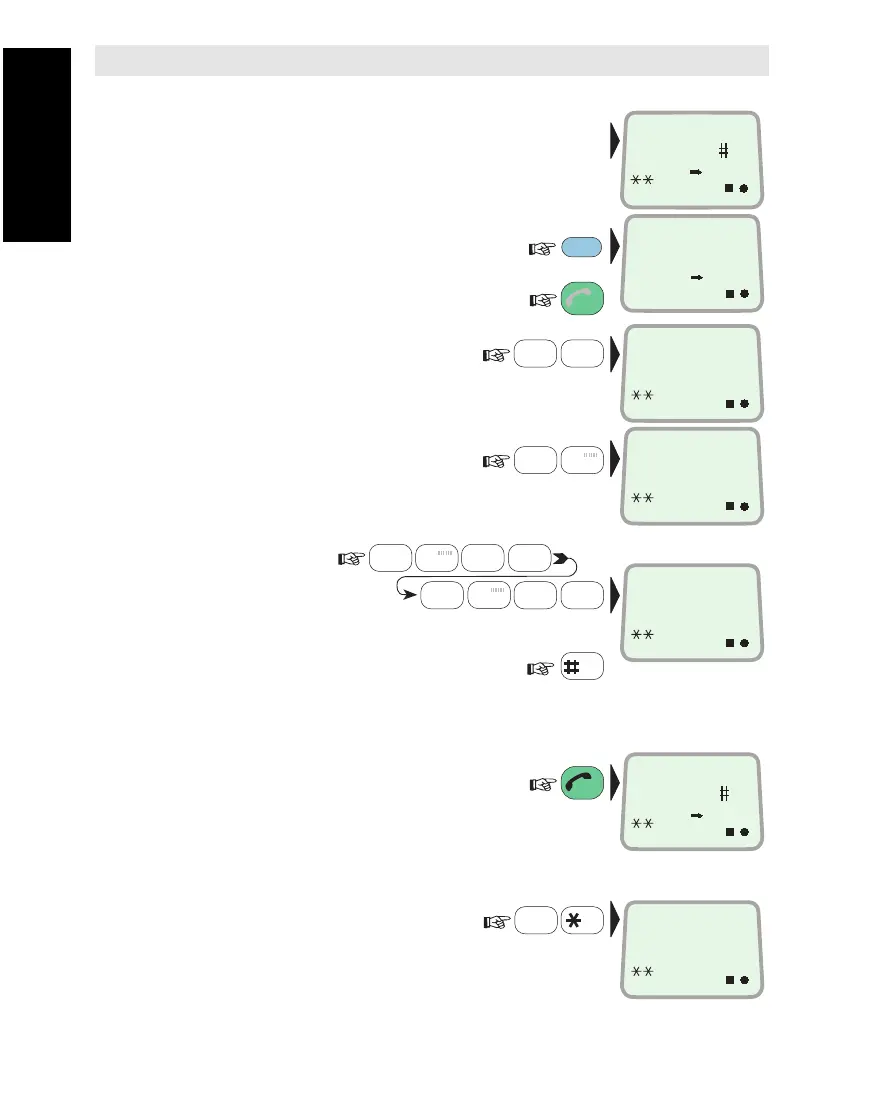
Call through Default LES
•
Ready for operation:
To check the default LES
in this Ocean Region:
(
To modify, see "Selecting Default LES"
in chapter 2. Operation.)
1Key in the international
call prefix 00:
2Key in the country code,
e.g. 47 (Norway):
(
See appendix B for list of
telephone country codes)
3Key in subscriber
number:
(within 45 seconds)
4Initiate the call:
Slow beeps are heard during call setup.
The yellow indicator lights when LES
has accepted the call.
Ringing tone is heard until answer.
5Clear the call when finished:
For short number and last number
dialing and other functions,
see chapter 2. Operation.
Call through Selected LES
6Enter the LES code:
Continue from step 1.
(See appendix A for Satellite Coverage Map
and list of Land Earth Stations.)
Call from Display Handset
SPC
0
ÄÖÜ
7
STU
4
JKL
0
ÄÖÜ
3
GHI
DATA
ØÅ.
LES
PTT
7
STU
2
DEF
PLAY
7
STU
ON
IOR
LES 4
3
ON
LES 004
00
ON
LES 004
0047
4
JKL
0
ÄÖÜ
0
ÄÖÜ
6
PQR
4
JKL
ON
LES 004
004767244700
ON
ESC
ESC
ON
LES 003
DIAL 00+INTL
TEL.NO.+
DIAL 00+INTL
TEL.NO.+
ON
Call from Display Handset



 To Next Page