Saturn B – Chapter 3. Configuration 3.7
Hexadecimal Decimal
Number Number
0 . . . . 9 0 . . . . 9
A . . . . F 10 . . . . 15
10 . . . . 19 16 . . . . 25
1A . . . . 1F 26 . . . . 31
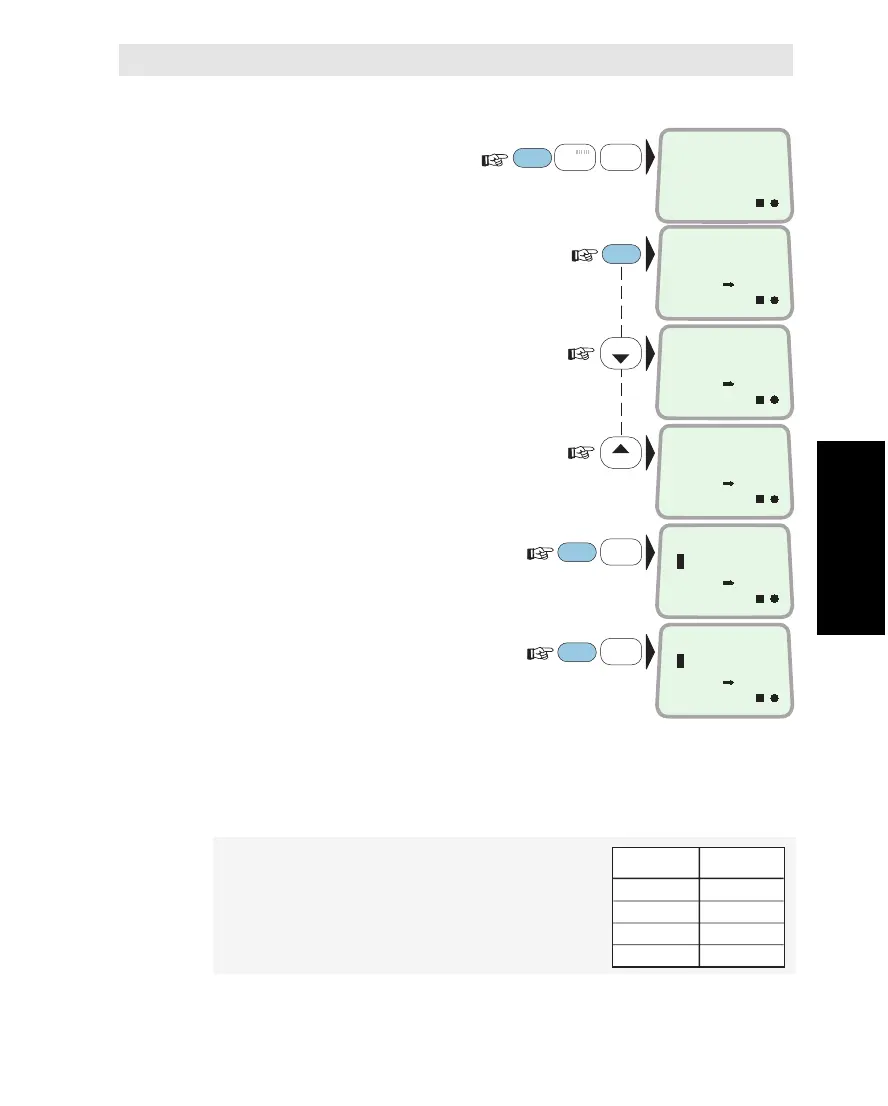
Selecting End Terminal Service
1 Select CONFIGURE
PORTS
function (70):
("Operator level function")
2 ENTER the list of connectors, and if
required scroll down to the one to be
reprogrammed:
Pressing MORE/HELP displays the
current Originating Id for each end
terminal connector:
HANDSET: OI = 1
TEL.1: OI = 2
TEL.2: OI = 17
TEL.3: Nothing
TEL.4: Nothing
TEL.5: Nothing
3
To select telephone service for the TEL.3
connector e.g., key in end terminal type:
1 = telephone (TPH), 2 = telefax (FAX)
4 Key in the Originating Id provided
by Inmarsat e.g. 3:
Valid value is 0 . . 99
Note!
The Originating Ids (OI) and Destination Ids
(DI) provided by Inmarsat are hexadecimal
numbers.
OI no.11, e.g., equals the decimal
no. 17 in Saturn B.
The table shows the correspondence:
Configuring Ports Cont’d
Configuring Ports * Cont’d
1
ABC
FUNC
LIST
LIST
0
ÄÖÜ
ON
7
STU
3
GHI
CONFIGURE
PORTS
70
ON
HANDSET
PHONE
ON
TEL. 1
PHONE
ON
TEL. 3
NOTHING
ON
ORGTERMID
3
ON
TERM TYPE
1
ENTER
ENTER
ENTER



 To Next Page