Saturn B – Chapter 3. Configuration3.8
Configuring Ports * Cont’d
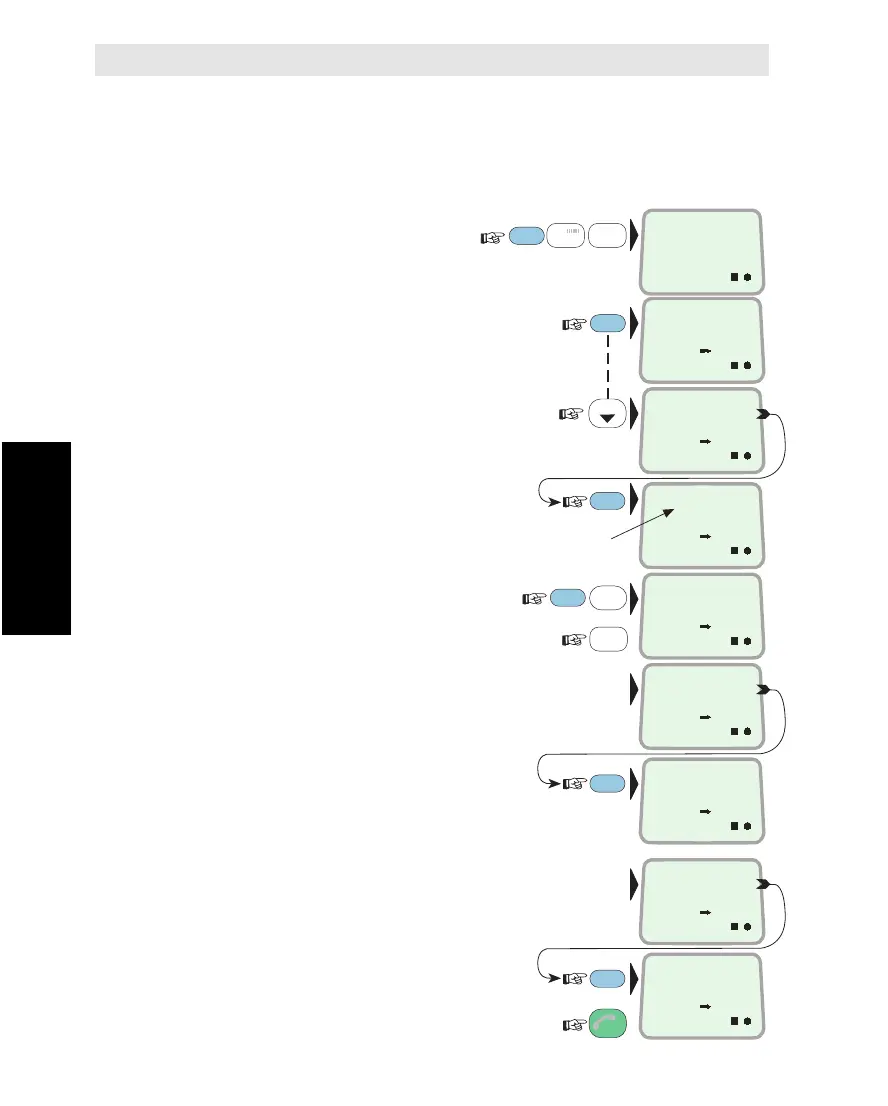
Deleting End Terminal Service
Be aware that all incoming call routes established to a port must be
deleted (function 71) before configuration of a port is permitted.
Procedure:
1Select CONFIGURE
PORTS
function (70):
(* operator level function)
2ENTER the list of connectors, and
scroll down to wanted port, e.g. TEL.2:
3To check assigned Originating Id:
4Press and hold the DEL key:
and
press the Y-key to delete existing setup:
If DIs have been routed to the port:
remove route (and corresponding DI), see
"Incoming Call Route: Deleting Call Route".
When the configuration has been deleted:
Revert to IDLE:
FUNC
LIST
0
ÄÖÜ
ON
7
STU
DEL
MORE/
HELP
9
LIGHT
YZÆ
MORE/
HELP
MORE/
HELP
ESC
CONFIGURE
PORTS
70
3x
ON
HANDSET
PHONE
ON
TEL. 2
FAX
ON
OI = 17
ON
PORT EXIST
IN ROUTE
ON
DELETE ?
Y = YES
ENTER
ENTER
Originating Id
ON
DELETE ROUTE
FIRST
ON
TEL.2
NOTHING
ON
OI = 0
Configuring Ports Cont’d



 To Next Page