22
Nera WorldCommunicator
GETTING STARTED
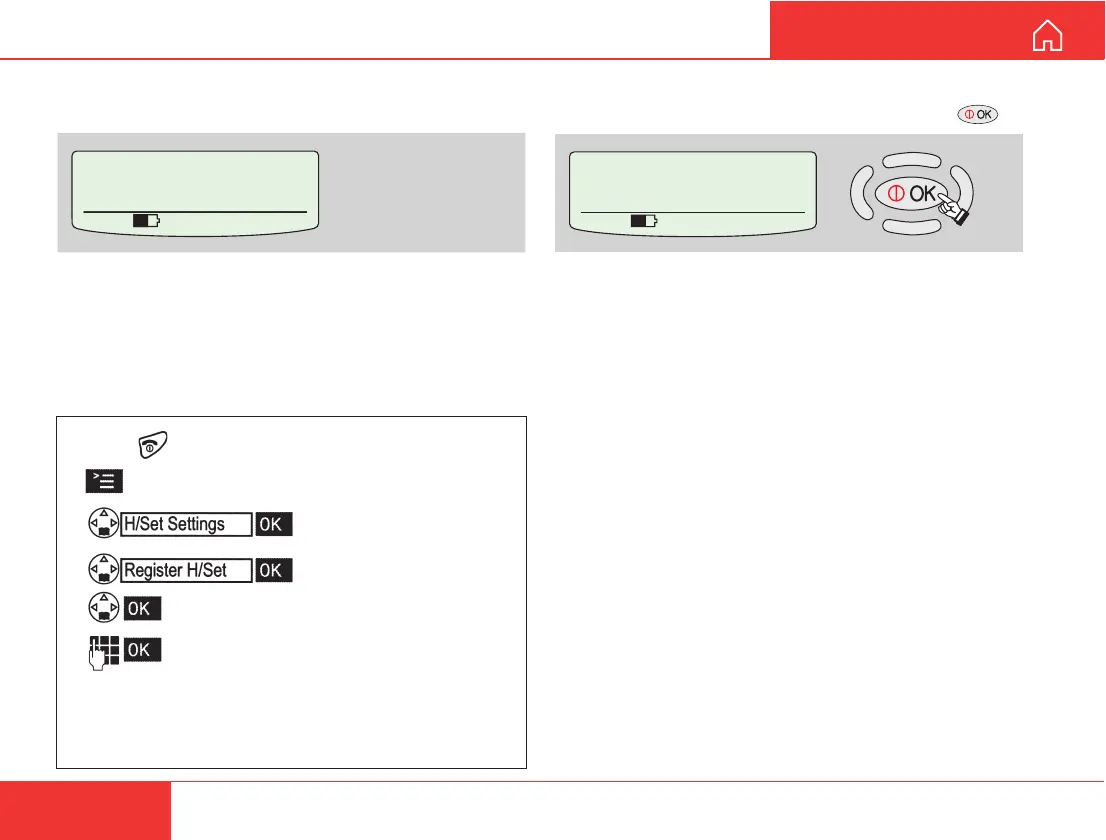
8 Wait until the message REGISTERED is displayed
in the WorldCommunicator display, and press .
The handset is now ready for use with 4.8 kbps
specch, internal number 01 and incoming IMN
number corresponding to ID: 02.
6 After a while, the base station is “Open to register” the
handset.
7 Link the DECT handset to the
WorldCommunicator DECT base station as de-
scribed in the example on the below.
Example of registering Siemens Gigaset 4000:
(See also the manual enclosed with the DECT phone or
on the CD.)
• Press to switch ON the DECT handset.
• Press the DECT display key.
• Select and confirm.
• Select and confirm.
• Select the base station.
• On the DECT keypad, enter the
WorldCommunicator base station
pass word: 1 2 3 4 (the first four digits of the
owner password. Use new code when the owner
password has been changed.)
SETTING UP CONT’D
Registered HndSet 01
for Std. Voice usage
Id=02 MSN=01
535 09:46
Open to register
Any key to exit
535 09:46



 To Next Page