36
Nera WorldCommunicator
GETTING STARTED
Speed
> 1200bps
2400bps
4800bps
9600bps
19200bps
38400bps Default
57600bps
115200bps
Format
> d=7, p=none, s=1
d=7, p=e, s=1
d=7, p=o, s=1
d=7, p=m, s=1
d=7, p=s, s=2
d=8, p=none, s=1 Default
d=8, p=e, s=1
d=8, p=o, s=1
d=8, p=m, s=1
d=8, p=s, s=1
d=8, p=none, s=2
d=8, p=e, s=2
d=8, p=o, s=2
d=8, p=m, s=2
d=8, p=s, s=2
MENU
> Configure DTE
Information
670 09 : 46
Configure DTE
> Speed
Format
Flow control
Flow control
> none
rts/cts
xon/xoff transprnt.
xon/xoff stripped
Default
Configure DTE
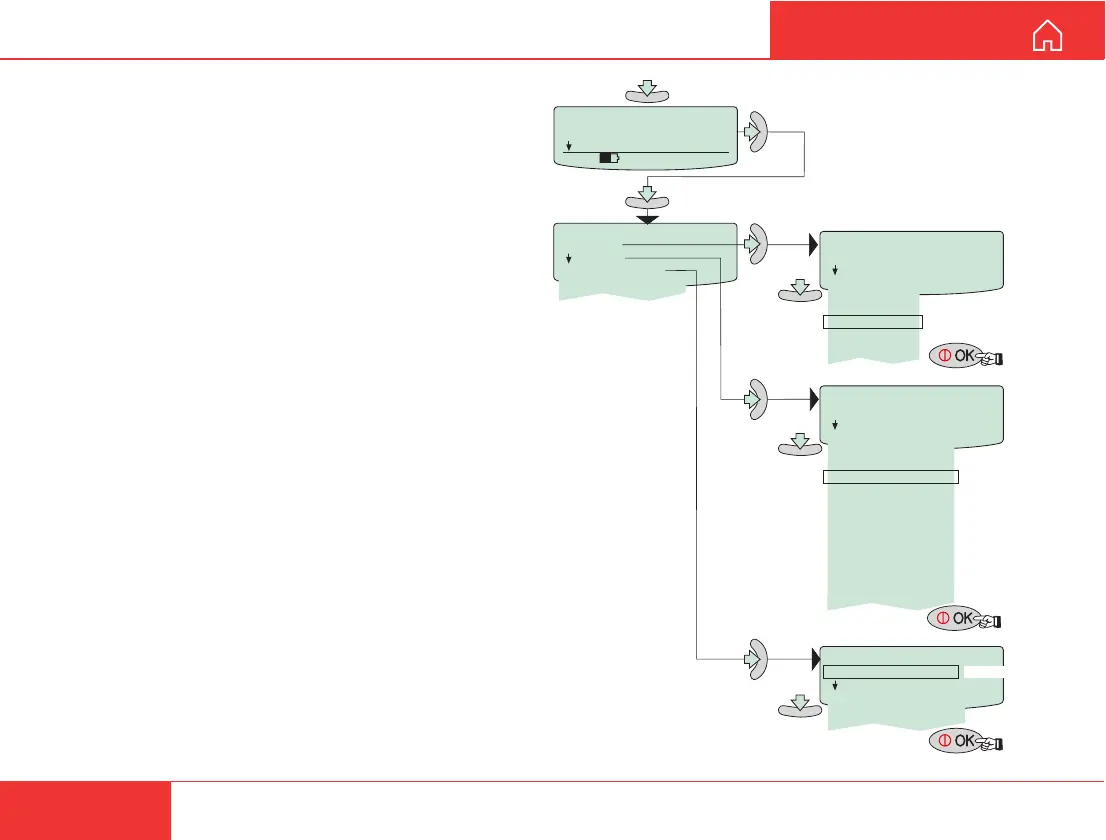
The RS-232 port is intended for connection of PC
for operation of the WorldCommunicator functions.
The default settings of the port are suitable for
operation of the vtLite program on a PC.
(Speed: 115200 bps. Format: 8 bits, no parity, 1 stop bit. Flow control: none.)
No configuration is needed on the WorldCommunicator.
Remember to set the PC accordingly!
Procedure for other than default settings:
Speed:
1 Scroll down to the Configure DTE function.
2 Pressing “right arrow” opens the
Configure DTE menu.
3 Scroll down to Speed and press “right arrow”
to open the list of bit rates.
4 Scroll down to the required bit rate and press
OK to enter the chosen value.
Format:
1 Scroll down to the Format function and press
“right arrow” to open the list of combinations
(d=number of bits, p=parity, s=stop bit).
2 Scroll down to the required format combination
and press OK to enter the chosen settings.
Flow control:
1 Scroll down to Flow control.
2
Scroll down to the required settings and press OK.
DISPLlAY FUNCTIONS CONT’D



 To Next Page