46
Nera WorldCommunicator
GETTING STARTED
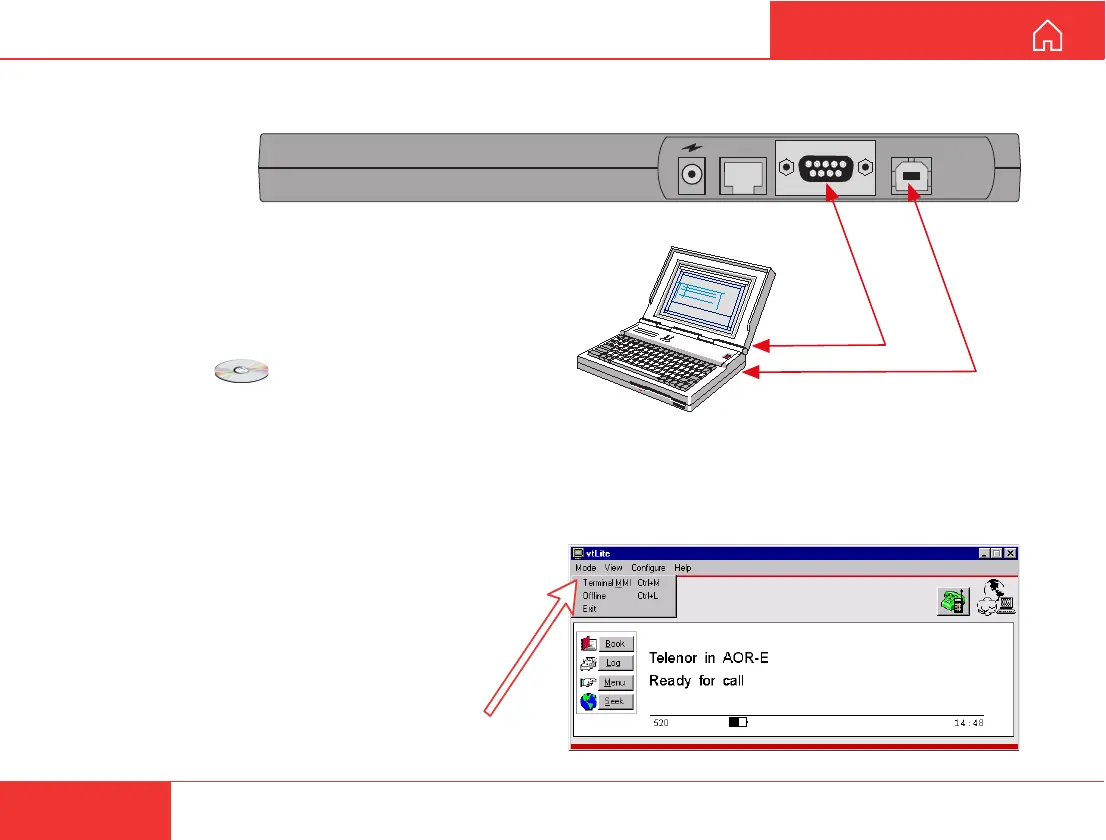
USB
RS-232
ISDN
PC USB port
PC serial port
INSTALLING THE PC PROGRAM
The vtLite program allows the WorldCommunicator
functions to be operated or configured from a PC,
such as:
• Phone book
• Traffic log
• Precharge
• DECT/ISDN configuration
For an explanation of the functions, see the User
Guide accessible on the enclosed CD.
The vtLite program is stored on the enclosed CD and must
be installed on the PC harddisk (Windows 95/98/NT).
Make sure no Acrobat program is opened on the PC:
1 Insert the CD :
The Start Page opens automatically in a few seconds.
(Alternatively, open the Acrobat file “NWC_StartPage” on
the CD. If necessary, install Acrobat Reader by clicking
“ar500enu” in the “SW Installation” folder.)
2 Click “Software Installation” and then “vtLite”.
Allow files to load on to the PC harddisk.
The installation of the program starts automatically
when files have been loaded.
3 Connect the serial cable between the PC serial
port and the RS-232 port on the WorldCommunicator
Modem Unit.
4 Start the vtLite program by clicking
Start>Programs>WorldCommunicator>vtLite.
5 Turn ON the Modem Unit.
If no contact, click Mode>Terminal MMI.
If still no contact, click Configure>Port>Autodetect



 To Next Page