28
Nera WorldCommunicator
GETTING STARTED
Making a call
Call through default Net service provider
When using the WorldCommunicator for the first
time in an Ocean Region, make sure that the region
appearing in the display is correct:
If incorrect, see "Selecting default Net provider" on
the previous page.
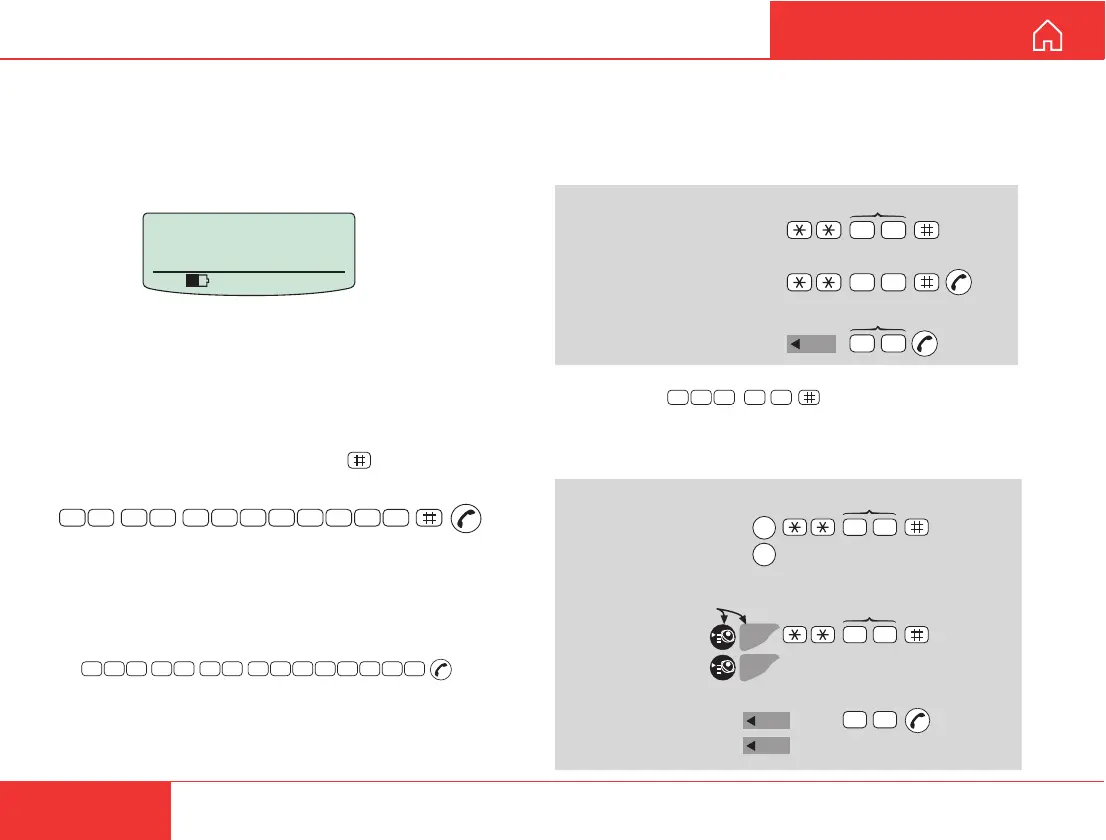
Dialing:
1 On the connected equipment, dial 00 and the
country code, followed by the subscriber number
(max 22 digits), and finally press
to send the
number, e.g.:
0
0
4
7
6
7
2
4
4
7
0
0
Note! Some types of equipment do not have # imple-
mented in software even if the #-key is on the keypad.
Then in front of the telephone number use:
903 if dialing the number digit by digit, or
902 if for the number to be sent as a block. e.g.:
2 Wait for answer.
3 Disconnect the call when finished.
Unknown net
AOR-W
Ready for call
535 09:46
Internal communication
Calls can be made internally by dialing MSN numbers
between the connected ISDN and/or DECT equipment.
Examples:
Transfer of incoming/outgoing satellite calls (with
above examples):
SETTING UP CONT’D
On DECT
also:
0
0
4
7
6
7
2
4
4
7
0
0
9 0
2
ISDN-to-ISDN/DECT:
MSN (example)
ISDN Handset/
DECT-to-ISDN:
0
2
Note! If the telephone lacks the
*
-key, 103 may be dialed
instead, e.g.:
2 00 31
DECT-to-DECT:
Handset Id (example)
INT
2
0
5
0
DECT-to-ISDN:
toggles between subscribers
Hang up
MSN/Handset Id
Press button>1sec,
R appears in display:
INT
DECT-to-DECT:
Hang up
toggles between subscribers
INT
2 0
50
ISDN-to-ISDN/DECT:
toggles between subscribers
R
Hang up
R
MSN/Handset Id
2 0
R
R



 To Next Page