26
Nera WorldCommunicator
GETTING STARTEDSETTING UP CONT’D
Removing devices
ISDN, DECT, USB and COM entries are removed in
the same way as described for ISDN below.
Note that if connected to PC, vtLite must be closed.
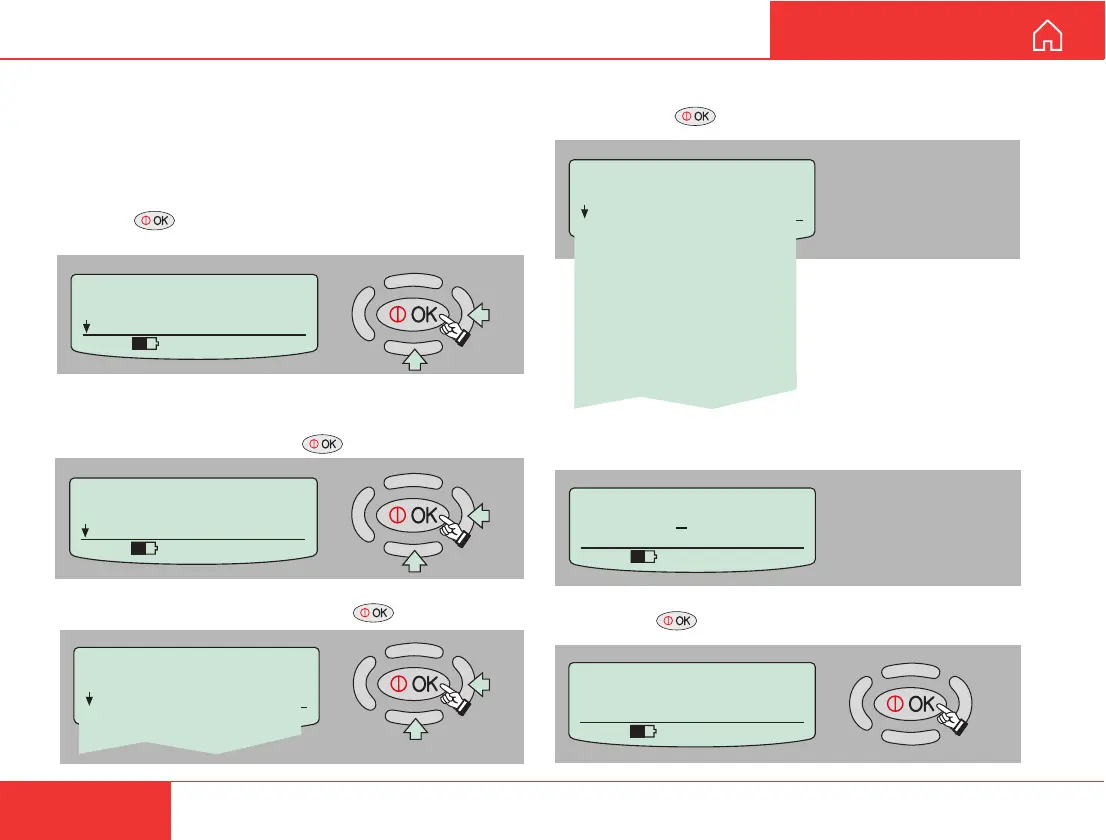
Example of removing an ISDN device:
1 Press on the WorldCommunicator Modem
Unit to open the MENU:
2 In the Device Manager menu, scroll down to
Remove Device and press .
3 Scroll down to ISDN and press .
Device Manager
> ISDN
DECT
USB
COM
Device Manager
> Remove Device
Factory Defaults
535 09:46
MENU
> Device Manager
Configure DTE
535 09:46
Press OK to delete:
ISDN64k Data (UDI)
Press Left to abort
535 09:46
Owner's password:
123456789
0
535 09:46
ISDN
> Remove Device
ISDN Speech
Id: 01 MSN: 20
ISDN64k Speech
Id: 91 MSN: 30
ISDN64k Audio
Id: 61 MSN: 40
ISDN56k Data (V110)
Id: 71 MSN: 50
ISDN64k Data (UDI)
Id: 51 MSN: 60
4 Scroll down to the entry to be removed from the
list and press .
5 Enter the owner password (1........90).
6 Pressing deletes the chosen entry.



 To Next Page