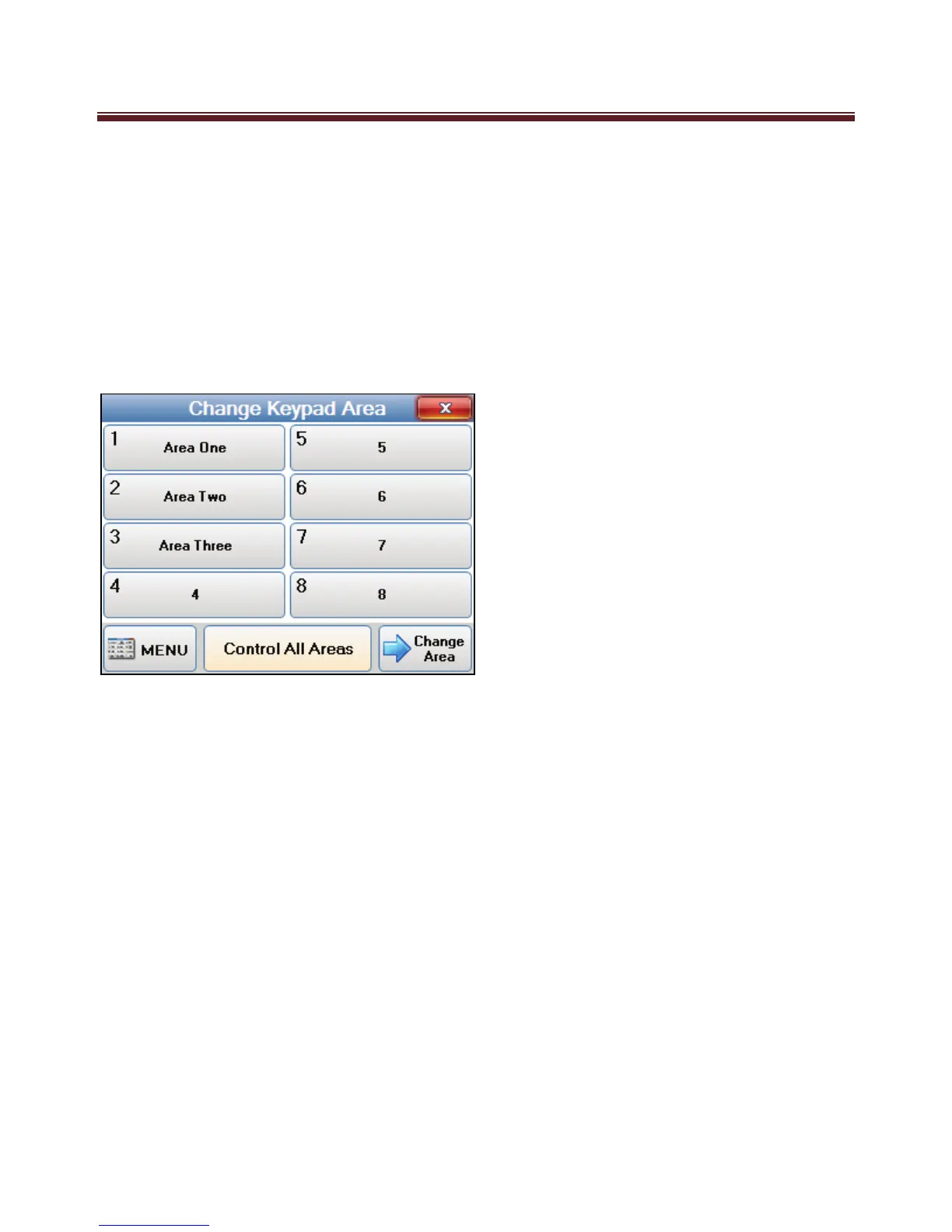
Select Area
(Requires User Code)
If your system is programmed into multiple areas (e.g. Office, warehouse, showroom,
House, Garage etc) where part of the system can be Armed while other areas (sections) of
the system are disarmed, the “Change Keypad Area” can allow full control of your system
from the one Navigator Keypad.
A Ness M1 key Pad is programmed to control one Area only. However with this option it
allows the Navigator Keypad to control any of the 8 Areas the M1 controls.
The control of multiple areas can be performed in a couple of different ways.
1. When “Change Keypad Area” option is selected the keypad can be temporally
changed (or mapped) to a different Area to allow you to fully control an alternative
Area. For example if your Navigator Keypad is programmed to control Area 1, and
you select this option it can change the keypad and make it a Area 2 keypad.
Therefore all functions of an Area 2 keypad . This includes full arming and disarming
as well as all other keypad buttons such as F-Keys.
To change the keypad to an alternative area, select the “change Keypad Area” option,
select the Area you wish to change the keypad to and then select “Change Area”
Once the keypad is mapped to alternative area it will now display the status,
including LEDs and the LCD screen of the mapped area for the next 1 minute it will
be possible to arm, disarm, bypass, etc. the mapped area from this keypad. The 1
minute will be extended with each key press. The keypad will return to its primary
assigned area after 1 minute of no key press activity.


 To Next Page