Share USB Devices Attached to the Router
108
AC750 Wireless Dual Band Gigabit Router R6050
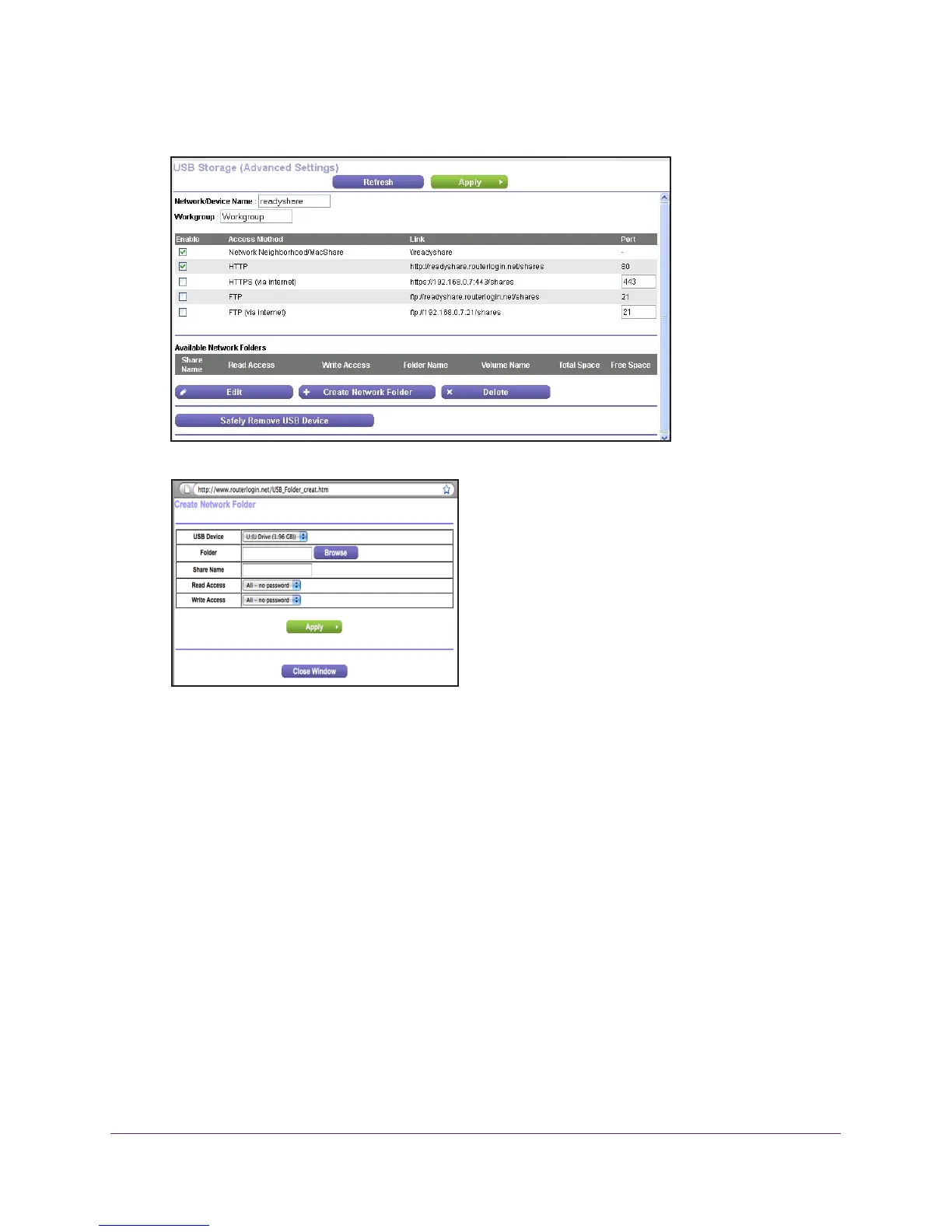
5. Click the Edit button.
6. Click the Create Network Folder button.
If the Create a Network Folder screen does not display, your web browser might be
blocking pop-ups. If it is, change the browser settings to allow pop-ups.
7. Click the Browse button next to the Folder field, and select the folder.
8. In the Share Name field enter a name.
9. In the Read Access list and the W
rite Access list, select the settings that you want.
The user name (account name) for All – no password is guest. The password for admin is
the same one that is used to log in to the router. By default, it is password.
10. Click the Apply button.
The folder is added on the USB device.
To edit a network folder:
1. Launch a web browser from a computer or WiFi device that is connected to the network.
2. Enter http://www
.routerlogin.net or http://www.routerlogin.com.
A login screen displays.
3. Enter the router user name and password.

 To Next Page
 Loading...