Management and Monitoring
59
ProSAFE Dual-Band Wireless AC Access Point WAC720 WAC730
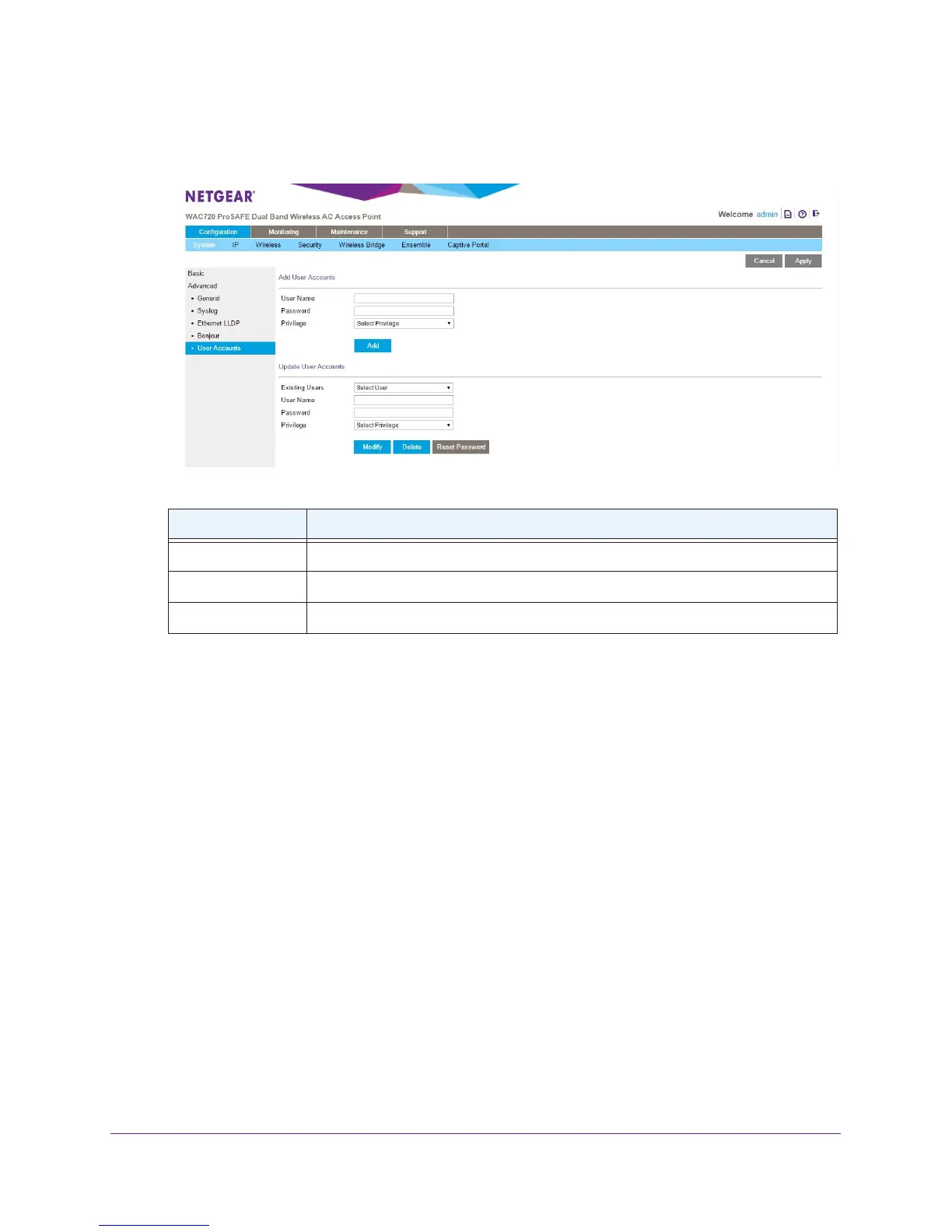
To add a new user account:
1. Select Configuration > System >
Advanced > User Accounts.
2. Configure the settings in the upper part of the page as explained in the following table:
Setting Description
User Name Enter a new user name
Password Enter a password between 4 and 12 characters in length.
Privilege From the Privilege menu, select Read W
rite or Read Only.
3. Click the Add button.
The user account is added.
4. Click the Apply button.
Your settings are saved.
To change the name for a user account:
1. On the User Accounts page, in the lower part of the page, select a user from the
Existing Users menu.
2. In the User Name field, modify the name.
3. Click the Modify button.
The user name is changed.
4. Click the Apply button.
Your settings are saved.
To change the privilege for a user account:
1. On the User Accounts page, in the lower part of the page, select a user from the
Existing Users menu.
2. From the Privilege menu, select another privilege.


 To Next Page